Shopping for technology accessories can feel surprisingly complicated. You may think you only need a charger, USB-C cable, hub, power bank, or docking station, but once you start comparing wattage, ports, protocols, charging speeds, display support, storage compatibility, and device requirements, the simple purchase can quickly become a technical puzzle. This is where knowing how to navigate a specialist store such as UGREEN EU can make the process easier. The current UGREEN EU store organizes products into major categories including Chargers, Power Banks, Hubs & Docks, Cables, Bundles, and Accessories, while also offering more specialized products such as trackers, adapters, hard-drive enclosures, and KVM switches.
Table of Contents
ToggleThe key is not to begin with the most expensive or most powerful product. Instead, begin with the device you already own and the problem you want to solve. A laptop user who needs two monitors has a completely different requirement from someone who simply wants a compact phone charger for travel. Likewise, a person carrying a tablet and phone all day may value a multi-port charger or power bank, while a desktop user may benefit much more from a docking station. UGREEN EU’s current catalog includes everything from compact 65W chargers and USB-C cables to high-capacity power banks and Thunderbolt 5 docking stations, so having a clear buying method is more useful than simply browsing product names.
Understanding the UGREEN EU Product Range
The first step toward finding the right accessory is understanding what the store actually offers. UGREEN EU currently groups its products into several broad categories, making it possible to move from a general need toward a more specific product. Its main categories include chargers, power banks, hubs and docks, cables, bundles, and accessories. The accessories area also includes products such as smart finders, M.2 NVMe enclosures, Ethernet adapters, laptop stands, tablet holders, and KVM switches.
This variety is useful because modern devices increasingly depend on accessories that perform several jobs at once. A laptop may need charging, external displays, Ethernet, USB peripherals, and high-speed storage, while a smartphone may need fast charging, wireless charging, a reliable cable, and portable power. Instead of treating every accessory as a separate purchase, think about your setup as a small ecosystem. What ports does your computer have? How many devices do you normally connect? Do you work from a desk or travel frequently? Do you need additional displays? Once these questions are answered, the product categories become much easier to understand.
Chargers, Power Banks, and Wireless Charging
Charging products form one of the largest sections of the current UGREEN EU catalog. The store lists compact USB-C chargers, multi-port desktop chargers, GaN chargers, wireless chargers, and car chargers. Current listings include products such as a 65W Nexode Air USB-C Charger, 100W and 160W Nexode Pro chargers, and desktop models designed to handle several devices simultaneously.
The important point is that higher wattage is not automatically better for everyone. A 65W charger may be perfectly sensible for someone charging a phone, tablet, and lightweight laptop, while a user with several high-power devices may benefit from a charger with more total output and additional ports. Wireless charging introduces another consideration because the phone, charging standard, case, and charger all need to work together. UGREEN’s current MagFlow range includes Qi2 products, including magnetic wireless chargers and power banks, showing how the store separates conventional wired charging from newer magnetic charging options.
Cables, Hubs, and Docking Stations
Cables may look simple, but specifications matter. UGREEN EU currently lists USB-C cables supporting different power levels and data capabilities, including 60W, 100W, and 240W models, with some products also advertising 10Gbps data transfer and 4K video support.
Hubs and docking stations are even more specification-heavy. A small USB-C hub might provide HDMI, USB, and power delivery, while a full docking station can add multiple displays, Ethernet, storage connectivity, and numerous USB ports. The current catalog includes simple five-port hubs, seven-in-one USB-C hubs, larger multi-port docks, and Thunderbolt 5 products capable of supporting advanced desktop setups. The best choice therefore depends less on how impressive the product name sounds and more on which connections you actually need.
Start With Your Device and Daily Needs
Before opening product pages, write down the devices you want to support. This small step can prevent a surprisingly large number of buying mistakes. Imagine that you have a MacBook, an Android phone, wireless earbuds, an external SSD, and a monitor. You could potentially need a laptop charger, USB-C cable, USB-C hub, display cable, and portable power bank. But if your laptop already has enough ports and your monitor connects directly, buying a large docking station could be unnecessary.
Your daily routine matters just as much. Someone who works entirely from a home office may prioritize a powerful desktop charger and docking station. A frequent traveler might care more about compact dimensions, built-in cables, and multi-device charging. A student could prioritize affordability and portability, while a content creator may care more about high-speed data transfer, external storage, display resolution, and multiple simultaneous connections. UGREEN EU’s current product range is broad enough to cover these different situations, but the right choice becomes much easier once your actual routine is treated as the starting point.
Checking Ports, Compatibility, and Power Requirements
Compatibility should be treated as a checklist rather than a guess. Look at your device’s available ports first. USB-C does not automatically mean that every USB-C accessory will provide identical functionality. One USB-C port may support charging and data but not video output, while another may support high-speed data, DisplayPort output, or Thunderbolt functionality. The same principle applies to cables: a cable rated for charging may not necessarily provide the data speed or video capability you need.
Power requirements are equally important. Check the maximum charging input supported by your device and compare it with the charger’s output. A charger capable of delivering more power does not necessarily force the device to consume that full amount; compatible devices generally negotiate an appropriate power level. The practical goal is therefore to choose a charger with enough capacity and the correct standards, rather than simply selecting the largest wattage number you can find. This approach can save money, reduce unnecessary bulk, and make your setup easier to carry.
Choosing Accessories for Work, Travel, and Home
Think of accessories according to where you use them. For a home office, a docking station can act like a central junction where the laptop connects to a monitor, keyboard, mouse, Ethernet, and other peripherals. For travel, the priority may shift toward a compact charger, durable cable, and power bank. At home, a multi-port desktop charger may reduce the number of adapters competing for wall sockets.
UGREEN’s current EU catalog reflects these different use cases. Its listings include compact chargers, desktop GaN chargers, car chargers, magnetic power banks, high-capacity power banks, hubs, docks, stands, and adapters. Rather than asking, “Which UGREEN product is best?”, a more useful question is, “Which product solves the specific problem I have?” That small change in thinking makes technology shopping much more practical.
How to Navigate UGREEN EU Efficiently
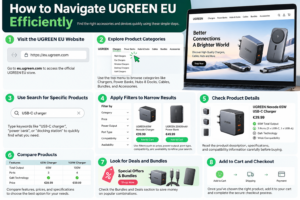
Once you know what you need, use the store’s category structure instead of scrolling through every product. The UGREEN EU website currently provides categories for chargers, power banks, hubs and docks, cables, bundles, and accessories. It also provides more specialized collections for items such as Bluetooth adapters, hard-drive enclosures, finder trackers, and related accessories.
Category-based browsing is particularly helpful when you already know the type of product you need but have not decided on the exact model. For example, if you need a laptop dock, start with Hubs & Docks rather than searching randomly. If you need portable charging, start with Power Banks. If you need a replacement charging lead, go directly to Cables. This reduces the number of irrelevant products you see and lets you compare products that solve similar problems.
Using Categories and Product Filters
Filters and sorting options can turn a large catalog into a manageable shortlist. The current UGREEN EU product pages provide sorting options such as relevance, best selling, alphabetical order, price, and date.
Use these tools strategically. If your budget is fixed, price sorting can help establish the available range, but do not assume that the cheapest product is automatically suitable. If you want newer technology, sorting by date can reveal newer models, but newer does not necessarily mean that the older product has become unsuitable. Best-selling products can help you identify popular options, but popularity alone does not establish compatibility with your particular device. The most useful filter is the one that matches your real requirement: number of ports, power output, display support, connection standard, capacity, or another specification relevant to your setup.
Reading Product Specifications Before Buying
A product title rarely tells the complete story. A title such as “USB-C Cable 240W” tells you an important power specification, but it does not necessarily answer every question about data transfer, video support, length, connector construction, or compatibility. UGREEN’s current catalog demonstrates this variation: some cables list 240W alongside 10Gbps and 4K@60Hz capabilities, while other cables emphasize charging capacity rather than advanced data or display features.
The same principle applies to hubs and docking stations. A “7-in-1” hub and a “17-in-1” dock are not simply different versions of the same thing. Their port selection, display capabilities, network connectivity, power delivery, storage features, and supported standards can be substantially different. Read the specifications as if they were a contract between the product and your device: every port and capability you depend on should be explicitly supported.
Choosing the Right Charger
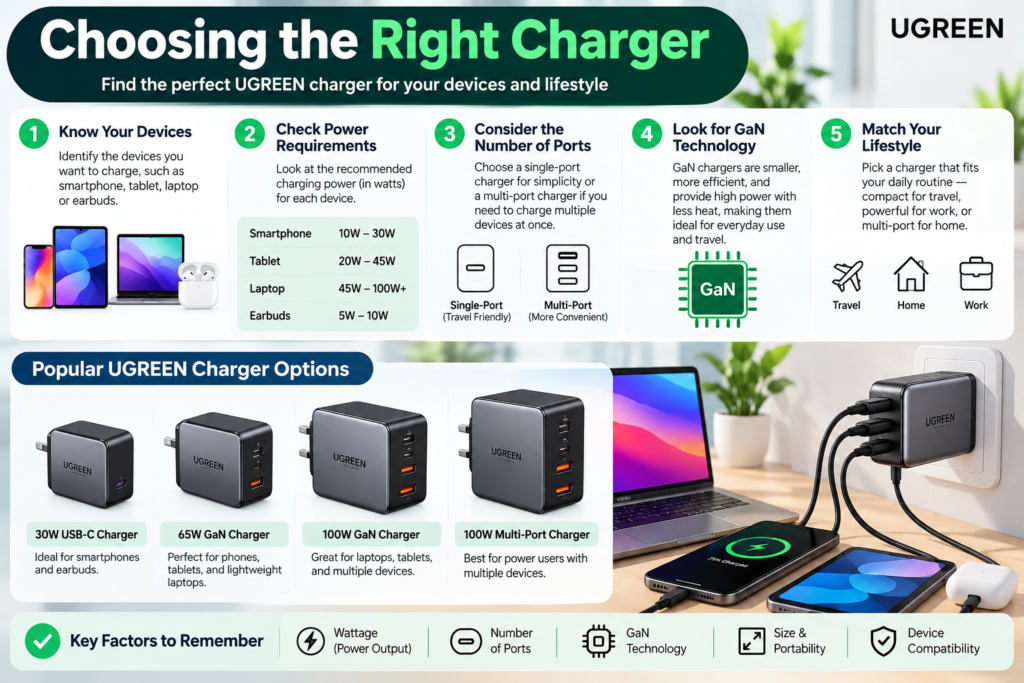
Selecting a charger begins with identifying how many devices you want to charge and what each device requires. A phone-only user may need a relatively compact charger, whereas someone charging a laptop, tablet, phone, earbuds, and other devices may benefit from multiple USB-C ports. UGREEN’s current EU catalog contains products ranging from 65W compact chargers to 160W and 300W multi-port models, illustrating the broad range available.
Port count is another important consideration. A single-port charger can be ideal when you value simplicity and portability, but a multi-port model can reduce the number of adapters you need to carry. Remember that the advertised total output of a multi-port charger may be distributed among connected devices, so check the detailed specifications rather than assuming every port will always deliver the maximum headline wattage simultaneously. For a practical purchase, balance power, port count, physical size, and the devices you actually carry.
Understanding Wattage and GaN Technology
Wattage describes the amount of electrical power a charger can provide under supported conditions. It is one of the most visible numbers on a charger, but it should never be considered in isolation. A 100W charger may be useful for a compatible laptop and several smaller devices, while a 65W charger can be more convenient for a lightweight travel kit. UGREEN’s Nexode range includes several GaN chargers at different output levels, including 65W, 100W, 160W, 200W, and higher-output products across its current catalog.
GaN, or gallium nitride, is a semiconductor technology commonly used in modern compact power adapters. Its use can help manufacturers create chargers that deliver substantial power while maintaining relatively compact designs. But the presence of GaN should not become the only buying criterion. Check charging protocols, port configuration, total output, dimensions, plug design, and the needs of your devices. In other words, GaN can be part of the value proposition, but it is not a substitute for checking compatibility.
Selecting the Right Power Bank
Power banks are essentially portable energy reservoirs, and the right capacity depends on how you intend to use one. UGREEN EU currently lists power banks with capacities including 10,000mAh, 20,000mAh, 25,000mAh, and even 48,000mAh on certain models. The catalog also includes different output levels, built-in cables, multiple ports, digital displays, and magnetic wireless charging options.
A smaller capacity can be easier to carry and may make sense for everyday emergency charging. A larger power bank can provide more energy for long journeys, multiple devices, or demanding equipment, but it may also be heavier and less convenient. Capacity alone therefore does not determine whether a power bank is suitable. Pay attention to output power, charging ports, built-in cables, supported charging standards, dimensions, and the requirements of the devices you plan to recharge.
Capacity, Output, and Built-In Cables
Output is especially important if you intend to charge a laptop rather than only a phone. A power bank with a large capacity but insufficient output may not provide the charging experience you expect for a higher-powered device. UGREEN’s current catalog includes products such as a 25,000mAh power bank rated at 200W with four ports and another 25,000mAh model rated at 165W with built-in cables.
Built-in cables can also change the convenience equation. They remove the need to remember a separate cable, which can be useful when traveling. However, a built-in cable can also be less flexible if your devices use different connector arrangements. Magnetic wireless power banks provide another option for compatible smartphones, with UGREEN’s current MagFlow range featuring Qi2-based models. The best power bank is therefore the one that matches your combination of capacity, output, portability, and connector needs.
Finding the Right USB-C Cable
USB-C has become extremely common, but “USB-C” is not a complete description of what a cable can do. Different cables can support different charging power, data rates, display functions, and construction characteristics. UGREEN EU’s current cable selection illustrates this clearly, with listings for 60W, 100W, and 240W cables as well as models advertising capabilities such as 10Gbps data transfer and 4K video support.
Before buying, identify what you expect the cable to accomplish. If it is only for charging a phone, you may not need the highest data specification. If it will connect a laptop to a fast external SSD, data performance becomes much more important. If it will be used for video output, verify that the cable explicitly supports the display capability you need. Cable length also matters: a longer cable may provide flexibility at a desk, while a shorter one can be easier to manage in a travel bag.
Durability should be considered as well. Braided construction, connector reinforcement, and a suitable cable design can matter if the cable is plugged and unplugged frequently. UGREEN’s current catalog includes nylon-braided USB-C cables as well as retractable cable designs, giving shoppers different approaches to portability and cable management. A good cable should disappear into your routine rather than becoming another source of frustration.
Choosing USB Hubs and Docking Stations
A USB hub and a docking station may appear similar, but they generally serve different levels of connectivity. A compact hub can expand a laptop’s limited ports with connections such as HDMI, USB, and Ethernet. A docking station is more likely to function as a complete desktop connectivity center, potentially supporting multiple displays, high-speed data, networking, storage, and power delivery.
UGREEN EU currently lists simple five-in-one hubs, seven-in-one Revodok models, larger multi-port docking stations, and Thunderbolt 5 docks. Some current high-end listings advertise support for dual 6K/8K displays, while other models are designed specifically for systems such as the Mac mini. The right choice depends on how many connections you need and how demanding those connections are.
For a basic laptop setup, buying a very large dock may be unnecessary. If your goal is simply to connect an HDMI monitor, keyboard, mouse, and USB storage, a smaller hub may be enough. If you want multiple high-resolution displays, fast external storage, Ethernet, and a permanent desktop setup, a larger docking station can make more sense. Always verify your computer’s compatibility before purchasing because display support can depend on the laptop’s hardware, operating system, USB-C capabilities, and the dock’s supported standards.
Comparing Features, Prices, and Bundles
Price should be one part of the comparison rather than the entire decision. UGREEN EU’s current listings show products at significantly different prices within the same broad category. For example, compact chargers and basic hubs are available at relatively low prices, while advanced Thunderbolt docking stations can cost several hundred euros.
The smartest way to compare products is to identify the features that genuinely matter to you and ignore specifications you will never use. A professional who regularly connects two displays may benefit from paying more for advanced connectivity. Someone who only needs one external monitor and a few USB peripherals may not gain much from a premium dock. Similarly, a high-capacity 200W power bank may be excessive for someone who only needs emergency phone charging.
Bundles can also be worth examining. The current UGREEN EU store lists combinations such as charger-and-cable packages and power-bank-and-cable bundles. Compare the bundle price with the individual product prices and, more importantly, make sure both products are actually useful for your setup. A discount does not create savings if you end up with an accessory you never use.
Checking Compatibility Before Ordering
Compatibility is the final checkpoint before pressing the purchase button. Go back to your original device list and compare it with the product specifications. For chargers, check power output and charging standards. For cables, check power, data, and display requirements. For hubs and docks, check supported operating systems, display capabilities, port types, power delivery, and any specific hardware requirements.
This is particularly important for advanced accessories. A dock advertised with multiple displays may not automatically provide the same display configuration on every computer. A high-speed SSD enclosure requires a compatible SSD and an appropriate host connection to reach its advertised performance. UGREEN’s current catalog includes M.2 NVMe enclosures with specifications such as 40Gbps and Thunderbolt 5/4 or USB 4 on certain models, which demonstrates why the complete connection chain matters.
Think of compatibility as a chain. Your computer is one link, the cable is another, the accessory is another, and the connected device is another. If one link has a lower capability, the complete setup may operate at that lower level. Reading the specifications before purchase is therefore not unnecessary technical homework; it is the easiest way to avoid buying something that cannot deliver the performance you expected.
Making a Smarter UGREEN EU Purchase
A smart purchase does not necessarily mean buying the cheapest item or the most advanced one. It means matching the product to the job. Start with your device, identify the problem, establish your required specifications, shortlist a few products, and then compare price and features. UGREEN EU’s current website makes this process easier through product categories, sorting options, product collections, and specialized sections.
It is also useful to distinguish between essential specifications and marketing features. If you need a cable capable of charging a laptop at a particular power level, that specification matters. If you need 4K video output, that matters. If you need Ethernet, multiple displays, or a particular number of USB ports, those requirements should determine your choice. On the other hand, a feature you will never use should not become the reason you spend more.
Before completing an order, review the product page one last time. Confirm the connector type, power rating, port configuration, dimensions, compatibility information, and any relevant display or data specifications. Also review the current price because online product prices and promotions can change. The UGREEN EU store currently advertises promotional pricing on numerous products and also highlights seasonal sales and bundles, so checking the live listing immediately before purchase is sensible.
Conclusion
Finding the right accessories and devices on UGREEN EU becomes much easier when you stop shopping by product name and start shopping by requirement. The current store offers a wide selection covering chargers, power banks, cables, USB hubs, docking stations, wireless charging products, adapters, trackers, storage enclosures, stands, and other accessories. That variety can initially feel overwhelming, but it becomes an advantage once you know what you need.
The most practical approach is straightforward: identify your devices, list the connections and power requirements, choose the appropriate product category, compare specifications, verify compatibility, and then consider price or bundles. A 65W charger, 100W cable, 25,000mAh power bank, seven-port hub, or Thunderbolt 5 docking station can all be excellent solutions in the right situation, but none is universally suitable for every user. Current UGREEN EU listings demonstrate just how broad the available specifications can be, from compact everyday accessories to advanced desktop connectivity systems.
The real goal is to build a setup that works smoothly without unnecessary accessories. When every cable, charger, hub, and power bank has a clear purpose, technology becomes simpler rather than more complicated. That is the best way to approach shopping on UGREEN EU: start with your needs, understand the specifications, and let those requirements guide the product you choose.
Read Also:
What Learners Should Know Before Choosing Courses on edX
A Complete Guide to Creating and Editing Documents With DocHub
How DigitalOcean Can Simplify Cloud Infrastructure Management
Everything You Need to Know About DHgate: A Complete Guide
Key Things to Know Before Joining the Daily High Club Affiliate Program
Frequently asked questions
UGREEN EU currently offers a broad range of technology accessories and devices, including chargers, power banks, USB-C cables, wireless chargers, USB hubs, docking stations, adapters, trackers, hard-drive enclosures, stands, and other accessories. The store also has specialized categories for products such as Thunderbolt docking stations and Bluetooth adapters.
Start by checking how much power your devices require and how many devices you want to charge simultaneously. Then compare the charger's total wattage, number of ports, supported charging technologies, size, and portability. A higher-wattage charger can be useful for laptops or multiple devices, while a smaller charger may be more convenient for everyday travel.
Check power delivery, data-transfer speed, video support, connector type, and length. Do not assume that every USB-C cable provides identical capabilities. UGREEN's current EU listings include cables with different power and data specifications, including 60W, 100W, and 240W options.
Choose according to the number and type of connections you need. A USB hub is generally suitable when you need a few additional ports, while a docking station can be more appropriate for a permanent workstation involving multiple displays, Ethernet, storage, peripherals, and charging. UGREEN EU currently offers both compact hubs and much more advanced multi-port docking stations.
Not necessarily. A larger capacity can provide more stored energy, but it can also increase the size and weight of the power bank. Consider capacity together with output wattage, number of ports, built-in cables, charging standards, portability, and the devices you intend to charge. UGREEN EU currently offers several power-bank capacities and output configurations, so matching the model to your routine is more useful than simply choosing the largest capacity.