Managing documents has changed dramatically over the last few years. Gone are the days when people needed desktop software, printers, scanners, and endless email attachments just to complete simple paperwork. Today, online document platforms allow users to create, edit, sign, and share files from almost anywhere. Among these solutions, DocHub has become a popular platform for handling PDF documents, electronic signatures, forms, and digital workflows.
Table of Contents
ToggleWhether you are a student completing assignments, a freelancer sending contracts, a business managing agreements, or a professional handling daily paperwork, having a reliable document management tool can save valuable time. Think of DocHub as a digital workspace where your documents move through every stage, from creation to completion, without requiring complicated software installations. Instead of treating documents as static files, DocHub turns them into interactive resources that can be edited, customized, shared, and signed.
This complete guide explains how to create and edit documents with DocHub, explores its major features, and shows how individuals and organizations can improve their workflow using this online document platform.
Understanding What DocHub Is and How It Works
DocHub is an online PDF editing and electronic signature platform designed to simplify document workflows. Users can upload documents, make changes, add annotations, create forms, collect signatures, and share completed files through a web browser or connected applications. The platform supports various document formats and provides tools for editing PDFs without requiring traditional desktop PDF software.
The biggest advantage of DocHub is that it combines multiple document tasks into one environment. Instead of using one application for editing, another for signing, and another for collecting information, users can manage the entire process from one location. This makes it especially useful for businesses that handle contracts, agreements, applications, and approval documents regularly.
Imagine your document workflow as a journey. A normal PDF might start as a simple file, then travel through different applications before reaching its final destination. DocHub works like a central station where the document can be edited, reviewed, signed, and delivered without unnecessary stops.
The platform includes features such as text editing, highlighting, comments, page management, form creation, electronic signatures, templates, and collaboration tools. Recent updates have also introduced AI-powered editing capabilities and smarter document organization features designed to make document handling faster.
Why Online Document Management Has Become Essential
Modern workplaces depend heavily on digital documents. From employment agreements and invoices to academic forms and business proposals, documents are everywhere. However, managing these files manually can create problems such as lost versions, delayed approvals, and unnecessary printing costs.
Online document management solves these challenges by allowing users to access and control files digitally. With platforms like DocHub, teams can work together even when they are located in different cities or countries.
Some major reasons people prefer online document solutions include:
- Faster document processing
- Reduced paperwork
- Easier collaboration
- Better file organization
- Secure digital signing
- Remote accessibility
For businesses, speed is often connected directly to productivity. A contract that previously required printing, signing, scanning, and emailing can now move through the entire process digitally.
Getting Started With DocHub
Starting with DocHub is simple because the platform works directly through a browser. Users can create an account, access the dashboard, and begin uploading documents without installing complicated software.
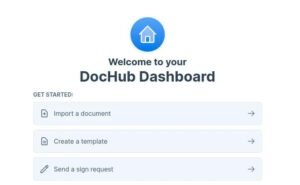
The first step is creating a DocHub account. After registration, users are taken to the main dashboard, which acts as the control center for managing documents. From here, you can upload files, access previous documents, create templates, and organize your workflow.
The dashboard is designed for simplicity. Even users who are not technically experienced can quickly understand where to upload files, where to edit documents, and where to find completed paperwork.
Once your account is ready, you can bring documents into DocHub from multiple sources. These may include your computer, cloud storage platforms, or connected applications. This flexibility helps users avoid wasting time downloading and uploading files repeatedly.
How to Create Documents Using DocHub
Creating documents in DocHub can be done in different ways depending on your requirements. Some users start with existing PDFs, while others prefer creating a new document from an empty page.
Uploading Existing Files
Most users begin by uploading an existing document. DocHub allows you to import files and immediately start editing them.
Common file sources include:
- Computer storage
- Google Drive
- Dropbox
- Other connected cloud services
Once uploaded, the document opens inside the DocHub editor. From there, you can modify content, add fields, insert signatures, or prepare the file for sharing.
This approach is especially helpful when working with contracts, forms, applications, or documents created in other software.
Creating Documents From Scratch
DocHub also supports creating documents from a blank workspace. This option is useful when you need to build a simple form, agreement, or template.
Users can add text sections, images, signature areas, and interactive fields. Instead of creating a document elsewhere and importing it, you can build the complete workflow directly inside the platform.
Editing Documents With DocHub Tools
Editing is one of the strongest features of DocHub. The platform provides multiple tools that allow users to customize PDF files according to their needs.
Adding and Modifying Text
One common challenge with PDF files is that they are usually difficult to edit. Unlike regular word-processing files, PDFs are designed mainly for sharing and viewing.
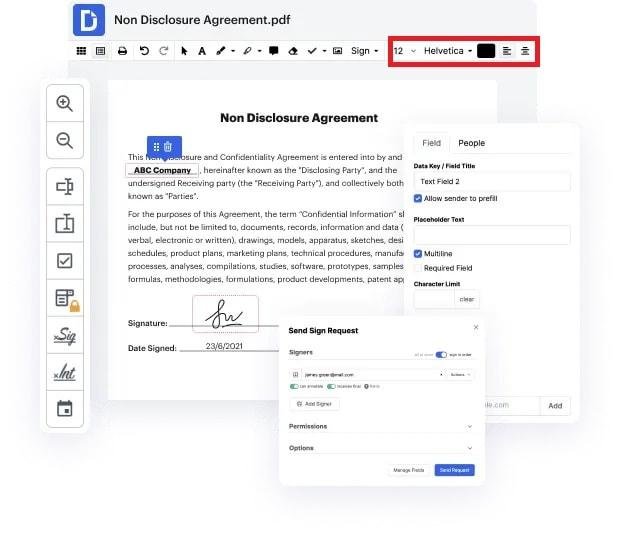
DocHub simplifies this process by allowing users to add text and make changes directly inside documents. Users can update information, correct mistakes, insert additional details, or modify sections without recreating the entire file.
This is useful for updating:
- Agreements
- Reports
- Forms
- Business documents
- Application files
The ability to edit directly saves time because users do not need to convert PDFs into another format before making changes.
Using Annotation and Markup Features
Sometimes documents do not need major edits. Instead, users simply need to highlight information, leave comments, or provide feedback.
DocHub includes annotation tools that allow users to:
- Highlight important sections
- Add comments
- Draw shapes
- Insert images
- Add stamps
- Whiteout sensitive information
These tools make collaboration easier because reviewers can communicate directly on the document itself.
Managing PDF Pages Efficiently
Large documents often require page organization. A report may contain unnecessary pages, or a contract may need additional sections added before completion.
DocHub provides page management features that allow users to organize documents quickly. Users can reorder pages, rotate pages, delete unwanted sections, or combine multiple PDF files.
For example, imagine preparing a business proposal containing separate PDFs for pricing, services, and terms. Instead of sending multiple files, you can merge them into one professional document.
Page management features help maintain cleaner files and create better experiences for recipients.
Creating Fillable Forms With DocHub
Many organizations depend on forms to collect information. Traditional paper forms are slow and difficult to manage, while digital forms provide faster responses and easier storage.
DocHub allows users to convert standard documents into interactive forms by adding fields such as:
- Text boxes
- Checkboxes
- Signature fields
- Date fields
- Dropdown menus
This feature is valuable for companies, schools, healthcare organizations, and administrative teams.
A fillable form works like a digital conversation between the document and the user. Instead of writing information manually, recipients can complete required sections online.
Signing Documents Electronically With DocHub
Electronic signatures have become an important part of modern business communication. DocHub allows users to sign documents digitally and request signatures from others.
The signing process is simple:
- Upload the document.
- Add signature fields.
- Select recipients.
- Send the document.
- Track completion.
Businesses can use eSignature workflows for agreements, approvals, contracts, and authorization forms.
Digital signing reduces delays because documents no longer need to be physically printed and mailed.
Collaboration and Document Sharing Features
Working together on documents is easier when everyone can access the same file. DocHub provides sharing and collaboration options that allow users to send documents through links, email, or connected platforms.
Teams can review documents, leave feedback, and manage permissions. This is particularly useful for remote teams where employees may work from different locations.
Instead of sending multiple versions of the same document, everyone can work around a central file.
DocHub Security and Document Protection
Security is an important concern when handling digital documents. Many files contain private information, including contracts, financial details, or personal data.
DocHub provides security features such as encrypted storage, authentication options, document permissions, and audit tracking.
Users can control who can access documents and track important activities.
A secure document system works like a locked digital office. Only authorized people should have access to important files.
Using DocHub With Google Drive and Other Platforms
Integration with other applications makes document workflows smoother. DocHub connects with platforms such as Google Drive, Gmail, Dropbox, and other cloud services.
This means users can open, edit, and manage documents without constantly switching between applications.
For people already using cloud-based tools daily, these integrations create a more connected experience.
Mobile Document Editing With DocHub
Work is no longer limited to desktop computers. Many professionals need to manage documents while traveling or working remotely.
DocHub mobile functionality allows users to edit, sign, organize, and share documents from mobile devices.
This flexibility helps users complete urgent tasks without waiting until they reach a computer.
Benefits of Using DocHub for Businesses and Individuals
DocHub provides several advantages for different types of users.
User Type | Benefits |
Students | Easy form completion and assignment management |
Freelancers | Faster contract signing and client communication |
Businesses | Improved workflow and team collaboration |
Organizations | Better document security and management |
The platform reduces manual work and creates a smoother document experience.
Conclusion
DocHub has transformed the way people create, edit, sign, and manage documents online. Instead of treating PDFs as fixed files, users can turn them into flexible digital workflows that support collaboration, automation, and faster communication.
From basic editing and annotations to advanced signing workflows and form creation, DocHub provides tools that help individuals and businesses handle documents more efficiently. Its browser-based approach, cloud integrations, and security features make it a practical choice for anyone who regularly works with digital paperwork.
As organizations continue moving toward paperless systems, tools like DocHub will remain valuable for improving productivity and simplifying everyday document tasks.
Read Also:
Unlocking Wellness: How Your Super DE is Transforming the Superfood Industry
Tiqets: Your Ultimate Ticketing Platform for Seamless Travel and Attraction Bookings
Weight Watchers Online: Achieve Your Health Goals with Personalized Weight Loss Programs
TicketNetwork: Your Go-To Marketplace for Concert, Sports, and Event Tickets
The Rise of Kontist: Smart Banking Solutions for Modern Professionals
Why Novakid Global ARABIC Is a Game-Changer in Digital Language Education
Frequently asked questions
Yes, DocHub offers free options that allow users to perform many basic PDF editing and signing tasks. Advanced features may require paid plans.
Yes, DocHub allows users to modify PDF content, add text, and make document adjustments directly within the editor.
Yes, DocHub supports workflows where multiple recipients can sign documents in a specified order.
Yes, DocHub works through a web browser, allowing users to manage documents online without traditional software installation.
Yes, businesses commonly use DocHub for contracts, forms, approvals, and other document workflows requiring editing and electronic signatures.