Discover the best Envato tips and tricks to maximize your creative workflow. Learn how to organize projects, use AI-powered tools, choose the right subscription, and streamline your design process to boost productivity and create professional-quality content more efficiently.
Table of Contents
ToggleUnderstanding the Modern Envato Ecosystem
Creative work has changed dramatically over the last few years. Designers, marketers, video editors, bloggers, YouTubers, and agencies no longer rely on a dozen disconnected platforms to complete a single project. Instead, they want an integrated ecosystem where templates, graphics, stock photos, music, videos, fonts, mockups, and AI-powered creative tools are available in one place. Envato has evolved into exactly that type of platform. Recent product updates have expanded its ecosystem beyond traditional digital assets by introducing AI-powered image generation, video creation, voice generation, smart editing tools, and improved workspace management. These updates allow creators to move from an idea to a finished product much faster than before. According to Envato’s latest product announcements, the platform now focuses heavily on simplifying workflows with features like nested workspaces, storyboard generation, and smarter AI-assisted content creation, making it easier for professionals to organize projects while reducing repetitive work.
Rather than spending hours searching across multiple websites for compatible resources, users can now centralize their creative process. This dramatically reduces context switching, one of the biggest productivity killers in creative industries. Think of Envato as a fully equipped workshop instead of a toolbox scattered across different rooms. Every resource is designed to work together, allowing creators to stay focused on producing high-quality work instead of managing files and subscriptions. Whether you’re building websites, editing promotional videos, designing social media graphics, or producing marketing campaigns, understanding how the modern Envato ecosystem functions is the first step toward maximizing your creative workflow.
Recent Updates That Improve Creative Productivity
Envato has introduced several major improvements designed specifically for professional creators. One of the most notable additions is its expanding collection of AI-powered creative tools. These include ImageGen, VideoGen, VoiceGen, AI image editing, and AI-assisted search functionality. Instead of treating artificial intelligence as a replacement for creativity, Envato positions these tools as productivity assistants that eliminate repetitive work while allowing creators to maintain artistic control. The platform has also introduced Storyboard generation, making it possible to convert simple concepts into structured visual sequences with only a few clicks. New Nested Workspaces help users organize multiple clients, campaigns, and creative projects more efficiently, reducing clutter and improving collaboration.
Another important improvement involves generation history and workflow continuity. Instead of losing previous AI-generated assets, creators can revisit earlier outputs, compare iterations, refine prompts, and improve future results. These features significantly reduce duplicated work while encouraging experimentation. Productivity isn’t only about working faster; it’s about making better creative decisions without wasting time repeating previous efforts. By combining traditional creative assets with modern AI-powered features, Envato has created an environment where inspiration, organization, and execution happen within a single platform.
Choosing the Right Envato Subscription
Choosing the right Envato subscription is one of the easiest ways to improve your creative workflow. Many creators sign up without considering how often they download assets, what types of projects they handle, or whether they work alone or with a team. As a result, they may end up paying for features they never use or struggling with limitations that slow them down. Taking a few minutes to evaluate your needs can save both time and money while making your workflow much smoother. If you’re a freelance graphic designer, your priorities may differ from those of a YouTuber, web developer, or digital marketing agency. Understanding these differences helps you make a smarter investment.
Recent updates have expanded Envato’s offerings with multiple subscription tiers and AI-powered creative tools. While some plans focus primarily on unlimited digital asset downloads, others include advanced AI credits, premium generation tools, and collaborative workspace features. Instead of simply asking, “Which plan is cheapest?” ask yourself, “Which plan helps me complete projects faster?” The right subscription should eliminate obstacles rather than create them. When your workflow becomes more efficient, the subscription often pays for itself through saved hours and increased productivity.
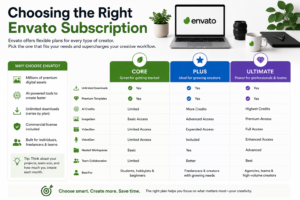
Comparing Core, Plus, and Ultimate Plans
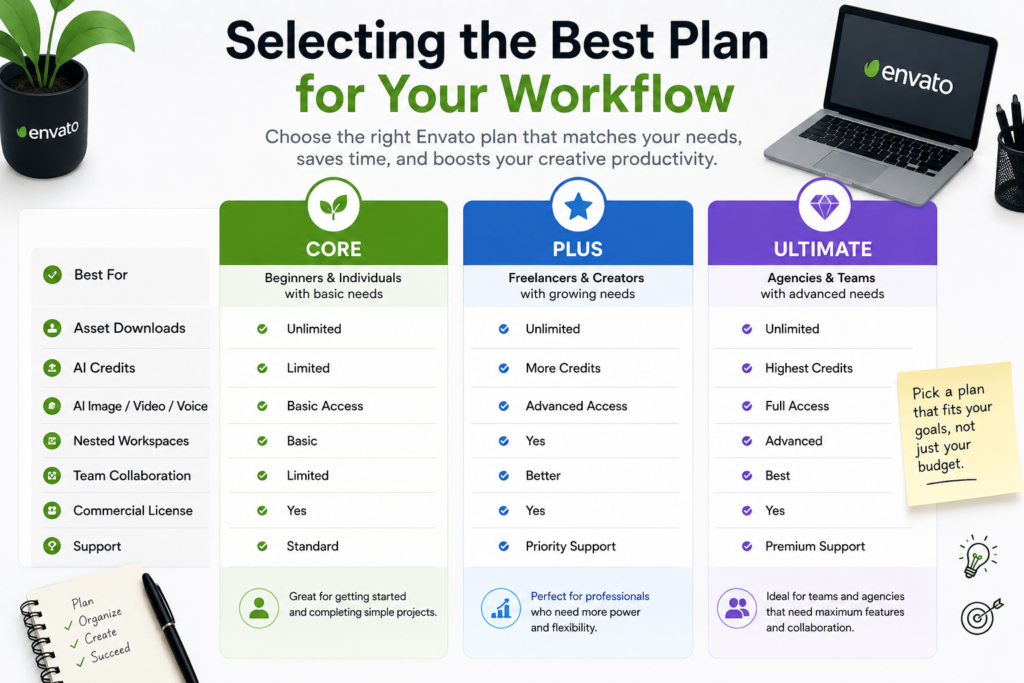
Envato currently offers multiple subscription options designed for different types of creators. While the exact pricing may change over time, the feature differences generally remain consistent. Here’s a simplified comparison:
Feature | Core | Plus | Ultimate |
Unlimited Asset Downloads | ✅ | ✅ | ✅ |
Premium Templates | ✅ | ✅ | ✅ |
AI Credits | Limited | More Credits | Highest Credits |
Image Generation | Basic | Advanced | Premium |
Video Generation | Limited | Expanded | Full Access |
Voice Generation | Limited | Included | Enhanced |
Nested Workspaces | Basic | Yes | Advanced |
Commercial License | ✅ | ✅ | ✅ |
Team Collaboration | Limited | Better | Best |
For beginners or occasional creators, the Core plan usually provides enough resources for standard projects like blogs, websites, presentations, and social media graphics. Professionals who regularly create client work may find the Plus plan offers a better balance between affordability and productivity. Agencies and high-volume content creators often benefit most from the Ultimate plan because of its expanded AI capabilities, collaboration features, and larger allocation of generation credits.
Selecting the Best Plan for Your Workflow
Rather than choosing based solely on price, evaluate how you actually work every day. If your projects mainly involve downloading stock photos and PowerPoint templates a few times each month, paying for advanced AI capabilities might not deliver significant value. On the other hand, if you’re creating multiple YouTube videos, social campaigns, website mockups, or client presentations every week, AI-assisted image generation and workspace organization can dramatically reduce production time.
Think of your subscription like buying professional equipment. A casual photographer doesn’t necessarily need the same camera as a commercial studio, but a wedding photographer certainly benefits from better tools. The same principle applies to Envato. Your subscription should match the scale of your creative business rather than your aspirations alone. Choosing wisely ensures you spend less time worrying about limitations and more time producing exceptional work.
Organizing Projects for Maximum Efficiency
Even the best creative assets won’t improve productivity if your files are scattered across dozens of folders with confusing names like “Final_Final_V3_NEW.” Organization may not seem exciting, but it’s one of the biggest factors separating efficient professionals from overwhelmed creators. Every minute spent searching for a font, graphic, or presentation template is a minute not spent creating. Envato’s organizational features make it much easier to build a structured workflow that remains manageable even as projects grow more complex.
Start by organizing projects according to clients, campaigns, or content categories instead of file types. For example, instead of storing all Photoshop files together and all videos in another folder, keep every asset related to a single client inside one organized workspace. This approach mirrors how projects are actually completed and reduces unnecessary navigation. Combined with Envato’s Collections and Nested Workspaces, creators can quickly locate previously downloaded assets without repeatedly searching the marketplace.
Creating Structured Workspaces
A structured workspace begins with consistent naming conventions. Whether you’re managing five projects or five hundred, consistency makes searching faster and reduces mistakes. Create folders for drafts, approved assets, exported files, reference materials, and brand guidelines. Within Envato, use Collections to group templates, graphics, fonts, and stock resources according to specific clients or recurring project types.
Nested Workspaces further improve productivity by allowing teams and freelancers to separate projects while maintaining a centralized asset library. Instead of mixing corporate branding assets with personal projects, everything remains neatly categorized. This reduces confusion when deadlines become tight and multiple projects overlap. Professional organization isn’t about perfection—it’s about making future work easier than today’s work.
Managing Downloads and Asset Collections
One common mistake is downloading hundreds of assets “just in case” without any organization. This quickly creates digital clutter that becomes difficult to navigate. Instead, create themed Collections such as Website UI Kits, Social Media Templates, Product Mockups, Video Intros, Business Icons, and Presentation Graphics. These curated libraries become valuable resources you can reuse repeatedly instead of starting every project from scratch.
Another useful strategy is regularly reviewing your Collections and removing outdated resources. Trends in graphic design, web development, and video editing evolve rapidly, so keeping your library current improves both efficiency and quality. Treat your downloaded assets like a professional toolbox—organized, maintained, and ready whenever inspiration strikes. A clean creative environment leads to clearer thinking and faster execution.
Using AI Tools to Accelerate Creativity
Artificial intelligence has become one of the most significant productivity boosters in the creative industry, and Envato has embraced this transformation by integrating AI-powered tools directly into its ecosystem. Instead of treating AI as a replacement for designers, writers, or marketers, Envato positions it as an assistant that handles repetitive tasks while allowing creators to focus on strategy and originality. This approach is especially useful for freelancers, agencies, and businesses that need to produce large amounts of content without sacrificing quality. From generating marketing visuals to creating voiceovers and editing images, AI helps eliminate bottlenecks that traditionally slowed down creative production.
The biggest advantage of using AI within the same platform is workflow continuity. Rather than switching between multiple applications to generate an image, edit it, find stock assets, and download templates, creators can complete much of their work in one place. This minimizes distractions and keeps projects moving forward. AI also encourages experimentation because users can quickly generate multiple variations before selecting the strongest concept. Instead of fearing that AI will replace creativity, think of it as having an extra team member who never gets tired of repetitive tasks and always works at lightning speed.
ImageGen, VideoGen, and VoiceGen
Envato’s growing collection of AI-powered tools includes ImageGen, VideoGen, and VoiceGen, each designed to simplify different stages of the creative process. ImageGen enables users to create unique visuals from text prompts, making it ideal for concept art, blog illustrations, social media graphics, and marketing campaigns. VideoGen accelerates video production by helping creators generate visual sequences, animations, or supporting clips without spending hours editing raw footage. VoiceGen complements these features by producing natural-sounding voiceovers for presentations, tutorials, advertisements, and explainer videos.
These tools are particularly valuable for solo creators who previously had to outsource multiple tasks or purchase separate software subscriptions. Imagine producing a complete YouTube video using stock footage, AI-generated graphics, AI voice narration, and professionally designed templates—all from a single platform. This level of integration reduces production costs while significantly shortening project timelines. As AI technology continues to improve, creators who learn to combine automation with their own expertise will gain a competitive advantage over those who rely entirely on traditional methods.
AI-Powered Search and Image Editing
Searching for the perfect asset can sometimes consume more time than creating the final design itself. Envato’s AI-powered search addresses this issue by understanding user intent rather than relying solely on exact keywords. Instead of typing numerous search variations, creators can describe what they need in natural language and receive more accurate recommendations. This feature reduces frustration while helping users discover assets they might otherwise overlook.
AI image editing further streamlines the workflow by allowing creators to enhance, modify, or refine visuals without leaving the platform. Tasks such as background removal, resizing, object replacement, and visual enhancements become significantly faster. These improvements may seem small individually, but together they save countless hours over weeks and months of creative work. Productivity often comes from eliminating dozens of tiny delays rather than finding one dramatic shortcut, and AI-powered editing exemplifies this philosophy perfectly.
Professional Workflow Tips
Great creative professionals rarely succeed because they work harder than everyone else. Instead, they build systems that allow them to work smarter and produce consistent results. One of the most valuable habits is developing reusable workflows instead of reinventing every project from scratch. Whether you’re creating websites, advertisements, social media campaigns, presentations, or video content, many project components remain similar. Templates, brand assets, typography, color palettes, and reusable design elements can dramatically reduce production time while maintaining professional quality.
Consistency also builds trust with clients. When every project follows an organized workflow, revisions become easier, deadlines become more predictable, and collaboration improves. Professional creators understand that creativity flourishes within organized systems rather than chaotic environments. By combining Envato’s vast template library with your own standardized processes, you can increase both efficiency and output quality without feeling overwhelmed by repetitive work.
Building Reusable Templates
Reusable templates are one of the biggest secrets behind fast creative production. Instead of designing every presentation, website layout, Instagram post, or promotional banner from the beginning, create master templates that can be customized for each project. Store frequently used fonts, brand colors, icons, logo variations, and style guides in easily accessible folders. Envato’s extensive template collection provides an excellent starting point that can be personalized according to individual brand requirements.
Another helpful strategy is maintaining a “creative starter kit” for recurring project types. For example, if you regularly produce blog graphics, prepare a collection of thumbnail layouts, typography styles, stock image categories, and call-to-action designs. Each new project then begins with a strong foundation rather than a blank canvas. This approach reduces decision fatigue while allowing more mental energy for genuine creativity and problem-solving.
Maintaining Brand Consistency
Brand consistency is often overlooked when discussing productivity, yet inconsistent branding creates unnecessary revisions and confusion. Every project should maintain the same typography, color palette, imagery style, spacing, and visual identity unless intentionally redesigned. Envato’s templates and brand assets make it easier to establish these standards across websites, advertisements, presentations, videos, and social media campaigns.
Developing a centralized brand library further improves efficiency. Keep approved logos, color codes, typography guidelines, icons, illustrations, and marketing templates together so every team member works from identical resources. This prevents outdated assets from appearing in new projects and reduces client revision requests. Strong branding isn’t about restricting creativity—it’s about creating a recognizable visual language that audiences immediately associate with your business or client.
Avoiding Common Productivity Mistakes
Even the most talented creators can unintentionally slow themselves down by repeating common workflow mistakes. One frequent issue is downloading too many assets without a clear purpose. While unlimited downloads are convenient, collecting thousands of unused files creates digital clutter that eventually becomes difficult to manage. Another mistake is constantly chasing new design trends without mastering a reliable workflow. Productivity depends less on using the latest tools and more on using existing tools effectively.
Another major challenge is multitasking. Creative professionals often believe working on multiple projects simultaneously increases efficiency, but research consistently shows that frequent context switching reduces focus and increases errors. Instead, dedicate uninterrupted blocks of time to one project before moving to another. Pair this habit with Envato’s organized collections and workspaces, and you’ll notice significant improvements in both speed and creative quality.
Managing Licensing Correctly
Licensing may not be the most exciting aspect of creative work, but understanding it is essential for professionals who create commercial content. Always ensure that every downloaded asset is properly licensed for the intended project. Register assets according to Envato’s licensing requirements, especially when working with client projects, advertisements, or products intended for commercial distribution.
Maintaining a simple spreadsheet or project record that documents downloaded assets, project registrations, and usage rights can prevent future legal complications. This habit becomes increasingly important as your client portfolio grows. Proper license management also demonstrates professionalism and builds client confidence, particularly for agencies handling multiple campaigns simultaneously.
Preventing Creative Burnout
Creative burnout is a hidden productivity killer that many professionals underestimate. Long hours, constant revisions, and unrealistic deadlines gradually reduce creativity and motivation. Ironically, trying to work faster often produces the opposite effect because mental fatigue leads to poorer decisions and more mistakes. Sustainable productivity requires balancing focused work with regular breaks, learning opportunities, and personal creative exploration.
Instead of measuring success by the number of hours worked, evaluate how much meaningful progress you make during focused sessions. Short periods of concentrated effort often produce better results than marathon editing sessions. Keeping your workspace organized, using high-quality templates, automating repetitive tasks, and leveraging AI tools all reduce unnecessary stress, allowing creativity to remain enjoyable rather than exhausting.
Best Practices for Teams and Freelancers
Whether you’re a solo freelancer or part of a growing creative agency, having a standardized workflow can dramatically improve productivity and collaboration. Teams often struggle with inconsistent file naming, duplicated downloads, scattered project resources, and communication gaps. Envato helps reduce these challenges by offering centralized asset management, organized collections, and collaborative workspaces that make it easier for everyone to access approved creative resources. Instead of asking teammates where a particular icon, font, or template is stored, everyone can work from the same organized library.
Freelancers benefit just as much from these organizational strategies. Managing multiple clients becomes easier when every project follows the same structure from beginning to end. Create separate folders for client assets, maintain version control for deliverables, and keep a record of licensed downloads. This not only saves time but also presents a more professional image to clients. Consistency in workflow leads to consistent results, and consistent results build long-term client relationships that generate repeat business and referrals.
Client Collaboration
Successful collaboration begins with clear organization. Before starting any project, establish a shared folder structure, define file naming conventions, and agree on version control practices. When everyone knows exactly where files belong and how updates are tracked, projects move forward with fewer misunderstandings. Envato’s templates also make it easier to present polished concepts to clients early in the design process, reducing revision cycles and accelerating approvals.
Communication is equally important. Instead of sending scattered feedback through emails, messaging apps, and phone calls, consolidate client comments into a single document or project management platform. Pairing organized communication with Envato’s ready-to-use assets allows designers to implement revisions quickly without rebuilding entire layouts. Faster revisions lead to happier clients, stronger reputations, and more opportunities for future work.
Scaling Creative Projects
As creative businesses grow, manual processes quickly become bottlenecks. What works for one client may become impossible when managing twenty or fifty clients simultaneously. Scaling requires repeatable systems rather than simply working longer hours. Build reusable project templates, automate repetitive tasks where possible, maintain standardized asset libraries, and document workflows so every team member follows the same process.
Another effective strategy is regularly auditing your workflow. Every few months, review which tasks consume the most time and identify opportunities for automation or improvement. Perhaps your team spends too much time searching for stock images or recreating presentation layouts. Addressing these recurring inefficiencies has a much greater impact than trying to work faster. Growth isn’t just about increasing output—it’s about improving the systems that support that output.
Conclusion
Maximizing your creative workflow isn’t about finding a single productivity hack or purchasing the latest software. It’s about building an efficient system that combines high-quality resources, organized project management, smart automation, and consistent creative practices. Envato provides an impressive ecosystem where designers, marketers, developers, content creators, and agencies can access professional assets alongside modern AI-powered tools that significantly reduce repetitive work. By taking advantage of organized workspaces, reusable templates, AI-assisted generation, and proper asset management, creators can spend less time on administrative tasks and more time producing meaningful work.
The most successful professionals understand that creativity thrives when unnecessary friction is removed. Every organized folder, reusable template, automated process, and well-managed asset library contributes to a smoother workflow. Whether you’re launching your freelance career, expanding an agency, or creating content for your own brand, applying these Envato tips and tricks can help you work faster, stay organized, and consistently deliver high-quality results. Productivity isn’t measured by how busy you are—it’s measured by how effectively you transform ideas into finished projects.
Read Also:
Frequently asked questions
Envato is ideal for designers, developers, marketers, video editors, bloggers, and businesses that need professional digital assets such as templates, graphics, stock photos, videos, music, fonts, mockups, website themes, and AI-powered creative tools in one platform.
Absolutely. Freelancers can save significant time by accessing ready-made templates, premium design assets, and AI-powered creative tools that reduce project turnaround times while maintaining professional quality.
AI tools help automate repetitive tasks such as image generation, voice creation, visual editing, and asset discovery. This allows creators to focus more on strategy, storytelling, and design rather than routine production work.
Create dedicated collections for different clients or project categories, use consistent folder names, maintain separate brand libraries, and periodically remove outdated resources. Organized assets reduce search time and improve workflow efficiency.
Yes. Envato supports collaborative workflows through organized workspaces, shared asset management, reusable templates, and licensing options that help teams work more efficiently while maintaining consistent branding across projects.