

Managing a website requires more than simply purchasing a domain name and hosting plan. Behind every successful website is a powerful system that manages files, databases, security, email accounts, applications, and server resources. For many website owners, developers, agencies, and hosting providers, Plesk has become one of the most trusted solutions for simplifying web hosting management.
Whether you are launching your first blog, building an online store, managing business websites, or handling multiple client projects as a professional developer, Plesk provides a centralized platform that makes complex server tasks easier. Instead of relying entirely on technical commands and complicated configurations, users can manage important hosting functions through an intuitive dashboard.
The growth of cloud computing, online businesses, and digital services has increased the demand for reliable hosting management tools. According to industry trends, millions of websites depend on hosting control panels to reduce maintenance complexity and improve operational efficiency. Plesk stands out because it supports multiple operating systems, offers automation features, provides strong security options, and works well for both beginners and experienced professionals.
This complete guide explains everything you need to know about Plesk web hosting, including its features, benefits, security capabilities, comparison with other control panels, and how beginners and professionals can use it effectively.
Table of Contents
ToggleUnderstanding Plesk and Its Role in Modern Web Hosting
What Is Plesk?
Plesk is a web hosting control panel that allows users to manage websites, servers, domains, emails, databases, applications, and security settings through a graphical user interface. Instead of typing complicated server commands, administrators can perform many tasks with simple clicks.
Think of Plesk as the control center of your hosting environment. Just like a smartphone settings panel allows you to manage different features of your device, Plesk provides a dashboard where you can control your entire hosting infrastructure.
Originally launched in 2001, Plesk was designed to simplify server management for hosting companies and website owners. Over time, it evolved into a complete platform supporting shared hosting, VPS servers, dedicated servers, and cloud environments.
Plesk supports both Linux and Windows servers, making it flexible for different hosting requirements. Users can install popular web applications, manage WordPress websites, configure databases, create email addresses, monitor server health, and improve website security without needing advanced system administration knowledge.
For beginners, Plesk removes much of the technical difficulty associated with hosting. For professionals, it provides automation tools and advanced features that save time when managing multiple websites and servers.
Why Plesk Is Popular Among Hosting Users
The popularity of Plesk comes from its balance between simplicity and professional-level functionality. Many hosting platforms focus either on beginners or advanced administrators, but Plesk attempts to serve both groups.
A beginner can use Plesk to install WordPress, create an email account, upload website files, and manage domains without learning server programming. At the same time, developers and system administrators can access advanced tools for database management, server configuration, automation, and application deployment.
One major reason businesses choose Plesk is efficiency. Managing multiple websites manually can become overwhelming because every website requires updates, backups, security monitoring, and performance improvements. Plesk combines these activities into one organized interface.
Another advantage is its extensive ecosystem. Plesk supports various extensions that allow users to add extra functionality such as SEO tools, security scanners, developer tools, backup solutions, and performance optimization features.
For hosting providers, Plesk helps simplify customer management by allowing different users to have separate accounts, permissions, and resources. This makes it suitable for companies offering hosting services to customers.
How Plesk Works Behind the Scenes
The Plesk Control Panel Explained
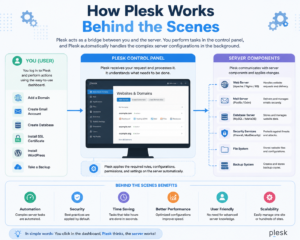
At its core, Plesk works as a management layer between users and the server. Normally, managing a server requires command-line knowledge, configuration files, and technical expertise. Plesk creates a visual interface that communicates with server components automatically.
When a user performs an action inside Plesk, such as creating a new website or installing an SSL certificate, Plesk handles the required server configurations in the background.
The control panel includes different sections for managing:
- Websites and domains
- Email accounts
- Databases
- File storage
- Applications
- Security settings
- Server performance
- Backup systems
The dashboard provides an overview of important information, including resource usage, active subscriptions, installed applications, and security status.
For hosting companies, administrators can create customer accounts and assign specific resources. For example, a hosting provider can limit storage space, bandwidth, databases, and email accounts for different customers.
Server Management Made Simple
One of
advantages is simplifying server administration. Without a control panel, even basic tasks can require technical knowledge.
For example, installing a website manually may involve configuring web servers, creating databases, setting permissions, connecting domains, and securing the installation. Plesk automates many of these steps.
Users can also manage popular content management systems like WordPress through tools such as the WordPress Toolkit. This allows website owners to install, update, secure, clone, and manage WordPress websites from one place.
For professionals managing dozens or hundreds of websites, automation becomes extremely valuable. Tasks that would normally take hours can often be completed within minutes.
Key Features That Make Plesk Powerful
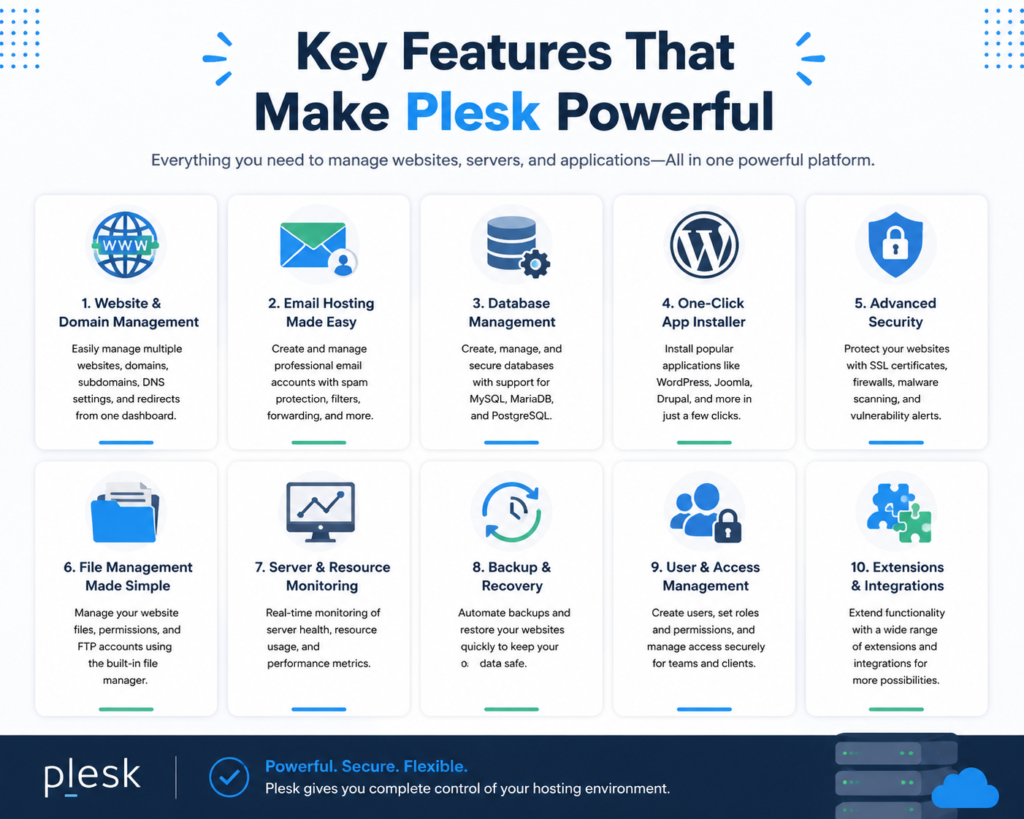
Website and Domain Management
Managing websites is one of the main reasons people use Plesk. The platform provides complete control over domains, subdomains, DNS settings, and hosting configurations.
Users can easily add new domains, create subdomains, configure redirects, and manage website files. This makes Plesk useful for individuals running multiple websites as well as agencies handling client projects.
The file manager allows users to upload, edit, move, and organize website files without requiring FTP software. Advanced users can still connect through FTP or SSH when needed.
Plesk also supports popular programming environments, including:
- PHP
- Node.js
- Python
- Ruby applications
This flexibility makes it suitable for different types of websites, from simple blogs to complex web applications.
Email Hosting and Security Tools
Professional websites often require custom email addresses connected to their domains. Plesk allows users to create and manage business email accounts easily.
For example, instead of using a generic email service, businesses can create addresses like:
- contact@yourdomain.com
- support@yourdomain.com
- sales@yourdomain.com
Plesk provides tools for managing mailboxes, spam protection, email forwarding, and security settings.
Email security is especially important because businesses depend on reliable communication. Features like spam filtering and authentication settings help protect users from unwanted messages and phishing attempts.
Plesk for Beginners: Getting Started With Web Hosting
Setting Up Your First Website
For beginners, starting with Plesk is relatively straightforward. After purchasing a hosting plan that includes Plesk, users receive access to the control panel dashboard.
The basic website setup process usually involves:
- Connecting a domain name.
- Creating a hosting subscription.
- Uploading website files.
- Creating databases if required.
- Installing applications.
- Activating security features.
Many beginners choose WordPress because it powers a significant portion of websites worldwide. Through Plesk’s application installer, WordPress can usually be installed quickly without manual configuration.
Once installed, users can manage themes, plugins, updates, and backups directly from the dashboard.
Managing Files, Databases, and Applications
Every website depends on important components such as files and databases. Plesk makes these easier to manage.
The database management section allows users to create databases, users, and permissions. It supports popular database systems such as MySQL and MariaDB.
Developers can also use database management tools like phpMyAdmin to edit tables, run queries, and maintain website data.
Application management is another useful feature. Instead of manually downloading and configuring software, users can install supported applications through Plesk’s interface.
This reduces setup time and lowers the technical barrier for new website owners.
Advanced Plesk Features for Professionals
Developer-Friendly Tools and Extensions
Professional developers require more control, and Plesk provides tools designed for advanced workflows.
Developers can manage:
- Git repositories
- Node.js applications
- Docker environments
- Development frameworks
- Custom server configurations
The extension marketplace allows users to add additional capabilities depending on their requirements.
For agencies, Plesk provides a practical environment for managing client websites while maintaining separate permissions and security controls.
Server Automation and Performance Optimization
Automation is essential for professionals managing multiple websites. Plesk includes automation tools that reduce repetitive tasks.
Administrators can schedule backups, monitor server resources, apply updates, and manage security policies automatically.
Performance optimization features help websites load faster by managing caching, PHP settings, and server configurations.
A faster website improves user experience and can positively influence search engine rankings.
Plesk Security Features and Website Protection
SSL Certificates and Malware Protection
Website security is one of the most important parts of hosting management. Plesk includes several security tools designed to protect websites from threats.
SSL certificates encrypt communication between visitors and websites. Modern browsers require HTTPS connections for secure browsing, making SSL essential for every website.
Plesk supports automated SSL installation through services such as Let’s Encrypt, allowing users to secure websites without complicated configuration.
Security extensions can also help detect malware, monitor vulnerabilities, and strengthen server protection.
Backup and Recovery Solutions
Website failures can happen because of software errors, cyberattacks, accidental deletion, or server problems. Reliable backups ensure websites can be restored quickly.
Plesk provides backup management features that allow users to create scheduled backups and restore website data when necessary.
Professional users often combine Plesk backups with cloud storage solutions for additional protection.
Plesk vs Other Hosting Control Panels
Plesk vs cPanel
Plesk and cPanel are two of the most recognized hosting control panels. Both provide website and server management features, but they have different approaches.
Feature | Plesk | cPanel |
Operating System Support | Linux and Windows | Mainly Linux |
User Interface | Modern and organized | Traditional interface |
WordPress Management | Strong WordPress Toolkit | Strong WordPress tools |
Developer Features | Extensive extensions | Large ecosystem |
Server Support | VPS, dedicated, cloud | VPS and dedicated |
The right choice depends on user requirements, hosting provider availability, and personal preference.
Benefits of Using Plesk for Businesses and Developers
Plesk offers several advantages for modern website management:
- Easy website administration
- Strong security features
- Support for multiple technologies
- Automation capabilities
- Reliable backup management
- Developer-friendly tools
Businesses benefit because employees can manage websites without requiring deep technical knowledge. Developers benefit because they can automate tasks and maintain multiple projects efficiently.
Common Challenges and Limitations of Plesk
Although Plesk is powerful, it is not perfect. Some users may find licensing costs higher compared with open-source alternatives.
Beginners may also need time to understand advanced settings because the platform includes many professional features.
Server performance depends heavily on hosting infrastructure. Even the best control panel cannot compensate for poor-quality hosting resources.
However, for users who need a reliable and flexible hosting management solution, Plesk remains a strong option.
Conclusion
Plesk has become one of the most trusted web hosting control panels because it successfully combines simplicity, flexibility, and professional features. Whether you are a beginner launching your first website or a developer managing complex projects, Plesk provides the tools needed to manage hosting environments efficiently.
Its powerful website management features, security solutions, automation capabilities, and support for different technologies make it suitable for individuals, businesses, agencies, and hosting providers.
Choosing the right hosting management platform can save time, reduce technical challenges, and improve website performance. For many users, Plesk provides the perfect balance between control and convenience.
Read Also:
A Complete Review of Parallels | Mac & Windows Virtualization for Professionals
Top Trending Boots Styles That Are Worth Investing in This Year
Wise – Commission payout currency USD Guide: How to Receive International Payments
Why Choose Wise – Commission payout currency EUR for Global Commission Payments?
How Wise – Commission payout currency AUD Works for International Affiliates
Frequently asked questions
Plesk is mainly used for managing web hosting environments, including websites, domains, emails, databases, security settings, and server resources through an easy-to-use control panel.
Yes, Plesk is beginner-friendly because it provides a graphical interface that simplifies common hosting tasks like installing WordPress, managing files, and creating email accounts.
Both platforms have advantages. Plesk supports both Linux and Windows servers and offers a modern interface, while cPanel is widely used in Linux hosting environments.
Yes, developers can use Plesk for managing Git repositories, applications, databases, Node.js projects, Docker environments, and advanced server configurations.
Plesk helps improve website security through SSL management, backups, malware protection tools, vulnerability monitoring, and security extensions.