
When it comes to cloud hosting, Vultr vs DigitalOcean is one of the most common comparisons you’ll come across. Both platforms are popular, powerful, and developer-friendly—but they’re not identical. Choosing the wrong one can mean paying more than you need to, or struggling with features that don’t really match your project.
Table of Contents
ToggleIn this guide, you’ll get a clear, side-by-side comparison of Vultr and DigitalOcean so you can confidently decide which cloud hosting provider is right for you.
Introduction to Vultr and DigitalOcean
Why Cloud Hosting Choice Matters
Your cloud hosting provider is like the foundation of a house. If it’s weak, everything you build on top—your website, app, or SaaS platform—will suffer. The right provider affects:
- Speed and performance
- Uptime and reliability
- Overall hosting costs
- Scalability and growth
- Developer experience and productivity
That’s why comparing Vultr and DigitalOcean properly is so important.
Quick Overview of Vultr
Vultr is known for:
- A wide range of data center locations across the globe
- Flexible compute offerings including high-frequency instances
- Competitive pricing with granular options
- Strong appeal to developers who want control and performance
It’s especially popular among power users, devops engineers, and people who want more configuration freedom.
Quick Overview of DigitalOcean
DigitalOcean built its reputation as the “developer-friendly” cloud. It’s widely used by:
- Startups and small businesses
- Agencies and freelancers
- Developers looking for simplicity
DigitalOcean focuses on ease of use, clean UI, and predictable pricing while still offering powerful features like managed databases, Kubernetes, and app platform services.
Pricing Comparison
Let’s be honest—pricing is one of the first things we check.
Note: Exact prices can change over time, but the structure and trends stay similar. Always double-check current pricing on each provider’s website before making a final decision.
Entry-Level Plans
Both Vultr and DigitalOcean offer entry-level cloud instances that are ideal for small websites, test environments, or hobby projects.
- DigitalOcean:
Common starter plans include low-cost Droplets with modest RAM and storage, designed to be budget-friendly while maintaining good performance for small apps. - Vultr:
Vultr also provides very low-cost instances, sometimes with slightly more granular pricing options and smaller configurations, which can be handy if you’re testing or running ultra-light workloads.
If you’re absolutely trying to minimize cost at the smallest scale, Vultr often gives more variety in micro-level plans, while DigitalOcean aims for simple, standard plans that are easy to understand.
CPU-Optimized and High-Performance Plans
For more demanding projects:
- DigitalOcean offers:
- CPU-Optimized Droplets
- General Purpose Droplets
- Plans tailored for apps, databases, and Kubernetes clusters
- CPU-Optimized Droplets
- Vultr offers:
- High Frequency Compute
- Optimized Cloud Compute
- Bare Metal and other performance-centric options
- High Frequency Compute
If your app is CPU-heavy (e.g., video encoding, data processing, high-traffic APIs), both platforms can handle it, but Vultr’s High Frequency instances are especially attractive for performance-focused users.
Bandwidth and Extra Costs
Both providers include bandwidth in their plans, but if you exceed the limit, you’ll pay per extra GB. For most small to medium projects, included bandwidth is usually enough. For very high-traffic sites or file delivery, you’ll want to compare:
- Bandwidth quota per plan
- Overage cost per GB
- Any free or discounted bandwidth between regions (if available)
Which Provider Is More Affordable Overall?
In many realistic scenarios:
- For simple pricing and predictability, DigitalOcean often feels easier to manage.
- For more granular control and potentially lower costs at edge cases, Vultr can have a slight advantage.
If you’re a beginner or running a straightforward project, DigitalOcean’s pricing is easier to understand. If you’re optimizing every dollar and know what you’re doing, Vultr might give you more room to tweak.
Performance and Speed
Global Data Center Locations
Both providers offer multiple data centers worldwide so you can host close to your users for better latency.
- DigitalOcean has data centers in major regions like North America, Europe, and Asia.
- Vultr generally has a broader spread of locations, including many additional cities around the world.
If you need a specific region that is closer to your audience (for example, certain Asian or European cities), Vultr might have more options.
Network Performance and Latency
Both Vultr and DigitalOcean have solid network infrastructures. Performance will depend on:
- The data center region you choose
- Your users’ locations
- Network routing and peering
In many community benchmarks, Vultr’s High Frequency instances often show impressive performance for web apps and databases, but DigitalOcean’s optimized instances are competitive and very stable.
Real-World Use Cases (Web Apps, APIs, SaaS)
For typical use cases:
- Websites and blogs: Both work great. Performance mainly depends on optimization and caching.
- APIs and SaaS apps: Both can handle them easily, but consider CPU-optimized or high-frequency options if traffic grows.
- E-commerce: Low latency and reliability matter more than minor pricing differences—both are capable.
If you anticipate heavy database loads or complex application logic, you may lean toward DigitalOcean’s managed databases and Kubernetes, or Vultr’s high-performance compute options, depending on your preference.
Ease of Use and User Experience
Dashboard and Control Panel
DigitalOcean:
- Clean, modern, and very intuitive
- Designed with developers and beginners in mind
- Easy navigation for Droplets, databases, volumes, networking, etc.
Vultr:
- Also offers a modern and functional control panel
- Gives you fine-grained control over instances, snapshots, DNS, and more
- Slightly more “technical” feel, which some developers actually prefer
If you’re completely new to cloud hosting, DigitalOcean’s UI feels a bit more beginner-friendly, but both are very usable.
One-Click Apps and Marketplace
Both providers offer one-click applications, such as:
- WordPress
- LAMP/LEMP stacks
- Docker
- Various CMS and frameworks
DigitalOcean also has a rich Marketplace with pre-configured images for popular tools, which can save you a lot of setup time.
Vultr has its own set of one-click apps, and they continue to expand and refine these options.
Learning Curve for Beginners
- DigitalOcean is widely loved by beginners for its combination of UI simplicity and excellent tutorials.
- Vultr is not hard to use, but it feels slightly more geared towards users who already understand VPS and cloud hosting basics.
If this is your first-ever cloud server, you’ll probably feel more comfortable starting with DigitalOcean.
Features and Services
Compute Options (Standard, High-Frequency, CPU-Optimized)
Both Vultr and DigitalOcean offer a variety of compute options to match different workloads:
- DigitalOcean:
- Basic Droplets (for general workloads)
- CPU-Optimized Droplets
- General Purpose and Memory-Optimized options
- Vultr:
- Regular Cloud Compute
- High Frequency Compute (popular for performance)
- Optimized Cloud Compute
- Bare Metal Servers
If you want a lot of choice in compute profiles, Vultr’s offerings feel slightly broader, especially with its bare metal and high-frequency focus.
Storage, Backups, and Snapshots
Both platforms provide:
- Block storage for adding more disk space
- Automatic backups (for an additional monthly fee)
- Snapshots to capture server state and redeploy quickly
These features are fairly comparable, though exact pricing and limits differ slightly. For most users, both providers deliver what you need.
Managed Databases and Kubernetes
Here, DigitalOcean really shines:
- Offers Managed Databases for PostgreSQL, MySQL, Redis, etc.
- Provides Managed Kubernetes (DOKS), making container orchestration much easie
- Has an App Platform for deploying apps without managing servers directly
Vultr has introduced similar modern services (like Kubernetes) in some regions, but in terms of maturity and ecosystem, DigitalOcean has a stronger managed services story.
Additional Tools for Developers and Agencies
DigitalOcean offers:
- Teams and Projects for organizing resources
- Powerful API and CLI
- Integrations with CI/CD and third-party tools
Vultr also provides:
- A robust API
- Useful features like startup scripts, custom ISOs, and powerful configuration controls.
If you’re an agency or SaaS team, DigitalOcean’s team/project structure and managed services can speed up collaboration and deployment. If you’re a power user or sysadmin, Vultr’s flexibility may appeal more.
Reliability and Uptime
SLAs and Uptime Guarantees
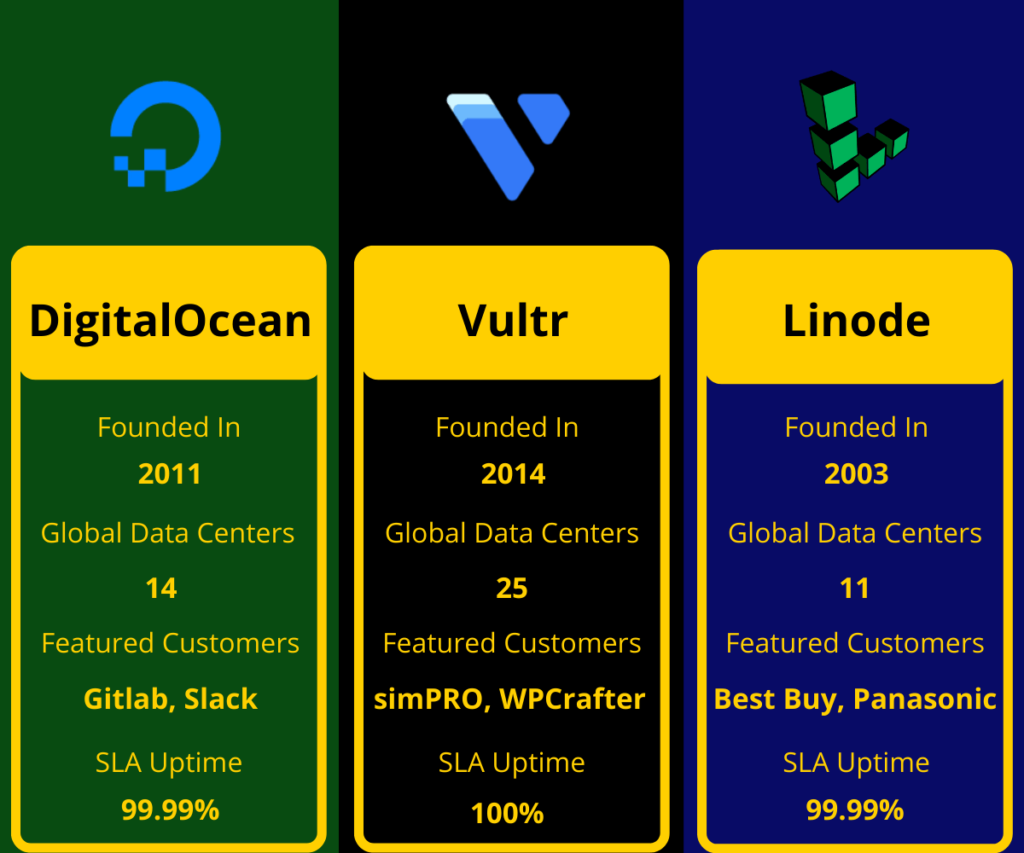
Both Vultr and DigitalOcean provide uptime guarantees and aim for high reliability. SLAs typically promise a certain uptime percentage, with credits offered in case of prolonged downtime.
In practice, both providers:
- Achieve generally strong uptime
- Experience occasional incidents, like all cloud providers
For mission-critical workloads, you should design redundancy (backups, multiple instances, maybe multi-region setups), regardless of which provider you choose.
Backup and Disaster Recovery Options
Both providers support:
- Scheduled automatic backups (extra fee)
- Manual snapshots
- Ability to create new instances from snapshots or images
Good disaster recovery is more about your architecture than just the provider. However, the tools from both Vultr and DigitalOcean make it easy to recover quickly if something goes wrong.
Security and Compliance
Built-in Security Features
Both providers offer:
- SSH key-based authentication
- Secure virtualization environments
- Data center-level physical security
- DDoS protection options (sometimes as an add-on or built-in in certain plans)
Firewalls, Private Networking, and Access Controls
- DigitalOcean:
- Cloud Firewalls
- VPC networking
- Access control via Teams
- Vultr:
- Firewall options
- Private networking within regions
- Security controls via API and panel
If you implement best practices (SSH keys, strong passwords, limited ports, proper firewall rules), both platforms are secure enough for most use cases.
Support and Documentation
Support Channels (Tickets, Live Chat, Community)
Both platforms primarily use:
- Ticket-based support
- Documentation and community discussion
DigitalOcean also enjoys a very active community, and their Q&A plus community posts often solve real-world issues quickly. Vultr has community resources too, but DigitalOcean’s ecosystem is larger and more widely referenced.
Guides, Tutorials, and Developer Resources
This is where DigitalOcean is famous:
- Thousands of high-quality tutorials
- Step-by-step guides on Linux, servers, Docker, Kubernetes, databases, and more
Vultr has documentation and guides, but if you often find yourself Googling “How to set up X on Ubuntu,” chances are DigitalOcean’s tutorials will appear at the top. You can still use those guides even if you host on Vultr—but having everything under one roof is convenient.
Best Use Cases for Vultr
When Vultr Is the Better Choice
You might lean toward Vultr if:
- You want more data center location options worldwide
- You’re a performance enthusiast and like High Frequency instances
- You need bare metal or very specific VM configurations
- You’re comfortable managing infrastructure and want granular control
Types of Projects That Benefit from Vultr
- Latency-sensitive apps where region choice is critical
- Performance-heavy workloads that benefit from high-frequency CPUs
- Advanced setups requiring custom ISOs or special configurations
Best Use Cases for DigitalOcean
When DigitalOcean Is the Better Choice
You might lean toward DigitalOcean if:
- You’re a beginner, startup founder, or solo developer wanting simplicity
- You prefer a clean, intuitive interface
- You need Managed Databases, Kubernetes, or App Platform
- You rely heavily on documentation and tutorials
Types of Projects That Benefit from DigitalOcean
- Startups and SaaS MVPs
- Agencies deploying multiple client websites
- Developers who want managed services instead of configuring everything manually
- Teams that care about collaboration, predictable billing, and a smooth learning curve
Vultr vs DigitalOcean: Pros and Cons Summary
Pros and Cons of Vultr
Pros:
- Wide range of global data centers
- High Frequency and performance-focused compute options
- Flexible plans and granular configurations
- Bare metal servers available
Cons:
- Slightly steeper learning curve for total beginners
- Ecosystem and community content smaller than DigitalOcean’s
- Managed services (like fully managed databases) less mature in some areas
Pros and Cons of DigitalOcean
Pros:
- Very beginner-friendly UI and experience
- Rich library of tutorials and guides
- Strong managed services: databases, Kubernetes, App Platform
- Great for startups, small teams, and agencies
Cons:
- Fewer data center locations than Vultr
- Slightly less granular at the tiniest plan levels
- Power users might find some areas less flexible than Vultr’s offerings
How to Decide: A Simple Framework
Still confused? Let’s break it down into a simple decision framework.
Budget-Based Decision
- On a tight budget and looking for granular control over very small instances?
→ Vultr may give more flexibility. - Want simple, predictable pricing and don’t want to think too much?
→ DigitalOcean is easier to manage.
Experience Level and Team Size
- Beginner or small team with limited devops experience?
→ DigitalOcean is usually the safer and smoother choice. - Experienced developer or sysadmin who likes fine-tuning infrastructure?
→ Vultr might feel more “at home.”
Future Scalability and Growth
- If you plan to scale into managed databases, Kubernetes, and platform services, DigitalOcean’s ecosystem is very handy.
- If you foresee specialized setups or want to mix VPS and bare metal, Vultr’s variety will be attractive.
Conclusion
Both Vultr and DigitalOcean are excellent cloud hosting providers, and there is no single “winner” for everyone. Instead, the best choice depends on who you are and what you’re building.
- Choose Vultr if you value performance flexibility, more global locations, and granular control over your infrastructure.
- Choose DigitalOcean if you want simplicity, outstanding documentation, strong managed services, and a very smooth experience from day one.
Think about your budget, experience level, and long-term plans. Once you’re clear on those, the Vultr vs DigitalOcean decision becomes much easier—and whichever you pick, you’ll be working with a solid cloud hosting platform.
Read Also:
Top Beaver Builder Features Every Web Designer Should Know
CJdropshipping (US) Review 2026: Best Supplier for American Sellers?
Quick Fix Synthetic Urine Affiliate Program 20%: A Complete Marketing Review for 2026
Bandwagonhost Review 2026: Is This VPS Hosting Still Worth It?
How to Plan the Perfect Adventure Using Roadtrippers.com
Frequently asked questions
Not always, but it can be in certain scenarios. Vultr’s High Frequency instances are designed for high performance and can be very fast for CPU-intensive workloads. However, DigitalOcean’s optimized Droplets also deliver excellent performance. Your actual speed will depend on your server configuration, region, and application optimization.
For beginners, DigitalOcean is usually the better choice. Its dashboard is very user-friendly, and the extensive tutorials make it easy to learn how to deploy and manage servers, databases, and apps. Vultr is still beginner-accessible, but it feels a bit more “technical.”
Yes, you can migrate between the two. Typically, this involves:
- Taking backups or snapshots
- Copying your application files and databases
- Reconfiguring DNS and environment variables
There’s no one-click migration between Vultr and DigitalOcean, but standard server migration practices work fine.
Both Vultr and DigitalOcean are great for WordPress. They both have:
- One-click WordPress images
- SSD storage
- Solid performance
If you’re new to server management and WordPress, DigitalOcean might be slightly easier because you can follow their step-by-step tutorials. If you want extra performance and don’t mind more tweaking, Vultr’s high-frequency instances are appealing.
For agencies and SaaS startups that value simplicity, collaboration, and managed services, DigitalOcean often fits better. Features like teams, projects, managed databases, and Kubernetes, plus rich documentation, make it easier to build and scale. Vultr is also a strong option if your agency or startup has advanced infrastructure needs and prefers more control over server configurations.