

In today’s connected world, cybersecurity is no longer something only large companies need to think about. Every time we browse websites, download files, shop online, or open emails, we expose our devices to potential threats. Viruses, ransomware, phishing attacks, spyware, and malicious applications continue to evolve, making reliable antivirus protection an essential part of digital life. Installing an antivirus program is a good first step, but proper configuration is what transforms basic protection into a strong security shield. Avira is one of the well-known antivirus solutions designed to help users protect their computers, personal information, and online activities.
Setting up Avira correctly allows you to take full advantage of its security features instead of simply running it with default settings. Many users install antivirus software and assume their devices are automatically protected, but security tools often require adjustments based on individual needs. Features like real-time scanning, web protection, privacy controls, and automatic updates work best when they are properly enabled and optimized. Think of Avira as a digital security guard: installing it gives the guard access to your home, but configuring it tells the guard where to focus and what threats to watch for.
This complete guide explains how to set up Avira Antivirus step by step and optimize its settings for maximum protection. Whether you are a beginner installing antivirus software for the first time or an experienced user looking to improve security, these instructions will help you create a safer digital environment.
Table of Contents
ToggleUnderstanding Avira Antivirus and Why Proper Setup Matters
Avira is a cybersecurity software platform that provides protection against various digital threats, including malware, viruses, ransomware, and online scams. The software is designed for different platforms, including Windows, macOS, Android, and iOS devices. Its main purpose is to identify suspicious activity, block harmful programs, and help users maintain safer online experiences. With cyber threats becoming more advanced every year, antivirus programs like Avira use multiple layers of protection rather than depending on a single scanning method.
A properly configured antivirus works continuously in the background. Instead of waiting until your device becomes infected, Avira monitors files, downloads, applications, and websites in real time. This proactive approach reduces the chances of malware entering your system. Many security problems happen because users disable important settings, ignore updates, or never customize their antivirus preferences after installation.
The setup process is important because every user has different security requirements. Someone who mainly uses their computer for browsing may need strong web protection, while a professional handling sensitive documents may prioritize privacy and ransomware protection. By adjusting Avira settings according to your activities, you can create a balance between security and performance.
What Makes Avira a Popular Security Solution
Avira has gained popularity because it combines traditional antivirus protection with additional privacy and optimization tools. Modern users do not only need protection from viruses; they also need help managing online privacy, unwanted tracking, and suspicious websites. Avira provides multiple features that work together to create a safer digital experience.
One of the biggest advantages of Avira is its lightweight design. Antivirus programs run constantly, so poor optimization can slow down computers. Avira focuses on delivering security without heavily affecting system performance. This makes it suitable for users who want protection without sacrificing speed.
Another reason users choose Avira is its user-friendly interface. Cybersecurity can feel complicated, especially for beginners. A clean dashboard helps users understand their protection status, run scans, and manage important settings without technical knowledge.
Key Protection Features Available in Avira
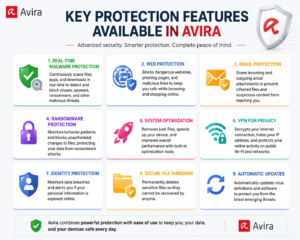
Avira includes several security features designed to protect users from different types of threats. Some important features include:
- Real-time malware protection that monitors files and applications.
- Web protection that helps block dangerous websites and phishing attempts.
- Automatic security updates that keep threat detection information current.
- Privacy tools that help protect personal information.
- System optimization features that improve device performance.
Each feature plays a different role in cybersecurity. Antivirus protection works like a security system with multiple locks; even if one layer fails, additional layers continue protecting your device.
Preparing Your Device Before Installing Avira
Before installing Avira, preparing your device properly can prevent installation errors and improve performance. Many antivirus problems occur because users install security software without checking compatibility or removing conflicting programs. Taking a few minutes before installation can save time later.
Start by checking whether your operating system meets Avira’s requirements. Antivirus software needs access to system resources to perform scans and monitor activity. An outdated operating system or insufficient storage space may cause problems during installation.
You should also make sure your device is connected to a stable internet connection. Avira needs internet access to download installation files, update security databases, and activate certain features.
Checking System Requirements and Compatibility
Before downloading Avira, confirm that your device supports the software. Most modern computers can run antivirus programs without difficulty, but older systems may experience performance issues.
Important checks include:
- Available storage space.
- Operating system version.
- Internet connection quality.
- Updated system drivers and security patches.
Keeping your operating system updated is also an important security practice. Antivirus software provides protection, but it cannot replace system updates that fix vulnerabilities.
Removing Conflicting Security Programs
Running multiple antivirus programs at the same time can create conflicts. Two security applications may attempt to scan the same files, causing slower performance or incorrect threat detection.
Before installing Avira, remove other antivirus software unless you specifically know they are designed to work together. Windows users should also check existing security tools that may automatically activate.
A clean installation environment allows Avira to work efficiently and provide stronger protection.
Step-by-Step Guide to Download and Install Avira
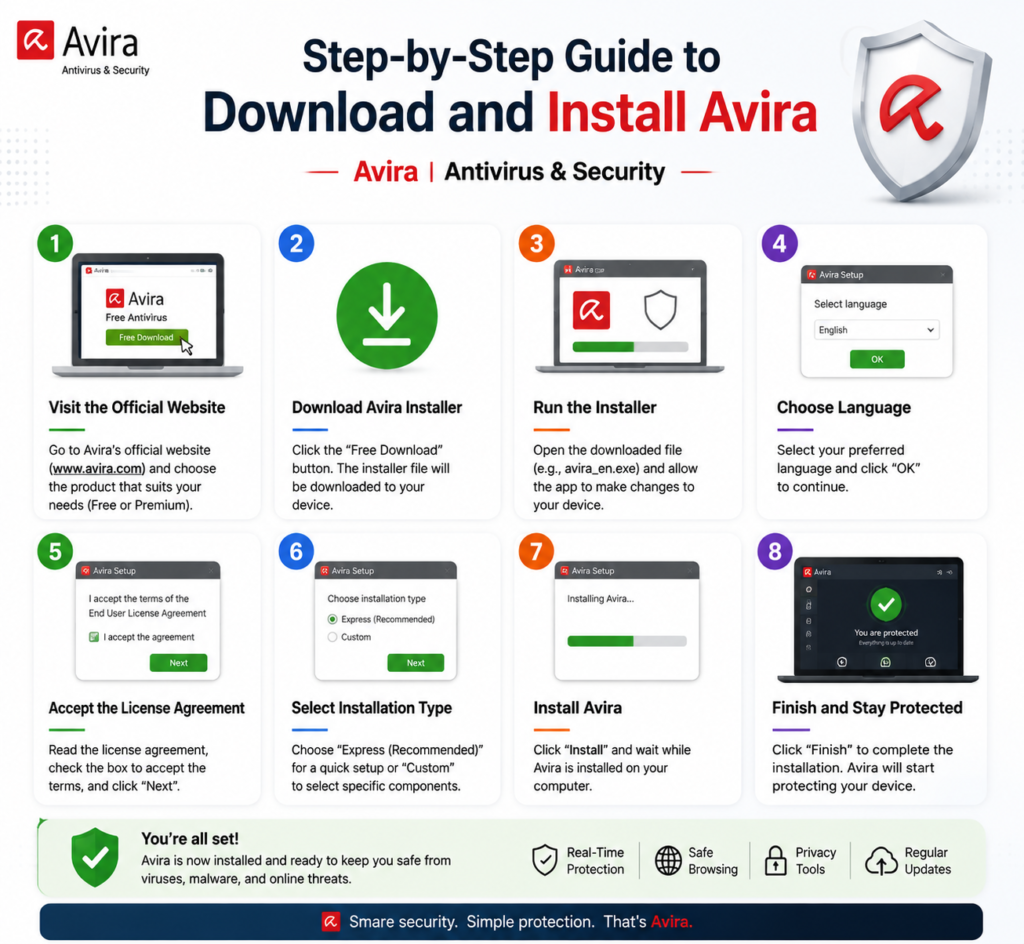
Installing Avira is a straightforward process, but following the correct steps ensures that all security components are activated properly.
First, download Avira from its official website or trusted software sources. Avoid downloading antivirus programs from unknown websites because modified installers can contain malware.
After downloading the installer, open the setup file and follow the installation instructions. The installer will guide you through selecting preferences and activating required components.
Creating an Avira Account
Creating an Avira account can provide additional benefits, including easier subscription management and access to security features. An account allows users to manage devices and monitor their protection status.
During registration, always use a strong password and enable additional account security options if available. Your antivirus account itself should also be protected because it controls your security settings.
Completing the Installation Process
During installation, Avira may ask permission to enable specific features. Review these options carefully instead of quickly clicking through every screen.
Recommended settings usually include:
- Enable real-time protection.
- Allow automatic updates.
- Activate web protection.
- Enable privacy-related features.
After installation finishes, restart your device if required. A restart allows security services to load correctly.
Configuring Avira Settings for Maximum Security
After installation, the next step is customizing Avira settings. Default settings provide basic protection, but advanced configuration improves security.
Open the Avira dashboard and review your protection status. Make sure important security modules are active and there are no warnings.
Adjusting Real-Time Protection Options
Real-time protection is one of the most important antivirus features. It continuously checks files, programs, and activities for suspicious behavior.
Keep real-time protection enabled unless you are performing specific troubleshooting steps. Disabling it leaves your system vulnerable to threats.
You can customize scanning behavior depending on your needs. For example, you may increase protection levels if you frequently download files from the internet.
Enabling Web and Network Protection
Many cyberattacks happen through websites rather than downloaded files. Phishing pages, fake login forms, and malicious advertisements can steal personal information.
Avira’s web protection features help identify unsafe websites before they cause damage. Keeping these features active creates an additional security layer while browsing.
Optimizing Avira Antivirus Scanning Features
Regular scanning helps identify threats that may bypass real-time protection. A complete security strategy includes both continuous monitoring and scheduled scans.
Running Your First Full System Scan
After installing Avira, perform a full system scan. This allows the antivirus to examine existing files and applications.
A full scan may take time depending on your storage size and number of files. It is usually best to run the first scan when you are not performing important tasks.
Scheduling Automatic Security Checks
Automatic scans reduce the risk of forgetting maintenance. Schedule scans during periods when your device is usually inactive.
Regular scanning combined with updated virus definitions keeps your protection system prepared against new threats.
Improving Privacy Protection with Avira Tools
Security is not only about viruses. Privacy has become a major concern as websites and applications collect user information.
Avira includes privacy-focused features designed to help users control their digital footprint.
Using VPN and Identity Protection Features
A VPN can help protect internet traffic, especially when using public Wi-Fi networks. It adds another layer of privacy by encrypting online connections.
Identity protection tools can also help users understand whether personal information may be exposed online.
Managing Personal Data Security
Strong passwords, careful browsing habits, and privacy settings are essential parts of cybersecurity.
Even the best antivirus cannot protect users who share sensitive information carelessly. Antivirus software works best when combined with responsible online behavior.
Common Avira Setup Problems and Solutions
Some users may experience issues during installation or daily use. Understanding common problems makes troubleshooting easier.
Fixing Installation Errors
Installation problems can happen because of outdated systems, insufficient storage, or conflicting programs.
Common solutions include:
- Restarting the device.
- Removing previous antivirus software.
- Running installation with administrator permission.
- Updating the operating system.
Resolving Performance Issues
If your computer becomes slower after installation, adjust scanning schedules and review active features.
Modern antivirus software is designed to minimize performance impact, but older devices may require optimization.
Best Practices for Maintaining Avira Security
Installing Avira is only the beginning. Regular maintenance ensures long-term protection.
Keeping Antivirus Definitions Updated
Cyber threats change constantly. Antivirus databases must receive updates to recognize new malware patterns.
Enable automatic updates so Avira can respond quickly to emerging threats.
Combining Avira With Safe Online Habits
Good cybersecurity requires both technology and awareness.
Avoid opening suspicious emails, downloading unknown files, or sharing sensitive information on unreliable websites. Antivirus protection is strongest when combined with smart digital habits.
Avira Free vs Premium Security: Which One Should You Choose?
Feature | Avira Free | Avira Premium |
Basic Virus Protection | Yes | Yes |
Real-Time Scanning | Yes | Yes |
Advanced Privacy Tools | Limited | Expanded |
Customer Support | Limited | Better Support |
Additional Security Features | Basic | More Complete |
Free protection can be suitable for casual users, while premium plans are better for people who need stronger privacy controls and advanced security features.
Conclusion
Setting up Avira correctly is an important step toward creating a safer digital environment. While installing antivirus software provides basic protection, customizing settings, enabling real-time security, updating threat databases, and using privacy features creates much stronger defense against modern cyber threats.
Avira works best when treated as part of a complete cybersecurity strategy. Regular updates, scheduled scans, and responsible online habits work together to protect your personal information and devices. Whether you choose the free version or a premium plan, taking time to configure Avira properly ensures you receive maximum protection from your security investment.
Read Also:
The Ultimate hide.me VPN Guide for Beginners and Advanced Users
The Ultimate Guide to Plesk | Web Hosting for Beginners and Professionals
A Complete Review of Parallels | Mac & Windows Virtualization for Professionals
Top Trending Boots Styles That Are Worth Investing in This Year
Wise – Commission payout currency USD Guide: How to Receive International Payments
Frequently asked questions
Yes, Avira is a trusted antivirus solution designed to protect devices from malware, viruses, and online threats. Proper configuration improves its effectiveness.
Most installations complete within a few minutes, depending on internet speed and device performance.
Avira is designed to operate efficiently. However, older devices may experience slower performance during intensive scans.
Yes. Real-time protection is one of the most important features because it detects threats while you use your device.
Avira Free provides essential antivirus protection, but users who need advanced privacy and security features may benefit from premium options.