Discover how Animoto makes video creation simple and accessible for beginners with this step-by-step guide. Learn how to create professional-looking videos using templates, drag-and-drop tools, music, branding features, and AI-powered options. Whether you’re creating content for social media, business marketing, education, or personal projects, this guide will help you master Animoto and produce engaging videos with ease.
Table of Contents
ToggleWhat Is Animoto and Why Is It Popular?
Video content dominates today’s digital world. Whether you are promoting a business, growing a social media audience, teaching students, or simply sharing personal memories, video has become one of the most effective ways to communicate. Research from Animoto’s latest State of Video report highlights that video remains one of the most memorable forms of content, with a large percentage of consumers preferring to learn about brands through video content.
Animoto is a browser-based video creation platform designed to make video production simple for beginners. Unlike traditional video editing software that often requires extensive training, Animoto focuses on a drag-and-drop workflow. Users can create professional-looking videos by selecting templates, uploading media, adding text, and choosing music. The platform is especially popular among marketers, educators, small business owners, and content creators who need quality videos without spending hours learning complex editing software.
One reason Animoto continues to attract new users is its accessibility. Everything runs online, eliminating the need for powerful hardware or software installations. Even someone creating their very first video can produce attractive content within minutes. This ease of use has helped Animoto maintain a strong reputation among users seeking fast and efficient video creation.
The Evolution of Animoto
Animoto has been helping users create videos for many years, but the platform continues to evolve with modern demands. Originally known for slideshow-style video creation, it now offers advanced features such as branding tools, stock media integration, social media optimization, and AI-assisted video generation. These additions allow users to produce more dynamic and engaging content than ever before.
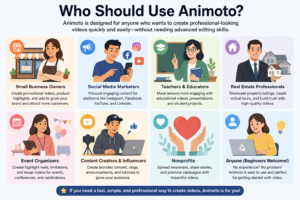
Who Should Use Animoto?
Animoto is ideal for:
- Small business owners
- Social media marketers
- Teachers and educators
- Real estate professionals
- Event organizers
- Beginners with no editing experience
The platform’s simplicity makes it especially valuable for users who prioritize speed and convenience over complex editing controls.
Key Features of Animoto
Understanding Animoto’s features is essential before creating your first project. The platform combines ease of use with powerful tools that streamline video production. Instead of overwhelming users with advanced editing panels and complicated timelines, Animoto focuses on practical features that help creators achieve results quickly.
Drag-and-Drop Video Builder
The drag-and-drop builder is the heart of Animoto. Users can simply upload media, rearrange content blocks, and customize layouts without technical knowledge. This intuitive approach removes many of the barriers associated with traditional editing software.
Templates and Stock Media
Animoto offers professionally designed templates that can be customized for various purposes, including promotions, social media posts, educational content, and event recaps. Users also gain access to extensive stock image, video, and music libraries, reducing the need to source content elsewhere.
AI Video Creation Tools
One of the most exciting additions is Animoto’s AI-powered video creator. Users can generate videos by providing a script, description, images, or even a website URL. The AI organizes content into scenes and creates a draft video automatically, saving significant production time.
Getting Started with Animoto
Starting your Animoto journey is straightforward. The platform is designed to guide users through every stage of the process, making it approachable even for complete beginners.
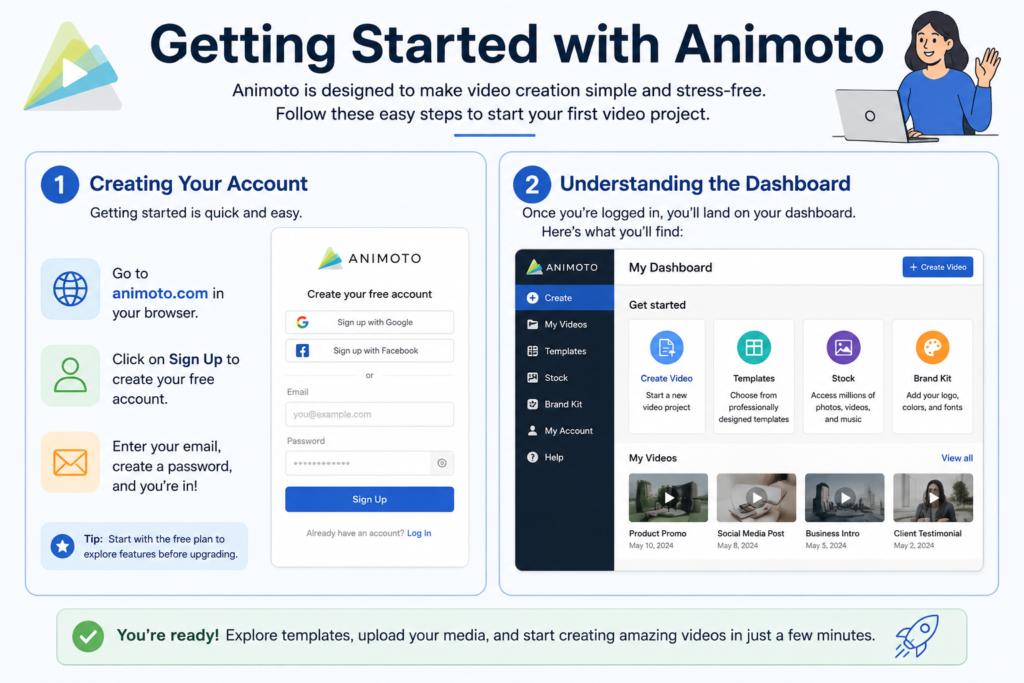
Creating Your Account
Visit the official Animoto website and sign up for a free account. The registration process requires only basic information, and users can begin exploring the platform immediately. Free plans allow beginners to test features before committing to a paid subscription.
Understanding the Dashboard
After logging in, users are greeted by a clean dashboard where projects are organized. From here, you can create new videos, access saved projects, explore templates, and manage branding assets. The dashboard acts as your command center, providing quick access to every major feature.
Choosing the Right Video Type
Before creating a video, it’s important to identify your goal. Different objectives require different approaches, and Animoto offers templates specifically tailored to various content categories.
Marketing Videos
Marketing videos are designed to promote products, services, or brands. These videos often include strong calls to action, branding elements, and persuasive messaging. Businesses frequently use Animoto for promotional campaigns because of its speed and ease of use.
Social Media Videos
Social media content requires attention-grabbing visuals and concise messaging. Animoto allows creators to optimize videos for platforms like Facebook, Instagram, LinkedIn, and YouTube through dedicated templates and aspect ratios.
Personal and Educational Videos
Beyond marketing, Animoto is widely used for personal projects such as family slideshows, event recaps, and educational presentations. Teachers often appreciate the platform’s simplicity when creating engaging learning materials.
Step-by-Step Guide to Creating a Video
This section walks through the complete video creation process from start to finish.
Step 1 – Start a New Project
Click the “Create Video” button from your dashboard. You can choose between starting from scratch, selecting a template, or using AI-powered video generation. Beginners usually find templates to be the easiest option because much of the structure is already prepared.
Step 2 – Select a Template
Browse through the available categories and choose a template that matches your objective. Templates serve as a foundation, helping maintain professional design consistency while saving time. Modern templates include layouts optimized for social media, business presentations, and storytelling videos.
Step 3 – Upload Media
Upload your photos and video clips directly from your computer or mobile device. Organize content logically so your story flows naturally. Think of your media as puzzle pieces that come together to form a complete picture. The better your organization, the smoother the editing process will be.
Step 4 – Add Text and Branding
Text overlays help communicate key messages. Add headlines, captions, and calls to action where necessary. Businesses can also upload logos, custom fonts, and brand colors through Animoto’s branding features to maintain visual consistency.
Step 5 – Add Music and Voiceovers
Music creates emotional impact and helps set the tone. Animoto provides a library of licensed music tracks suitable for various moods and industries. You can also record voiceovers to explain concepts, tell stories, or guide viewers through the content.
Step 6 – Preview and Edit
Always preview your video before publishing. Watch for spelling errors, awkward transitions, inconsistent branding, and timing issues. Small adjustments during this stage can dramatically improve the final product. Treat the preview process as quality control for your creative work.
Step 7 – Export and Share
Once satisfied, export your video in the desired format and resolution. Animoto supports multiple output options designed for websites, presentations, and social media channels. Sharing directly to various platforms simplifies distribution and saves additional uploading steps.
Tips to Create Better Videos with Animoto
Creating a good video is easy. Creating a memorable one requires strategy. Start by focusing on a single message. Trying to communicate too many ideas at once can confuse viewers and weaken engagement. Keep your story clear and direct.
Use high-quality visuals whenever possible. Blurry photos and poorly lit videos can undermine an otherwise excellent project. Consistent branding also helps build recognition, especially for businesses. Incorporating logos, colors, and fonts creates a cohesive viewing experience that strengthens brand identity.
Pay attention to pacing. Modern audiences often prefer shorter videos, especially on social media. Animoto’s own video research found that many viewers favor videos under one minute in length. Keeping content concise can improve retention and engagement.
Finally, remember that storytelling matters more than effects. A simple story told well will almost always outperform a flashy video with no clear message.
Common Mistakes Beginners Should Avoid
Many beginners make the mistake of overloading videos with text. While captions are useful, excessive text can distract viewers from the visual experience. Instead, focus on concise messaging supported by strong imagery.
Another common error is ignoring audio quality. Poor sound can instantly reduce professionalism, even when visuals look excellent. Choose appropriate music and ensure voiceovers are clear and balanced.
Some users also rush through the editing process without reviewing their work. Previewing multiple times allows you to identify mistakes that may otherwise go unnoticed. Treat editing as an essential stage rather than an optional step.
Overusing transitions and effects is another trap. Just because an effect exists doesn’t mean it should be used. Simplicity often creates a cleaner and more professional result.
Animoto Pricing and Plans
Pricing can influence your decision when choosing a video creation platform. While exact plans may change over time, Animoto generally offers a free tier alongside paid subscription options that unlock additional features such as HD exports, branding controls, premium stock assets, and advanced collaboration tools.
Feature | Free Plan | Paid Plans |
Basic Video Creation | Yes | Yes |
Templates | Limited | Extensive |
HD Exports | Limited | Available |
Brand Customization | Limited | Full Access |
Stock Media | Basic | Premium Library |
Collaboration Tools | No | Available |
Users should compare plan benefits against their content needs before upgrading. Businesses producing frequent marketing content often find premium plans worthwhile due to branding and productivity enhancements.
Animoto vs Other Video Creation Platforms
Choosing the right platform often comes down to balancing simplicity and flexibility.
Platform | Ease of Use | Templates | AI Features | Advanced Editing |
Animoto | Excellent | Strong | Available | Limited |
Canva | Excellent | Extensive | Available | Moderate |
Filmora | Moderate | Extensive | Advanced | Strong |
Adobe Premiere Pro | Challenging | Limited | Available | Professional |
Animoto shines when speed and simplicity are priorities. Users who need detailed timeline editing, motion tracking, or complex visual effects may eventually outgrow the platform and explore more advanced solutions. For beginners, however, Animoto remains one of the easiest ways to create polished videos quickly.
Conclusion
Animoto has earned its reputation as a beginner-friendly video creation platform by making professional-quality video production accessible to everyone. Its drag-and-drop interface, template library, branding tools, stock media resources, and AI-powered features reduce the complexity typically associated with video editing. Whether you’re a business owner creating promotional content, a teacher building educational presentations, or a content creator growing an online audience, Animoto provides an efficient path from idea to finished video.
The key to success with Animoto lies in understanding your objective, selecting the right template, organizing media thoughtfully, and refining your message before publishing. By following the step-by-step process outlined in this guide, even first-time users can create engaging videos that capture attention and communicate ideas effectively.
Read Also:
How Dollar Flight Club | Cheap Flights – International & Domestic Flight Deals Helps You Travel for Less
Why Exotic India Is a Hidden Gem for Cultural Shopping
How Parallels Runs Windows on Mac Smoothly
Geologie Review: Personalized Skincare for Men
How Lordhair Helps Restore Confidence with Hair Solutions
Frequently asked questions
Yes, Animoto offers a free plan that allows users to create videos and explore the platform before upgrading to paid plans.
Absolutely. Animoto is specifically designed for beginners and includes templates, drag-and-drop editing, and AI-assisted tools that simplify video creation.
Yes, Animoto offers access to stock images, video clips, and licensed music libraries that users can incorporate into their projects.
Yes. Animoto supports multiple aspect ratios and templates optimized for platforms such as Instagram, Facebook, LinkedIn, and YouTube.
Yes. Animoto includes AI-powered video generation features that can create videos from descriptions, scripts, images, or website URLs.