
Discover how Parallels makes it easy to run Windows on a Mac without sacrificing speed or performance. This guide explains the technology behind Parallels, its key features, benefits for professionals and students, and how it delivers a seamless Windows experience alongside macOS on both Intel and Apple Silicon Macs.
Table of Contents
ToggleUnderstanding the Need for Windows on Mac
Mac computers have built a reputation for reliability, security, and elegant design. Yet many users still encounter situations where they need access to Windows applications. Some businesses rely on Windows-only accounting software, developers test applications across multiple operating systems, and students often need specialized educational tools that only work on Windows. This creates a challenge because purchasing a separate Windows computer can be expensive and inconvenient.
The demand for running Windows on macOS has grown significantly over the years. Modern professionals often switch between operating systems throughout the day. Imagine carrying two laptops just to access a few essential applications. That approach is inefficient and frustrating. Users want a solution that allows both operating systems to coexist without sacrificing performance. This is where Parallels Desktop enters the picture.
Parallels has become one of the most popular solutions because it enables users to run Windows directly within macOS. Instead of rebooting the computer every time you need a Windows application, Parallels allows Windows to operate alongside macOS. The result feels seamless, almost as though Windows applications were native Mac applications. This convenience has made Parallels a preferred choice for professionals, students, and businesses worldwide. Recent reports continue to highlight Parallels as one of the most effective methods for running Windows 11 on modern Apple Silicon Macs.
Why Mac Users Still Need Windows
Many industries still depend on Windows-exclusive software. Engineering applications, enterprise management tools, accounting platforms, and certain gaming titles often perform best on Windows. Even cloud-based solutions haven’t completely eliminated operating system dependencies.
For developers, testing software across multiple environments is critical. Running Windows and macOS on a single machine saves time and increases productivity. Businesses also appreciate the flexibility because employees can maintain a Mac-first workflow while still accessing Windows applications whenever needed.
The Challenges of Dual Operating Systems
Traditionally, users relied on dual-boot systems like Boot Camp. This required restarting the computer each time they switched operating systems. While functional, it interrupted workflow and reduced productivity. Users needed a more fluid experience, and virtualization emerged as the answer.
What Is Parallels Desktop?
Parallels Desktop is a virtualization platform designed specifically for Mac computers. It creates a virtual machine that behaves like a complete Windows PC inside macOS. This virtual machine has its own operating system, memory allocation, storage space, and processing resources. To the user, it feels like running another computer within the Mac itself.
The software has evolved dramatically since its initial release. Today, it supports both Intel-based Macs and Apple Silicon Macs, including M-series processors. Microsoft’s official guidance recognizes Parallels as a supported method for running Windows 11 on Apple Silicon devices.
A Quick Introduction to Virtualization
Virtualization works by creating a software-based version of a physical computer. Instead of installing Windows directly on hardware, Parallels creates an isolated environment where Windows can operate safely. This environment has access to the Mac’s CPU, RAM, and storage resources.
Think of it as constructing a fully furnished apartment inside a larger building. The apartment functions independently while still sharing the building’s infrastructure. Similarly, Windows runs independently while leveraging the Mac’s hardware.
How Parallels Differs from Other Solutions
Unlike traditional emulators, Parallels uses advanced virtualization technology. Emulation often introduces significant performance penalties because it must imitate hardware. Virtualization, on the other hand, directly utilizes hardware resources, leading to much better speed and responsiveness. This distinction explains why Parallels delivers such smooth performance compared to older alternatives.
The Technology Behind Parallels
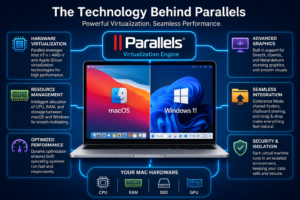
The secret behind Parallels’ smooth performance lies in its sophisticated virtualization engine. Modern processors include hardware-assisted virtualization features that allow operating systems to run efficiently in virtual environments. Parallels leverages these capabilities extensively.
Instead of translating every instruction, Parallels allows Windows to execute many operations directly through the processor. This reduces overhead and improves responsiveness. The software intelligently manages CPU cycles, memory allocation, and storage access to ensure both macOS and Windows remain responsive.
Virtual Machines Explained
A virtual machine acts like a self-contained computer. It includes a virtual processor, virtual graphics adapter, virtual memory, and virtual storage. Windows sees these components as genuine hardware and operates normally.
The beauty of this approach is isolation. If something goes wrong within Windows, macOS remains unaffected. Users can even create snapshots, allowing them to restore the virtual machine to a previous state instantly.
Hardware Resource Allocation
Parallels dynamically allocates system resources based on workload requirements. When Windows needs additional processing power, Parallels can provide it. When demand decreases, resources return to macOS.
This flexibility ensures efficient hardware utilization. Users avoid wasting resources while maintaining strong performance across both operating systems.
Apple Silicon Optimization
One of the biggest reasons Parallels performs so well today is its deep integration with Apple’s M-series chips. The software is optimized specifically for Apple Silicon architecture. Reports indicate that Windows 11 ARM on Parallels delivers highly responsive performance and can achieve approximately 85% to 90% of native ARM performance on modern Apple Silicon systems.
How Parallels Installs Windows on Mac
Setting up Windows with Parallels has become remarkably simple. In many cases, users only need to install Parallels Desktop and follow a guided wizard. The software automatically downloads and configures Windows 11 ARM, reducing technical complexity significantly.
This streamlined process eliminates the traditional hurdles associated with operating system installation. Users no longer need to manually partition drives or create bootable installation media.
Windows 11 ARM Integration
Apple Silicon Macs use ARM architecture rather than traditional x86 processors. To accommodate this change, Parallels runs Windows 11 ARM, Microsoft’s ARM-based operating system. Windows then uses its own compatibility technologies to run many traditional x86 and x64 applications.
Simplified Installation Process
The installation experience resembles setting up a regular application. Users select Windows, confirm a few settings, and Parallels handles most technical tasks automatically. This simplicity has contributed greatly to the software’s popularity.
Key Features That Make Performance Smooth
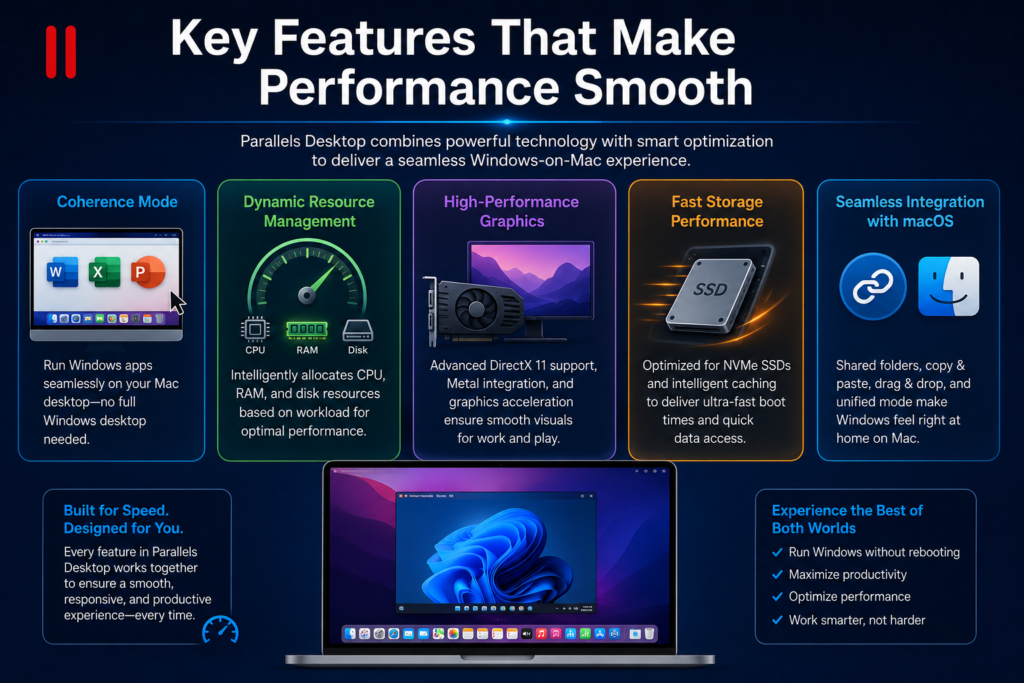
Several features distinguish Parallels from competing virtualization platforms. These capabilities focus on reducing friction between macOS and Windows while maximizing performance.
Coherence Mode
Coherence Mode is one of Parallels’ most celebrated features. Instead of displaying an entire Windows desktop, individual Windows applications appear directly on the Mac desktop. Users can launch Windows programs from the Dock and interact with them as though they were native Mac applications.
This creates an incredibly natural workflow. The boundaries between operating systems become nearly invisible.
Dynamic Resource Management
Parallels constantly monitors resource usage. It adjusts CPU and memory allocation dynamically to maintain smooth performance. This intelligent management helps prevent either operating system from becoming sluggish.
Graphics and Gaming Enhancements
Graphics virtualization has improved dramatically over recent years. Modern versions of Parallels provide enhanced DirectX support and optimized graphics acceleration. While hardcore gaming still benefits from native Windows hardware, many business applications, creative tools, and casual games perform exceptionally well.
Performance Comparison
Parallels vs Boot Camp
Feature | Parallels | Boot Camp |
Run Windows Without Restart | Yes | No |
Simultaneous macOS & Windows | Yes | No |
Apple Silicon Support | Yes | No |
File Sharing | Excellent | Limited |
Productivity Workflow | Excellent | Moderate |
Boot Camp once served as the primary solution for Windows on Mac. However, Apple Silicon Macs no longer support Boot Camp, making Parallels one of the most practical alternatives.
Parallels vs VMware
Feature | Parallels | VMware Fusion |
Ease of Setup | Excellent | Good |
macOS Integration | Excellent | Good |
Performance Optimization | Excellent | Good |
Coherence-Like Features | Advanced | Limited |
Windows 11 ARM Support | Strong | Available |
Parallels consistently earns praise for its ease of use and polished integration with macOS.
Benefits for Different Users
Business Professionals
Business users often depend on specialized Windows software while preferring the Mac ecosystem. Parallels allows them to access critical tools without disrupting their workflow. This flexibility improves productivity and reduces hardware costs.
Developers
Developers benefit enormously from virtualization. They can test software, websites, and applications across multiple environments without maintaining several physical devices. This accelerates development cycles and simplifies troubleshooting.
Students and Educators
Educational institutions frequently use software designed exclusively for Windows. Parallels enables students to participate fully in coursework without abandoning their preferred Mac hardware. The convenience of accessing both operating systems from one device is particularly valuable.
Tips for Maximizing Performance
To get the best experience from Parallels, users should optimize their system configuration.
- Allocate sufficient RAM to Windows.
- Use SSD storage whenever possible.
- Keep macOS and Parallels updated.
- Install Parallels Tools for enhanced integration.
- Close unnecessary applications when running demanding workloads.
- Choose a Mac with at least 16GB RAM for professional workloads.
These simple adjustments can dramatically improve responsiveness and overall user satisfaction.
Future of Windows on Mac with Parallels
The future looks bright for virtualization technology. As Apple Silicon processors continue to become more powerful, virtual machine performance is expected to improve further. Industry experts frequently highlight Parallels’ optimization for modern Apple hardware as a major advantage.
Microsoft’s continued investment in Windows ARM compatibility also strengthens the ecosystem. More applications are becoming ARM-native, reducing reliance on emulation and improving efficiency. This trend means future versions of Windows running through Parallels may feel even closer to native performance.
Parallels continues to release updates focused on compatibility, security, and performance enhancements. New features aimed at developers, businesses, and power users suggest the platform will remain a leading solution for cross-platform computing.
Conclusion
Parallels has transformed the way Mac users access Windows. Through advanced virtualization, intelligent resource management, Apple Silicon optimization, and seamless integration features, it delivers an experience that feels remarkably smooth and natural. Users can run Windows applications without rebooting, switch effortlessly between operating systems, and maintain productivity from a single device.
The combination of Windows 11 ARM support, optimized performance on M-series chips, and user-friendly setup has positioned Parallels as one of the most practical solutions available today. Whether you’re a business professional, developer, student, or casual user, Parallels provides a powerful bridge between two of the world’s most popular operating systems.
Read Also:
Frequently asked questions
Yes. Microsoft recognizes Parallels as an authorized solution for running Windows 11 ARM on Apple Silicon Macs.
Modern Macs with sufficient RAM and storage generally experience minimal slowdown. Proper resource allocation ensures smooth performance for both operating systems.
Yes, many games run successfully, though performance varies depending on hardware requirements and graphics demands.
No. Windows runs inside a virtual machine, allowing both operating systems to operate simultaneously.
For Apple Silicon Macs, Parallels is often the preferred option because Boot Camp is unavailable on these systems and Parallels offers seamless integration features.