Discover the ultimate BOOX Shop device for your reading, note-taking, and productivity needs. This detailed comparison explores popular BOOX models, including the Palma 2, Go Series, and Note Air4 C, highlighting their features, performance, display technology, and value. Whether you’re a student, professional, or avid reader, this guide will help you choose the perfect BOOX device that matches your lifestyle and budget.
Table of Contents
ToggleUnderstanding the BOOX Ecosystem
What Makes BOOX Different From Traditional E-Readers?
The e-reader market has changed dramatically over the past few years. While many people still associate digital reading with devices like Kindle, BOOX has carved out a unique position by creating Android-powered ePaper devices that function as much more than simple book readers. Instead of locking users into a single ecosystem, BOOX allows access to Google Play Store apps, making it possible to install Kindle, Kobo, Libby, Everand, Pocket, OneNote, Notion, and countless other applications. This flexibility is one of the biggest reasons why BOOX devices have become increasingly popular among students, professionals, and avid readers worldwide.
Unlike traditional e-readers, BOOX devices often include advanced note-taking features, stylus support, multitasking capabilities, and powerful processors. Many models use the latest E Ink display technologies, including Carta 1300 and Kaleido 3 color screens. These displays provide a paper-like reading experience while reducing eye strain during long reading sessions. For users who spend hours reading PDFs, research papers, or technical documents, the difference is immediately noticeable.
Another significant advantage is BOOX’s commitment to open Android functionality. Most recent devices run Android 13 and support thousands of applications through Google Play. This creates a hybrid experience somewhere between an e-reader and a tablet. Instead of carrying multiple devices, users can read books, take notes, review documents, browse articles, and manage tasks from a single screen. That versatility makes BOOX one of the most interesting brands in the ePaper industry today.
BOOX Product Categories Explained
BOOX offers several product families designed for different types of users. Understanding these categories is essential before deciding which device deserves your investment. The lineup ranges from compact pocket-sized readers to large professional productivity tablets.
The Palma series targets users who want maximum portability. These devices resemble smartphones but feature E Ink displays optimized for reading and distraction-free usage. The Go series focuses on everyday readers who want lightweight, affordable devices for books, articles, and basic note-taking. The Note Air series targets professionals, students, and creators who need advanced note-taking and productivity features. Larger devices provide enhanced workspace capabilities for PDFs, document annotation, and creative projects.
This structured lineup helps buyers avoid overpaying for features they may never use. Someone who primarily reads novels during commutes will likely benefit more from a Palma or Go device than a large Note Air tablet. On the other hand, a graduate student reviewing hundreds of academic papers each month may quickly discover that a larger screen dramatically improves productivity. Understanding your primary workflow is the first step toward selecting the ideal BOOX device.
BOOX Devices Available in 2026
BOOX Palma 2
The BOOX Palma 2 remains one of the most unique products in the e-reader market. Featuring a compact 6.13-inch E Ink display, 6GB RAM, 128GB storage, Android 13, and a fingerprint sensor, it delivers a smartphone-like form factor without the distractions of a traditional smartphone. BOOX upgraded the processor and software compared to the original Palma, improving responsiveness and overall usability.
What makes the Palma 2 special is its portability. It easily fits into a pocket and can be used one-handed. For commuters, travelers, and readers who consume articles throughout the day, the device feels incredibly natural. The 300 PPI Carta display offers sharp text rendering that rivals premium e-readers. Battery life remains excellent thanks to E Ink technology and efficient hardware.
The Palma 2 is not intended to replace a productivity tablet. Its small display limits document editing and extensive note-taking. However, for reading books, listening to audiobooks, browsing articles, and reducing screen fatigue, it excels. Many users consider it the ideal companion device for distraction-free content consumption.
BOOX Go 7 and Go Color 7
The Go 7 and Go Color 7 represent BOOX’s modern take on dedicated reading devices. Both feature 7-inch displays and Android 13 support, while the Go Color 7 adds Kaleido 3 color technology. The devices also include page-turn buttons, a feature many dedicated readers continue to appreciate.
For readers focused on novels and long-form content, the standard Go 7 delivers exceptional value. The 300 PPI monochrome display offers outstanding clarity, making text appear remarkably close to printed paper. Meanwhile, the Go Color 7 provides a more versatile experience for comic books, magazines, educational materials, and illustrated content.
Both devices strike an attractive balance between portability and screen size. Unlike the Palma 2, they provide a larger reading canvas while remaining lightweight enough for comfortable one-handed use. They also support numerous reading apps through Android, allowing users to combine multiple book libraries on a single device. For many readers, the Go series represents the sweet spot within the BOOX lineup.
BOOX Go 10.3
The BOOX Go 10.3 occupies an interesting middle ground between a traditional e-reader and a professional note-taking tablet. It features a large 10.3-inch 300 PPI display, stylus support, 4GB RAM, and 64GB storage. Despite its larger screen, it remains impressively lightweight at approximately 375 grams.
The larger display significantly improves PDF reading, document annotation, and handwritten note-taking. Students, researchers, and professionals often find that a 10.3-inch screen allows them to work more naturally with academic papers and business documents. Instead of constantly zooming and scrolling, users can view full pages comfortably.
The Go 10.3 is particularly appealing for users who prioritize reading and note-taking but do not necessarily require color functionality. The monochrome display offers sharper text and potentially better battery efficiency compared to color alternatives. For many knowledge workers, it provides an ideal balance between affordability and productivity.
BOOX Note Air4 C
The BOOX Note Air4 C stands as one of the most capable devices in the BOOX portfolio. Equipped with a 10.3-inch Kaleido 3 color display, Android 13, 6GB RAM, 64GB storage, and enhanced BOOX Super Refresh technology, it targets power users who demand maximum versatility. BOOX claims the upgraded processor delivers roughly 50% better performance compared to previous generations.
The color display transforms the experience of viewing charts, graphs, presentations, diagrams, and educational materials. Professionals working with data visualizations can interpret information more effectively, while students benefit from color-coded notes and highlights. The stylus experience is also highly refined, supporting 4,096 pressure levels for natural handwriting and sketching.
For users seeking an ePaper productivity powerhouse, the Note Air4 C offers one of the most comprehensive feature sets available. While it commands a higher price than smaller devices, its combination of color display, note-taking capabilities, Android flexibility, and performance makes it a compelling choice for serious users.
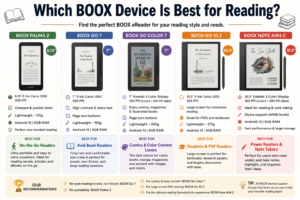
Which BOOX Device Is Best for Reading?
Best for Novels and eBooks
If your primary goal is reading novels, biographies, and long-form nonfiction, the Go 7 deserves serious consideration. Its 7-inch size creates an experience remarkably similar to holding a paperback book. The Carta 1300 display produces sharp text with excellent contrast, reducing eye fatigue during marathon reading sessions. Combined with physical page-turn buttons, the device feels purpose-built for readers who prioritize comfort.
The Palma 2 also performs exceptionally well for reading, especially for users who value portability above all else. It slips easily into pockets and small bags, making it perfect for spontaneous reading throughout the day. While its screen is smaller, many users appreciate the smartphone-like ergonomics and convenience.
Best for Comics and Color Content
Color content dramatically changes the equation. Comic books, manga covers, magazines, educational materials, and graphic-heavy publications benefit enormously from color displays. The Go Color 7 and Note Air4 C both leverage Kaleido 3 technology, providing richer visual experiences without sacrificing the benefits of E Ink.
For casual comic readers, the Go Color 7 delivers an excellent balance between portability and visual quality. For professionals reviewing presentations, infographics, and color-coded documents, the Note Air4 C offers a much larger canvas and enhanced productivity tools.
Key Features Comparison
Display Technology
Device | Screen Size | Display Type | Color Support |
Palma 2 | 6.13″ | Carta 1200 | No |
Go 7 | 7″ | Carta 1300 | No |
Go Color 7 | 7″ | Kaleido 3 | Yes |
Go 10.3 | 10.3″ | Carta 1200 | No |
Note Air4 C | 10.3″ | Kaleido 3 | Yes |
The choice between monochrome and color remains one of the most important buying decisions. Monochrome displays generally offer sharper text and higher contrast. Color displays add versatility but introduce slightly muted colors compared to traditional LCD screens. Users who primarily read novels should prioritize monochrome quality, while professionals and comic readers may benefit greatly from color support.
Android Operating System
One of BOOX’s strongest advantages is Android support. Unlike many competitors, BOOX devices allow installation of third-party apps through Google Play. Recent models generally run Android 13, providing access to a broad ecosystem of productivity and reading applications. This flexibility significantly expands the usefulness of each device.
Storage and Performance
The Palma 2 and Note Air4 C lead the comparison with 6GB RAM configurations. Higher memory capacity improves multitasking, application switching, and overall responsiveness. Users working with large PDFs or multiple apps simultaneously will appreciate the additional resources. Storage options range from 64GB to 128GB, providing ample room for books, documents, and applications.
Battery Life
E Ink technology remains one of the most power-efficient display solutions available. While actual battery life varies based on brightness, refresh rates, and usage patterns, BOOX devices generally deliver days or even weeks of reading between charges. The Palma 2 includes a 3950mAh battery, while larger tablets maintain substantial capacities designed to support extended productivity sessions.
Which BOOX Device Is Best for Note-Taking?
Students and Researchers
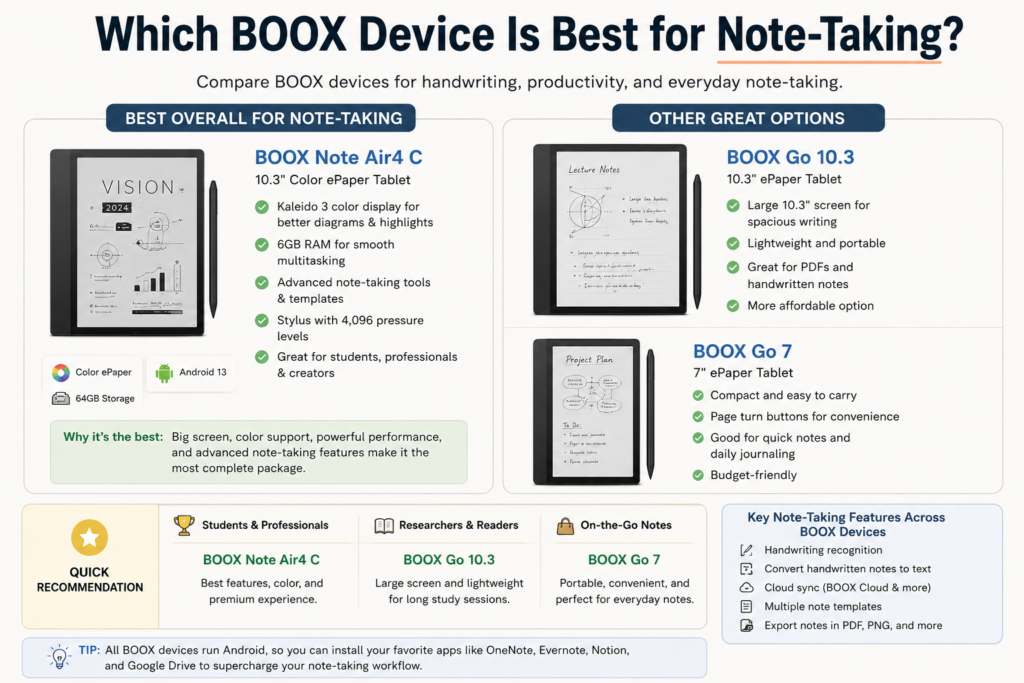
Students frequently juggle textbooks, lecture notes, PDFs, and research papers. The Go 10.3 provides a practical entry point into digital note-taking without the premium pricing associated with flagship devices. Its large display makes academic reading far more comfortable than smaller screens.
Researchers dealing with extensive documentation will appreciate the ability to annotate directly on PDFs. Handwritten notes can be organized digitally, reducing paper clutter while preserving the natural writing experience many people still prefer.
Professionals and Creators
The Note Air4 C clearly stands out for professional use. Its color display, improved performance, Android flexibility, and advanced note-taking tools create a comprehensive productivity environment. Designers can sketch ideas, consultants can review presentations, and managers can organize project notes from a single device.
The addition of color significantly enhances workflows involving charts, diagrams, and visual content. Combined with BOOX’s note management features, the Note Air4 C becomes far more than an e-reader—it becomes a digital workspace.
BOOX Device Comparison Table
Device | Best For | Major Strength |
Palma 2 | Portable reading | Pocket-sized convenience |
Go 7 | Traditional reading | Excellent text clarity |
Go Color 7 | Comics & magazines | Color content support |
Go 10.3 | PDFs & notes | Large reading workspace |
Note Air4 C | Productivity | Color note-taking and Android flexibility |
Celebrity Endorsements and Collaborations
Numerous celebrities, including as Kate Middleton, Emily Ratajkowski, and Alexa Chung, have adopted superga. The brand also collaborates with fashion icons and designers like Rodarte and Versus Versace, ensuring it stays trendy while keeping its roots intact.
Best BOOX Device for Productivity
Productivity requirements vary dramatically from user to user. Some people need simple document annotation, while others require multitasking across several applications. For pure productivity, the Note Air4 C currently offers the most complete package among the devices compared here. Its large color display, strong processor, Android 13 platform, and stylus support create a capable environment for professional work.
That said, productivity does not always require the most expensive device. Many users can accomplish their goals with the Go 10.3 while spending less money. The key question is whether color support and higher-end specifications meaningfully improve your workflow.
Price vs Value Analysis
Price alone rarely determines value. A less expensive device becomes costly if it fails to meet your needs, while a premium device can represent excellent value if it replaces multiple tools. The Palma 2 delivers tremendous value for readers seeking portability. The Go 7 provides one of the best reading-focused experiences in the lineup. The Go 10.3 offers a balanced blend of reading and note-taking. The Note Air4 C targets users who require advanced productivity capabilities and color functionality.
Buyers should evaluate how they intend to use the device over the next several years rather than focusing solely on initial purchase cost. Choosing the right tool from the beginning often results in greater satisfaction and fewer upgrade expenses later.
Final Buying Recommendations
- Choose BOOX Palma 2 if portability is your highest priority.
- Choose BOOX Go 7 if you mainly read novels and ebooks.
- Choose BOOX Go Color 7 if you read comics, magazines, or educational content.
- Choose BOOX Go 10.3 if you want affordable note-taking and PDF reading.
- Choose BOOX Note Air4 C if you need the best productivity and color ePaper experience.
Conclusion
BOOX has built one of the most diverse and flexible ePaper ecosystems available today. Whether you want a pocket-sized reading companion, a dedicated e-reader, a note-taking device, or a professional productivity tablet, there is a BOOX model designed for your needs. The Palma 2 excels in portability, the Go series shines for reading, the Go 10.3 balances productivity and affordability, and the Note Air4 C stands at the top for users who demand advanced functionality and color support.
The best BOOX device is not necessarily the most expensive one. It is the device that aligns most closely with how you read, learn, work, and create. By matching your daily habits to the strengths of each model, you can confidently choose the BOOX device that will provide the greatest long-term value.
Read Also:
Frequently asked questions
BOOX offers greater flexibility because it runs Android and supports third-party apps. Kindle provides a simpler, more focused reading experience.
The BOOX Go 10.3 and Note Air4 C are excellent choices for students due to their larger screens and note-taking capabilities.
Yes, most modern BOOX devices support Google Play Store and allow users to install Android applications.
For users who need color displays, advanced note-taking, and productivity features, the Note Air4 C is often worth the premium price.
Battery life varies by usage, but all BOOX devices benefit from highly efficient E Ink displays that can last significantly longer than traditional tablets.