Discover how Animoto helps beginners and content creators create engaging videos with ease. Explore its key features, templates, pricing, benefits, limitations, and practical tips to produce professional-looking videos for social media, marketing, and business projects.
Table of Contents
ToggleWhat Is Animoto?
Animoto is an online video creation platform that helps individuals, businesses, marketers, educators, and content creators turn photos, video clips, text, and music into engaging videos. It is designed to make video editing easier for people who do not have professional editing experience. With ready-made templates and simple customization tools, users can create promotional videos, slideshows, product showcases, tutorials, and social media content without spending hours learning complicated software.
The main idea behind Animoto is to simplify the video creation process. Instead of building every scene from scratch, you can select a template, upload your media, customize the text, choose suitable music, and arrange the content according to your needs. For example, an online shop owner can transform product photographs into a promotional video, while a travel blogger can combine holiday pictures with music and captions to create an engaging travel story. This makes Animoto a practical option for beginners who want to produce attractive videos with minimal technical knowledge.
Why Is Animoto Popular Among Content Creators?
Video content has become an important part of digital marketing, blogging, education, and social media communication. However, creating professional-looking videos can be challenging when you have limited time, equipment, or editing experience. Animoto addresses this problem by providing a straightforward workspace where users can combine visual elements, text, and audio without needing advanced technical skills. Its template-based approach helps creators focus on their message instead of spending too much time adjusting individual editing settings.
Another reason Animoto appeals to content creators is its versatility. Bloggers can create video summaries of their articles, businesses can showcase products and services, and educators can prepare visual learning materials. Freelancers can also use it to present their portfolios or explain their services to potential clients. By using consistent colors, fonts, and branding elements, creators can develop a recognizable visual identity across their videos. Although Animoto may not replace advanced editing software for complex projects, it can be an effective solution for everyday content creation.
How to Create Your First Video With Animoto
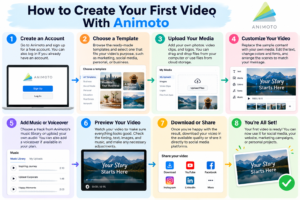
Creating your first video with Animoto becomes easier when you divide the process into manageable steps. Begin by deciding what you want your video to achieve. You might want to promote a product, introduce your business, share travel memories, explain a topic, or create a social media post. Once you understand your goal, collect the photographs, video clips, text, and other materials you want to include. Preparing your content in advance can make editing faster and help you maintain a clear message.
Next, open Animoto and start a new project. Browse the available templates and select one that matches your purpose, or choose a blank project if you prefer to build your own design. Upload your media, replace the sample content, and arrange the scenes in a logical order. Customize the text, colors, fonts, transitions, and music to suit your audience. Keep the design simple and avoid adding too many visual effects that could distract viewers from your message.
After editing, preview the entire video carefully. Check that the text is readable, the images appear in the correct order, and the music complements the content. If you have included narration, listen for unclear speech or distracting background noise. Make any necessary adjustments before using the available sharing or download options. Finally, check that your chosen subscription plan supports the export quality and publishing features you need.
Key Features of Animoto
Templates and Customization
Templates are one of Animoto’s most useful features because they provide a ready-made structure for video projects. Beginners can choose a design that suits their content and replace the sample images, clips, and text with their own material. Templates may include predefined layouts, transitions, colors, fonts, and music, helping users create videos with a consistent appearance. Users can customize these elements to match their personal style or business identity.
For example, if you operate a handmade jewelry business, you can select a product-focused template and upload photographs of your jewelry. Add short descriptions, choose complementary colors, and arrange the images to highlight your best products. You can also adjust the sequence of scenes to create a natural flow from introduction to presentation. Templates save time, but the final result will be more distinctive when you add original content and customize the design instead of relying entirely on the default settings.
Music, Voiceovers, and Branding
Music can significantly influence the mood and effectiveness of a video. A lively soundtrack may suit a promotional campaign, while gentle background music may work better for a travel slideshow or personal story. Animoto provides music options and supports uploaded audio, while voiceover and advanced audio capabilities may depend on the subscription plan. Adding narration can make educational videos, product demonstrations, and tutorials easier to understand.
Branding is equally important for businesses and professional content creators. Consistent logos, colors, fonts, and messaging help viewers recognize your content across different platforms. Animoto provides customization options that allow creators to develop a more consistent visual style, although some advanced branding features may require a paid subscription. Before publishing a video, make sure that your images, audio, logos, and other materials are properly licensed for their intended use.
Best Ways to Use Animoto for Content Creation
Animoto can support a variety of creative projects, depending on your audience and objectives. Social media creators can use it to produce promotional posts, announcements, personal stories, and short video presentations. Bloggers can turn important points from their articles into visual summaries that introduce readers to a topic. Businesses can create product showcases, service presentations, and event highlights to communicate information in an engaging format.
Small business owners and freelancers can also use Animoto to build portfolios and promotional materials. A photographer might combine selected images into a portfolio video, while a web developer could present website screenshots and project highlights to potential clients. Teachers can use slideshows to introduce lessons, explain concepts, or review educational material. The key is to choose a video format that supports your purpose instead of adding video content simply because it is popular.
When creating content for different platforms, consider how your audience will watch it. Short, visually clear videos may be suitable for social media, while longer presentations may work better for websites or educational resources. Use readable text, relevant images, and a logical sequence to maintain viewers’ attention. With thoughtful planning, Animoto can help transform existing content into useful visual material.

Animoto Pricing and Free Plan
Pricing is an important factor when choosing a video creation platform, especially for beginners, bloggers, and small businesses working with limited budgets. Animoto offers a free plan that allows users to experiment with video creation before committing to a subscription. The free plan has included features such as unlimited video creation, selected music tracks, standard fonts, and color customization. However, free videos include an Animoto watermark, and access to certain features and stock assets is limited.
Paid subscriptions provide additional capabilities that may include watermark removal, HD downloads, advanced branding, and expanded audio or collaboration features. The exact benefits depend on the subscription plan and its current terms. Since prices and included features can change, review the available plans before purchasing a subscription.
Plan | Main features | Suitable for |
Free | Basic editing, selected music and assets, and video creation with a watermark | Beginners learning video creation |
Basic | Additional publishing and download options, depending on current terms | Individuals creating regular videos |
Professional | Enhanced branding and audio features | Content creators and small businesses |
Professional Plus | Additional professional and collaboration capabilities | Teams and businesses with frequent video projects |
The best way to evaluate Animoto is to create a sample video using the free plan. This helps you understand the editor, explore its templates, and decide whether the available features meet your requirements. If you need professional branding or watermark-free videos, consider whether a paid plan offers enough value for your intended use.
Tips for Creating Better Videos With Animoto
Creating an engaging video begins with a clear message. Before opening the editor, decide what you want viewers to learn, feel, or do after watching your video. Organize the content into an introduction, a main section, and a closing message. Keep on-screen text concise because viewers may not have enough time to read long paragraphs. If you need to explain a complicated subject, use the video to introduce the main points and provide additional information separately.
Visual consistency can also improve the quality of your videos. Choose complementary colors, use readable fonts, and select images that match the style of your project. Avoid excessive transitions, animations, and decorative effects that compete with the main message. Instead, use visual effects to emphasize important information or create smooth connections between scenes. Select music that supports the mood of your video without overpowering narration or other important sounds.
Another important tip is to consider the platform where you intend to publish your content. Horizontal videos may work well for website presentations, while vertical videos may be better suited to certain mobile-first social media formats. Preview your project after changing its aspect ratio to ensure that text and images remain properly positioned. Where appropriate, add captions and ensure that important information is understandable even when viewers watch without sound. Finally, review audience feedback and available engagement metrics to identify opportunities for improvement.
Advantages and Limitations of Animoto
Animoto’s biggest advantage is its beginner-friendly design. Its templates and straightforward editing workflow allow users to create videos without mastering complex software. The platform combines photos, video clips, text, music, and transitions in one place, making it useful for social media campaigns, product promotions, and simple presentations. Its customization options also help creators maintain a consistent visual identity across multiple projects.
However, Animoto has limitations that users should consider. People who need advanced visual effects, detailed timeline editing, sophisticated color grading, or complex animations may find the available controls restrictive. The watermark on free videos may also be unsuitable for professional publishing. In addition, template-based videos can look similar when creators do not customize them sufficiently.
Advantages | Limitations |
Easy to use for beginners | Limited control for complex editing projects |
Ready-made templates | Free videos include a watermark |
Supports photos, clips, text, and music | Some features require a paid plan |
Useful for marketing and social media | Default templates may look repetitive |
Helps simplify video production | Export options vary by subscription |
Whether these limitations matter depends on your goals. A blogger creating simple video summaries may find Animoto more than sufficient, while a professional editor working on a complex production may need more powerful software. Choosing the right platform means balancing convenience, creative freedom, and cost.
Animoto Alternatives and Comparisons
Although Animoto is useful for template-based video creation, other platforms may be better suited to particular creative requirements. Some tools focus on graphic design and branded content, while others provide advanced video editing features or specialized tools for social media creators. Comparing alternatives can help you choose a platform that fits your budget, experience level, and preferred workflow.
Canva is useful for combining videos with graphics, presentations, and social media designs. Adobe Express provides accessible tools for creating branded visual content. CapCut is popular among creators who want short-form video editing and creative effects. DaVinci Resolve is a more advanced option for users who need detailed editing, color correction, and professional post-production capabilities.
Platform | Main strength | Best suited for |
Animoto | Template-based video creation | Beginners and small businesses |
Canva | Graphic design and video content | Bloggers and social media creators |
Adobe Express | Branded visual content | Individuals and business teams |
CapCut | Short-form video editing | Social media creators |
DaVinci Resolve | Advanced editing and post-production | Experienced editors |
The best choice depends on the type of content you want to create. If you need to turn photographs into a polished video quickly, Animoto is worth considering. If you want more detailed editing control or sophisticated effects, another platform may be a better fit. You can also combine different tools to build a workflow that suits your needs.
Is Animoto Worth It?
Animoto can be a worthwhile option for beginners and content creators who want to produce videos without a steep learning curve. Its templates, music options, and customization features make it suitable for product showcases, promotional videos, educational slideshows, and social media content. It can also help businesses and freelancers produce consistent visual materials without investing heavily in complicated editing workflows.
However, whether Animoto is worth paying for depends on how often you create videos and which features you need. The free plan can help you explore the platform, while a paid subscription may be useful if you require watermark-free downloads, advanced branding, or additional export options. Creators who need highly detailed editing controls should compare Animoto with more advanced alternatives before making a decision.
A practical approach is to create a complete sample project before choosing a subscription. Use your own photographs and clips, customize a template, and evaluate the final result. If the platform helps you achieve your goals efficiently, it may be a useful addition to your content creation toolkit.
Conclusion
Animoto offers a straightforward way for beginners and content creators to turn photos, video clips, text, and music into engaging visual content. Its ready-made templates and accessible editing tools make it useful for social media posts, product promotions, business presentations, educational slideshows, and personal projects.
However, successful video creation depends on more than the editing platform. A clear message, relevant visuals, readable text, appropriate music, and thoughtful pacing all contribute to an effective final result. Start with a simple project, experiment with different designs, and improve your skills as you gain experience. By understanding Animoto’s advantages and limitations, you can decide whether it is the right tool for your creative goals.
Read Also:
What Makes OFX a Popular Choice for International Money Transfers?
Can Blinkist Improve Your Reading Habits? Benefits, Limitations, and Tips
How Businesses Can Simplify Digital Document Workflows Using pdfFiller
Can WinZip Make File Compression and Storage Management Easier?
Tips for Promoting Digital Gaming Products Effectively with UniPin Affiliate Hub
Frequently asked questions
Yes, Animoto is suitable for beginners because it offers templates and simple editing tools. Users can upload photographs and clips, customize text and colors, add music, and arrange scenes without needing advanced video editing experience.
Yes, Animoto offers a free plan for creating videos. However, free videos include a watermark, and certain features may be restricted. Review the current plan details to understand which features are available before starting your project.
Animoto can help businesses create product promotions, announcements, branded slideshows, and short videos for social media. Its templates and customization options make it easier to prepare visual content for different audiences and publishing formats.
Animoto supports music and uploaded audio, while voiceover and advanced audio capabilities depend on the subscription plan. Users should check the current feature list and ensure that their audio is properly licensed for the intended use.
Popular alternatives include Canva, Adobe Express, CapCut, and DaVinci Resolve. Canva and Adobe Express are useful for design-focused content, CapCut is suitable for short-form video editing, and DaVinci Resolve offers more advanced editing capabilities.