3D printing used to feel like something reserved for engineers, tech geeks, and massive manufacturing companies. Fast forward to 2026, and things look completely different. Today, families, schools, hobbyists, and even kids are jumping into the world of 3D printing thanks to beginner-friendly brands like Toybox Labs. What once required complicated software and technical skills can now be done with a few taps on an app and a little imagination.
The rise of beginner-focused 3D printers has changed how people learn creativity and STEM skills at home. Toybox Labs has positioned itself as one of the easiest entry points into this world. Instead of overwhelming users with industrial-level settings and endless calibration problems, the company focuses on simplicity, safety, and fun. In fact, several recent expert roundups for beginner and kid-friendly printers continue to highlight Toybox as one of the easiest systems for first-time users.
Before you spend money on a printer or dive into designing toys and gadgets, you need to understand exactly how Toybox works, who it is best for, and whether it still makes sense in 2026 when competition in the 3D printing industry is exploding. This guide breaks everything down step by step in plain English, so even if you’ve never touched a 3D printer before, you’ll know exactly where to start.
Table of Contents
ToggleWhat Is Toybox Labs?
Toybox Labs is a company focused on making 3D printing accessible for beginners, families, and children. Unlike traditional 3D printer manufacturers that target engineers and advanced hobbyists, Toybox was designed around simplicity first. Think of it as the “plug-and-play” version of 3D printing. You don’t need to spend hours learning slicing software or manually adjusting complex printer settings. Instead, you browse designs, tap print, and watch your creation come to life.
The company became widely recognized because it removed the intimidation factor from 3D printing. Many people love the idea of printing custom toys, gadgets, or decorations, but most beginner printers still require technical setup and troubleshooting. Toybox simplified the process using a mobile-friendly app, cloud-connected design library, and pre-optimized print settings. According to recent beginner printer roundups, Toybox continues to rank among the easiest options for younger users and first-time creators.
One of the biggest reasons for its popularity is accessibility. Parents can introduce STEM learning without buying an industrial machine, and teachers can use it in classrooms without turning setup into a nightmare. The company also focuses heavily on creativity. Rather than just printing replacement parts or engineering prototypes, Toybox encourages imagination through toys, figurines, mini gadgets, and custom creations. That emotional connection makes the platform feel less like a technical tool and more like a digital toy factory sitting on your desk.
How 3D Printing Works for Beginners
If you’ve never used a 3D printer before, the process can sound almost magical. How does a machine create physical objects from nothing? The answer is surprisingly simple. A 3D printer builds an object layer by layer using melted filament, which hardens as it cools. Imagine squeezing toothpaste onto a surface very carefully, one thin line at a time, until an entire shape is built. That’s essentially how most beginner 3D printers work.
Toybox printers primarily use PLA filament, which the company refers to as “Printer Food.” PLA is one of the safest and easiest materials for beginners because it melts at lower temperatures and produces fewer fumes compared to more advanced plastics. Many educational experts recommend PLA for kids and schools because it is biodegradable and plant-based.
The printing process starts with a digital model. That model is converted into thin layers through software instructions. The printer then follows those instructions precisely, moving the nozzle back and forth while depositing melted filament. Slowly, the object grows upward until the final print is complete. Small objects may take only a few minutes, while larger prints can take hours depending on complexity.
What makes Toybox unique is that most of this technical work happens automatically behind the scenes. Traditional printers often require users to manually prepare files using slicer software, adjust temperatures, and calibrate print beds. Toybox minimizes these steps for beginners. That’s why many parents compare it to an “Easy-Bake Oven” version of 3D printing — approachable, simple, and fun.
Toybox 3D Printer Features in 2026
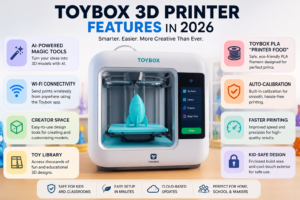
The 2026 version of Toybox has evolved far beyond the original beginner printer concept. One of the most talked-about additions is the company’s AI-powered Magic Tools, which allow users to type prompts or upload images that are transformed into printable 3D models. According to the official website, users can simply describe an idea and let the system generate a ready-to-print object automatically.
That feature changes everything for beginners. In the past, creating original 3D models required learning complicated CAD software. Now, someone with zero design experience can create a toy dragon, custom keychain, or mini sculpture just by typing an idea. This lowers the barrier for creativity dramatically and makes 3D printing feel much more approachable.
Another standout feature is cloud-based Wi-Fi printing. Instead of transferring files manually using SD cards, users can send designs directly from the Toybox app to the printer. This makes the entire experience feel similar to using a streaming service or smart home device. The app also includes access to a massive design library with thousands of printable objects available instantly.
Here’s a quick look at major Toybox features in 2026:
Feature | Benefit for Beginners |
AI Magic Tools | Create models using prompts |
Wi-Fi Printing | Easy wireless operation |
Creator Space | Beginner-friendly design tools |
Toy Library | Thousands of ready-made designs |
PLA Printer Food | Safer and easier printing |
Toolless Calibration | Faster setup experience |
The company has also improved print precision and durability over earlier versions. The newer Alpha models reportedly print faster and require less maintenance compared to original Toybox machines.
Toybox Printer Models and Pricing
Toybox now offers multiple bundles aimed at different types of users. Beginners usually start with the Starter Bundle, while families or classrooms often choose Deluxe versions that include extra filament and accessories. According to the official store, prices in 2026 range from around $199 for discounted starter packages to over $350 for premium bundles.
The company also offers a subscription called Toybox Pro. This membership unlocks premium AI tools, advanced design features, and additional printable content. Pricing starts around $18 to $20 per month depending on promotions.
Here’s a simplified comparison:
Bundle | Estimated Price | Best For |
Starter Bundle | $199–$249 | First-time users |
Deluxe Bundle | $309–$359 | Families & classrooms |
Toybox Pro | $18/month | Frequent creators |
While these prices may seem high compared to budget hobby printers, Toybox focuses heavily on convenience. You’re paying for ease of use, integrated software, and beginner support. Some Reddit users argue that more advanced printers offer larger build sizes and greater flexibility for similar prices. However, those alternatives often require much more technical knowledge.
This creates an important question: what matters more to you — simplicity or customization? If you enjoy tinkering and learning technical details, another printer might provide better value. But if you want something easy enough for kids or casual users, Toybox remains highly competitive.
Setting Up Your First Toybox Printer
One of the strongest selling points of Toybox is the setup process. Traditional 3D printers can take hours to assemble and calibrate. Some beginner hobby machines still require users to tighten belts, level beds manually, and install firmware updates before printing anything useful. Toybox tries to eliminate that frustration.
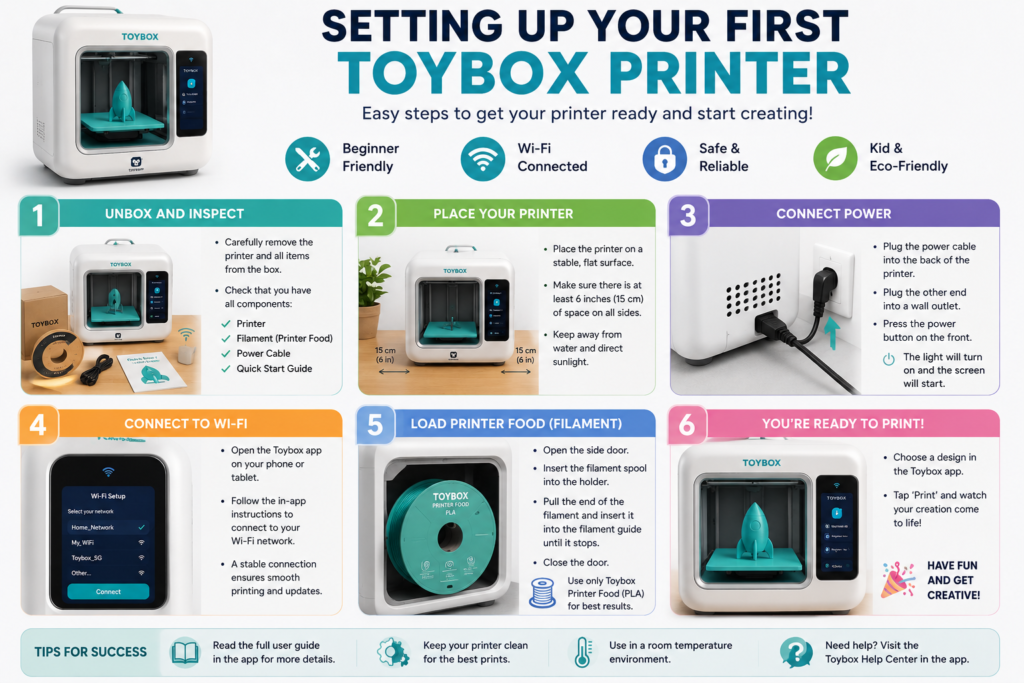
The unboxing experience is intentionally beginner-friendly. Most of the printer comes pre-assembled, so users mainly need to connect the power cable, install filament, and connect the device to Wi-Fi through the Toybox app. This simplicity is a major reason teachers and parents recommend it for younger users.
Loading filament — or “Printer Food” — is also designed to feel easy and approachable. Instead of handling giant industrial spools, Toybox uses smaller cartridges optimized for its printers. Some experienced hobbyists criticize this system because it can cost more over time, but it definitely simplifies the beginner experience.
After setup, users simply browse the app library, choose a design, and press print. Watching the first object slowly emerge from the print bed is usually the moment people truly understand why 3D printing feels so exciting. It’s like watching imagination turn into reality right in front of your eyes.
Creating Your First 3D Print
The first print is where the fun really begins. Toybox offers thousands of pre-made designs, including mini toys, animals, gadgets, and decorative items. Beginners usually start by selecting something simple and small because shorter prints reduce the chance of mistakes. Once the design is selected, the app handles the technical preparation automatically.
The AI design tools introduced in recent updates make this process even more creative. Instead of searching endlessly through a library, users can generate custom objects using text prompts or uploaded images. Imagine typing “cute baby dragon with wings” and getting a printable design minutes later. That kind of accessibility was almost impossible for beginners just a few years ago.
Toybox also supports importing files like STL and OBJ formats, meaning advanced users can eventually move beyond the built-in ecosystem. This is important because many beginners eventually want more creative freedom. They might start with ready-made toys but later explore custom designs from platforms like Thingiverse or Tinkercad-generated models.
Printing itself becomes addictive surprisingly quickly. Once people realize they can physically create objects from digital ideas, their imagination starts racing. One day you print a keychain. The next day you’re making desk organizers, mini robots, or personalized gifts. That sense of endless possibility is exactly why 3D printing continues growing worldwide.
Pros and Cons of Toybox Labs
No product is perfect, and Toybox definitely has strengths and weaknesses depending on your goals. The biggest advantage is simplicity. Very few printers make the beginner experience this smooth. The app ecosystem, guided setup, and curated design library reduce frustration significantly.
Another huge advantage is safety and accessibility for children. Many advanced printers expose hot components or require technical maintenance. Toybox reduces those barriers while still delivering decent print quality for casual projects. The educational value is also enormous. Kids learn creativity, design thinking, patience, and basic engineering concepts while having fun.
Still, limitations exist. Build volume is relatively small compared to standard hobby printers. That means users cannot create large objects easily. Some experienced users also dislike the more closed ecosystem and reliance on proprietary filament systems. Reddit discussions frequently mention that more advanced printers provide better long-term value and flexibility.
Here’s a balanced comparison:
Pros | Cons |
Extremely beginner-friendly | Small print size |
Great for kids | More expensive filament |
Simple app interface | Less customization |
AI design tools | Limited advanced control |
Minimal setup | Closed ecosystem concerns |
Ultimately, Toybox succeeds because it focuses on accessibility rather than technical perfection.
Toybox vs Other Beginner 3D Printers
Comparing Toybox to beginner-friendly competitors helps clarify who should buy it. The Bambu Lab A1 Mini is one of the strongest alternatives in 2026 because it offers higher-quality prints, larger build space, and optional multicolor printing. Experts frequently recommend it for older kids and beginners who want room to grow.
The Creality Ender 3 series is another common recommendation because it delivers strong value and a massive community for troubleshooting. However, it requires significantly more setup and technical learning. For some users, that learning experience is exciting. For others, it becomes frustrating quickly.
Toybox wins when simplicity matters most. If your goal is effortless creativity for young children or complete beginners, Toybox feels less intimidating. If your goal is long-term hobby growth and technical customization, printers like Bambu Lab or Creality may provide better flexibility.
Think of it this way: Toybox is like using a smartphone camera with automatic settings, while advanced printers are like using a professional DSLR camera. One prioritizes convenience. The other prioritizes control.
Is Toybox Good for Kids and Schools?
This is where Toybox shines brightest. Many schools struggle to introduce STEM technology because teachers don’t have time to become full-time printer technicians. Toybox reduces that burden significantly. The simple interface allows classrooms to focus on creativity instead of troubleshooting.
Experts consistently rank Toybox among the best beginner options for young users. The curated library also helps parents feel safer because children are not randomly downloading questionable designs online. Instead, they access moderated and beginner-friendly content.
The educational benefits go beyond printing toys. Kids learn problem-solving, spatial thinking, and digital creativity. They begin understanding how physical products are designed and manufactured. That hands-on experience can spark interest in engineering, robotics, architecture, or design careers later in life.
The printer’s simplicity also encourages experimentation. When technology feels approachable, children become more confident exploring it. That confidence is often more valuable than the prints themselves.
Common Problems Beginners Face
Even beginner-friendly printers experience occasional issues. The most common problem is failed prints caused by poor adhesion or tangled filament. Sometimes objects detach from the print bed midway through printing, creating what users jokingly call “plastic spaghetti.”
Another beginner issue involves unrealistic expectations. Many people assume 3D printing works instantly like a paper printer. In reality, patience matters. Small objects can still take 30 minutes or more, while detailed creations may require several hours.
Wi-Fi connectivity problems can also frustrate users occasionally, especially when cloud services experience delays. Some users prefer printers with offline options for reliability reasons. Others dislike subscription-based ecosystems because they feel locked into proprietary services.
Still, most beginner problems become manageable with practice. The key is understanding that 3D printing is partly creative art and partly technical process. Mistakes are normal, and every failed print teaches something useful.
Safety Tips for New Users
Although Toybox is safer than many traditional printers, basic safety still matters. The printer nozzle becomes hot during operation, so young children should still use it with adult supervision. Keeping the printer on a stable surface with proper ventilation is also important.
PLA filament is generally considered one of the safest beginner materials because it produces fewer fumes compared to ABS plastics. That’s one reason it remains the preferred option for schools and families.
Users should also avoid touching freshly printed objects immediately because some areas may remain hot for a short time. Regular cleaning and maintenance help keep the printer operating safely and smoothly over time.
Most importantly, beginners should understand that safety and patience go hand in hand. Rushing prints or ignoring instructions usually causes more problems than the printer itself.
Future of Toybox and Beginner 3D Printing
The future of beginner 3D printing looks incredibly exciting. AI integration is already transforming how people create models, and Toybox appears determined to lead that shift. Instead of forcing users to learn difficult software, AI tools now allow creativity through simple prompts and images.
This trend could dramatically expand the number of people using 3D printers in everyday life. Imagine children designing toys through voice commands or families creating personalized home decorations instantly. As printers become smarter and easier to use, the technology will likely move further into mainstream homes and classrooms.
Competition is also pushing innovation faster. Companies like Bambu Lab, Creality, and AOSEED are improving beginner printers rapidly. That means users benefit from better features, faster printing speeds, and lower prices each year.
Toybox’s biggest challenge will be balancing simplicity with flexibility. Beginners eventually become advanced users, and those users often want more control. If Toybox can evolve without losing its beginner-friendly identity, it could remain one of the most influential brands in educational 3D printing for years to come.
The Future of Superga
The future of beginner 3D printing looks incredibly exciting. AI integration is already transforming how people create models, and Toybox appears determined to lead that shift. Instead of forcing users to learn difficult software, AI tools now allow creativity through simple prompts and images.
This trend could dramatically expand the number of people using 3D printers in everyday life. Imagine children designing toys through voice commands or families creating personalized home decorations instantly. As printers become smarter and easier to use, the technology will likely move further into mainstream homes and classrooms.
Competition is also pushing innovation faster. Companies like Bambu Lab, Creality, and AOSEED are improving beginner printers rapidly. That means users benefit from better features, faster printing speeds, and lower prices each year.
Toybox’s biggest challenge will be balancing simplicity with flexibility. Beginners eventually become advanced users, and those users often want more control. If Toybox can evolve without losing its beginner-friendly identity, it could remain one of the most influential brands in educational 3D printing for years to come.
Conclusion
Toybox Labs has successfully transformed 3D printing from an intimidating technical hobby into something approachable for families, kids, and complete beginners. In 2026, the company continues standing out because it focuses on simplicity, creativity, and accessibility rather than overwhelming users with advanced engineering settings.
The addition of AI-powered design tools, cloud printing, and beginner-friendly Creator Space features makes the experience feel more modern than ever. While advanced hobbyists may prefer larger or more customizable printers, Toybox remains one of the easiest ways to enter the world of 3D printing without frustration.
For parents, teachers, and casual creators, Toybox offers more than just a printer. It offers a gateway into imagination, STEM learning, and hands-on creativity. Watching an idea become a physical object still feels magical, no matter how advanced technology becomes. That sense of wonder is exactly why beginner 3D printing continues growing worldwide.
Read Also:
Unlocking Wellness: How Your Super DE is Transforming the Superfood Industry
Tiqets: Your Ultimate Ticketing Platform for Seamless Travel and Attraction Bookings
Weight Watchers Online: Achieve Your Health Goals with Personalized Weight Loss Programs
TicketNetwork: Your Go-To Marketplace for Concert, Sports, and Event Tickets
The Rise of Kontist: Smart Banking Solutions for Modern Professionals
Why Novakid Global ARABIC Is a Game-Changer in Digital Language Education
Frequently asked questions
Yes, Toybox is specifically designed for beginners and young users. Its app-based system, guided setup, and curated design library make it one of the easiest 3D printers to start using.
Yes. Users can import STL, OBJ, and gCode files. The newer AI Magic Tools also allow users to generate printable models using prompts and images.
Toybox primarily uses PLA filament called “Printer Food.” PLA is biodegradable, beginner-friendly, and considered safer for educational environments.
For users who value simplicity and beginner accessibility, yes. Advanced users may prefer larger printers with more customization, but Toybox excels at convenience and ease of use.
Most experts recommend Toybox for children ages 6–8 and older with supervision. It is also popular in classrooms and among adults who want an easy introduction to 3D printing.