Discover how Renderforest can help you create stunning animated videos for digital marketing. Learn how to choose the right templates, customize animations, add music and voiceovers, and create engaging promotional videos that strengthen your brand, attract audiences, and improve your digital marketing strategy.
Table of Contents
ToggleUnderstanding Animated Videos in Digital Marketing
Digital marketing is no longer just about publishing blog posts, designing banners, or sharing product photographs. Businesses are constantly looking for creative ways to communicate with their audiences, explain their services, and stand out in crowded online spaces. This is where animated videos become especially useful. By combining movement, illustrations, text, sound, and storytelling, animation can turn complicated information into content that is easier to understand and more enjoyable to watch. Whether you run a small online store, manage a marketing agency, or promote a personal brand, animated videos can help you communicate your message in a memorable way.
Think about the last time you scrolled through social media. You probably encountered dozens of photographs, advertisements, and promotional posts within a few minutes. A well-designed animated video can interrupt that repetitive pattern by introducing motion, visual storytelling, and a clear message. For example, an online business could use animation to explain how its product works, while a software company could demonstrate how its application solves a customer’s problem. Instead of asking people to read a long explanation, the business can guide them through the information visually.
Why Animation Captures Audience Attention
One major advantage of animation is flexibility. You do not need to arrange a physical location, hire actors, purchase expensive filming equipment, or organize a complicated production schedule to create a simple promotional video. You can use animated characters, icons, transitions, text, and illustrations to represent almost any concept. Animation is also useful when your product is intangible, such as a subscription service, online course, financial application, or cloud-based software. You can visualize an invisible process and make it easier for potential customers to understand.
However, attractive visuals alone do not guarantee successful marketing. Your video must also deliver a relevant message, solve a genuine audience problem, and provide a clear next step. A beautiful animation that says very little may entertain viewers without encouraging them to learn more about your business. The best approach is to combine engaging visuals with useful information and a specific objective. When you build your strategy around that principle, animation becomes more than decoration; it becomes a practical communication tool.
What Is Renderforest and How Does It Work?
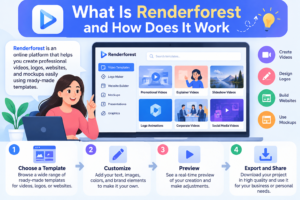
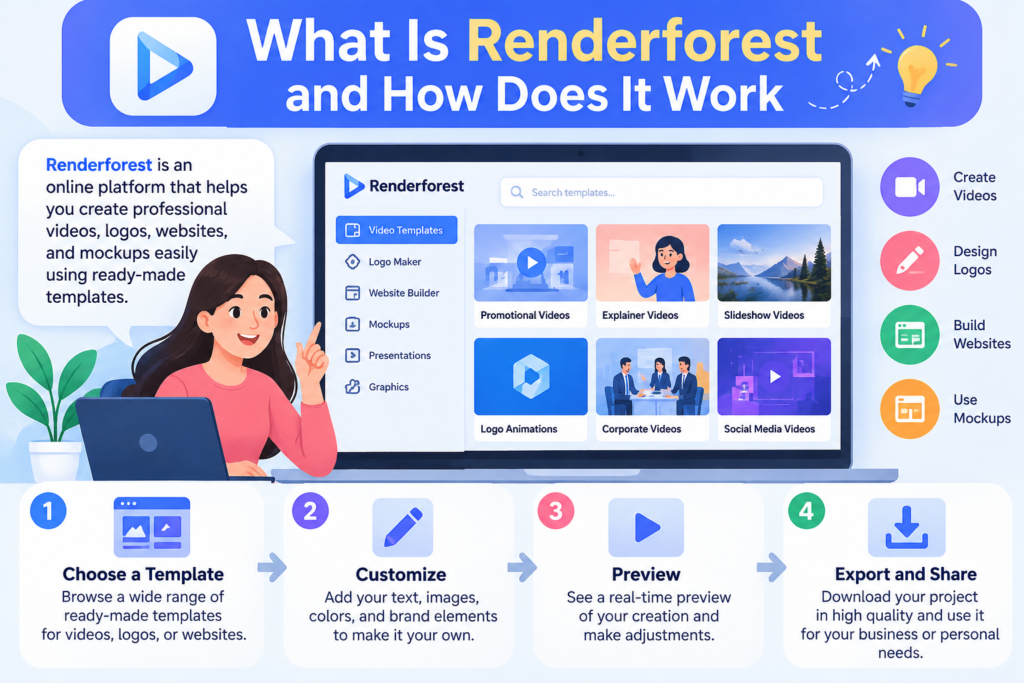
Renderforest is an online creative platform that helps users produce videos, animations, promotional graphics, and other branding materials. It offers ready-made video templates alongside AI-powered creation tools, allowing marketers to develop content without needing advanced animation or video-editing skills. The platform has attracted millions of creators and supports different types of creative projects, making it a useful option for individuals, businesses, and marketing teams.
One of Renderforest’s main advantages is that it brings several stages of video production into one workspace. Instead of creating every visual element from scratch, you can start with a template, enter your text, choose visual styles, add your logo, and customize the scenes to suit your campaign. You can also use its AI video tools to develop content from a written idea or script. Depending on the creation method, available options can include AI-generated visuals, narration, music, and further editing before export.
For digital marketers, this workflow can make producing regular video content more manageable. Imagine launching a new product and needing a short teaser for Instagram, an explainer for your website, and a promotional video for an email campaign. Rather than treating each video as an entirely separate production, you can develop a consistent visual concept and adapt it to different channels. You should still review every scene, verify the wording, and make sure the finished video reflects your brand accurately. Automation can speed up production, but thoughtful creative decisions are what make the final result useful.
Benefits of Using Renderforest for Marketing Videos
The first important benefit is accessibility. Traditional animation production can require specialized software, considerable technical knowledge, and significant time. Renderforest simplifies many of these tasks through templates and guided editing features. Beginners can explore different styles, while experienced marketers can use the available customization options to create content that fits an established campaign. This makes the platform worth considering for freelancers, startups, small businesses, and marketing teams that need a repeatable production process.
Another benefit is production flexibility. Renderforest offers different template categories for explainer videos, social media content, promotional campaigns, animated logos, presentations, and advertisements. This variety can be useful when your marketing calendar includes several content formats rather than a single video project. Instead of spending hours creating each animation from scratch, you can adapt a suitable template to your message and visual identity.
Brand consistency is another important consideration. Customers may encounter your company through a website, social media profile, advertisement, or email newsletter. If every piece of content looks completely different, it can become harder for people to recognize your business. By applying consistent colors, typography, logo placement, messaging, and visual styles across your videos, you can create a more recognizable brand identity. Renderforest can support this process, but consistency still depends on the choices you make.
Finally, an online video creation workflow can help you experiment. You might produce one video that emphasizes product benefits and another that focuses on a customer problem. By comparing their performance, you can learn which message resonates more strongly with your intended audience. The goal is not simply to create more videos; it is to use each video as an opportunity to improve your marketing communication.
Planning an Effective Video Marketing Strategy
Before opening Renderforest, take a few minutes to decide what your video should accomplish. This step might seem less exciting than choosing animations or music, but it can save you from producing a polished video that fails to support your business goals. Every effective marketing video begins with a clear purpose. Are you introducing a new product, explaining a service, attracting website visitors, increasing brand awareness, or encouraging people to make a purchase? Your answer will influence the script, visuals, length, and final call to action.
For example, suppose you operate an online store selling skincare products. You could create a general video showing attractive product packaging, but a more strategic approach would be to address a specific customer concern, explain the product’s intended use, and demonstrate how to incorporate it into a skincare routine. Similarly, a software company might focus on a common problem that its application solves instead of filling the entire video with technical specifications. The more closely your content connects with an audience’s needs, the easier it becomes for viewers to understand why your offering deserves their attention.
Defining Your Audience and Marketing Goals
Start by identifying your ideal customer. Consider their interests, age range, challenges, purchasing motivations, and preferred online platforms. You do not need an elaborate research report to begin, but you should have a reasonable understanding of whom you want to reach. Next, select one primary goal for your video. A brand-awareness video might introduce your company and communicate what makes it different, while a conversion-focused video might highlight a particular offer and direct viewers to a landing page.
You should also determine how you will evaluate success. If your goal is awareness, reach and qualified views may be useful indicators. If you want visitors to explore a product, measure click-through rates and landing-page engagement. If your objective is sales, track conversions and revenue alongside video performance. Establishing these measures before production gives your creative decisions a practical direction and helps you understand whether the final video is doing its job.
Choosing the Right Renderforest Template
Choosing a template is one of the most important decisions in the video creation process. A template establishes the visual language of your content, including the animation style, scene transitions, text placement, and general atmosphere. Renderforest offers categories that include animations, sales promotions, social media videos, advertisements, presentations, and logo intros. Selecting a suitable template can help you save time while maintaining a professional appearance.
Begin by matching the template to the purpose of your campaign. A whiteboard animation may work well when explaining a process, while a colorful cartoon style could suit a playful consumer brand. A clean promotional template may be more appropriate for a professional service, and a short animated logo reveal could provide a polished introduction to a YouTube video. Do not choose a template simply because it looks impressive in the preview. Consider whether its visual style suits your audience and gives your message enough room to breathe.
Before committing, preview the available scenes and imagine your actual script inside them. Check whether the template supports the text, imagery, and scene structure your project requires. Some templates may be better suited to fixed-duration content, while others offer greater flexibility. You should also check whether your desired export resolution and customization options are available under your selected plan. Choosing carefully at the beginning makes the editing process easier and reduces the need to rebuild your video later.
Writing a Compelling Video Script
A strong script is the foundation of an effective animated marketing video. Even excellent animation cannot rescue a confusing message, so focus on what you want viewers to understand before you begin adding visual effects. Start with a problem, question, or situation that your target audience recognizes. Then explain how your product or service helps, support the message with relevant details, and finish with a clear next step. This structure gives the video a logical progression instead of making it feel like a collection of unrelated scenes.
Imagine you are promoting a website-building service. You might begin by describing the frustration of managing a complicated website, introduce your service as a simpler alternative, highlight two or three useful features, and end by inviting viewers to explore a demo. Each scene should contribute something meaningful to that story. If a sentence does not help explain the problem, demonstrate a benefit, establish trust, or encourage action, consider removing it.
Keep the language natural and conversational. Write as though you are explaining your offering to a real person rather than delivering a formal corporate presentation. Short, clear sentences are generally easier to follow when viewers are simultaneously processing narration and moving visuals. If your video contains voiceover, read the script aloud to identify awkward phrases, unnecessary repetition, or sections that feel rushed. Finally, make sure every factual claim is accurate and supportable. Clear communication builds more trust than exaggerated promises ever will.
Customizing Animation, Colors, and Branding
Once you have selected a template and prepared your script, customize the video to reflect your business identity. Add your logo where it feels natural, use your established brand colors, and select typography that remains readable on different screen sizes. If your company already has a visual identity, use it as the starting point rather than creating a completely different look for every campaign. Renderforest’s template-based workflow supports customization of elements such as text, colors, logos, music, and other visual assets, although specific controls can vary by template.
Think of branding as a visual thread that connects each scene. Your logo does not need to appear in every corner, and every background does not need to use the same color. Instead, maintain a recognizable relationship between the opening, main content, and closing scene. Use contrast to make important information stand out, and avoid putting long paragraphs of text over complicated backgrounds. When the video is viewed on a mobile phone, small details can disappear quickly, so prioritize large, readable text and clear visual hierarchy.
You should also pay attention to pacing and transitions. A transition can connect two ideas smoothly, but too many spins, flashes, zooms, and bouncing effects can distract viewers from the message. Give important scenes enough time to be understood before moving to the next one. After editing, watch the entire video without pausing. Ask yourself whether the animation feels coherent, whether the branding appears consistent, and whether a first-time viewer could understand the message without needing additional explanation.
Adding Music, Voiceovers, and Visual Effects
Audio can change the way an animated video feels. Background music may create excitement, communicate professionalism, or establish a relaxed atmosphere, while narration can explain details that would otherwise require too much on-screen text. Renderforest provides video creation tools that support voiceovers and music, with AI-assisted options available in relevant workflows.
Choose music that supports your intended message instead of competing with it. An upbeat track might suit a product launch, while a softer background may work better for an educational explainer. Keep narration clear and ensure that background audio does not overpower the speaker. If you use AI-generated narration, listen carefully for unnatural pauses, incorrect pronunciation, or emphasis that changes the meaning of a sentence. Editing a script to improve spoken rhythm can make a noticeable difference.
Sound effects can add emphasis when used carefully. A subtle sound may help introduce a new feature or mark an important transition, but constant effects can make a video feel cluttered. Before publishing, review the audio balance with headphones and ordinary speakers if possible. Also confirm that you have the appropriate rights to use the selected music, images, fonts, and other media in your intended commercial setting. A professional-looking video should also be properly cleared for publication.
Creating Different Types of Marketing Videos
Renderforest can support several types of marketing videos, and each serves a different purpose. Explainer videos are useful when you need to introduce a product, simplify a service, or show how a process works. Promotional videos can highlight a new product, seasonal offer, or limited-time campaign. Animated logo intros can strengthen the presentation of branded video content, while social media animations can communicate a message in a compact format.
For an e-commerce business, a short product video could highlight important features, demonstrate how an item is used, and direct viewers to a product page. For a software company, an animated explainer might illustrate a workflow from beginning to end. An educational business could use animation to introduce a lesson or summarize a difficult concept, while a marketing agency could create a short service overview for potential clients. The central principle is to match the video format to the question your audience needs answered.
You can also use animation throughout the customer journey. Someone discovering your brand for the first time may respond to a short introduction, while a person comparing solutions may benefit from a detailed explainer. Existing customers may appreciate tutorial videos that demonstrate product features or explain new updates. Planning content for these different stages helps you build a useful library of videos instead of relying on a single advertisement to accomplish every objective.
Optimizing Animated Videos for Social Media
Social media platforms offer opportunities to distribute animated videos, but each platform has its own viewing habits and presentation requirements. A video designed for a widescreen website may not work equally well in a vertical mobile feed. Renderforest provides templates and aspect-ratio options that can help creators prepare videos for different formats.
Before creating the final export, determine where the video will appear. Vertical video is often appropriate for mobile-first placements, whereas landscape video may suit website explainers and conventional YouTube content. Square video can be useful for some feed placements. Check the platform’s current specifications for aspect ratio, duration, file format, captions, and advertising requirements before publishing, because these details can change.
Make the opening seconds useful. Introduce a relevant question, recognizable problem, product benefit, or visually interesting moment rather than starting with a lengthy introduction. Many people browse social media with sound turned off, so add readable captions or on-screen text when appropriate. Keep text away from interface elements that might cover it, and make sure the main message remains understandable even when viewers do not hear the narration.
Finally, adapt rather than blindly duplicate. You can reuse the core idea of a video while adjusting the opening, length, text placement, and call to action for different channels. This approach helps preserve brand consistency while respecting the expectations of each audience.
Using Animated Videos for SEO and Website Engagement
Animated videos can support a broader search engine optimization strategy when they provide useful information and complement the content on your website. For example, a service page might include an explainer that demonstrates how the service works, while a tutorial article might use a short animation to clarify a complicated step. These additions can make a page more helpful to visitors, especially when the visual explanation answers a question that is difficult to communicate through text alone.
However, adding a video does not automatically improve search rankings. Search engines evaluate many aspects of a page, including relevance, usefulness, accessibility, and technical quality. Your page should still contain clear written explanations, descriptive headings, meaningful image alternative text where appropriate, and a logical structure. Give the video a descriptive title and provide a transcript or summary when it helps users understand the content. Captions also improve accessibility for people who cannot or prefer not to listen to audio.
Video performance can influence how you evaluate website engagement, but avoid assuming that a longer visit automatically means a successful page. A visitor may watch an explainer because it answers a useful question, or they may spend time searching for information that is difficult to find. Connect video analytics with meaningful outcomes such as product-page visits, newsletter sign-ups, qualified leads, or purchases. This helps you understand whether the video contributes to your marketing goals rather than simply occupying space on the page.
Understanding Renderforest Pricing and Features
Before using Renderforest for a regular marketing campaign, understand the available plans and how they affect your workflow. The platform offers free access for trying its tools, as well as paid subscription options designed for different production needs. Features and limits can vary by plan, including export resolution, AI credits, stock media access, storage, and customization options.
The free option is a sensible starting point if you want to explore templates and understand the editor before spending money. Keep in mind that free exports may include a watermark or have other restrictions. If you plan to publish videos for a commercial campaign, review the relevant licensing terms and export limitations first.
A basic paid plan may suit a beginner who needs occasional videos, while a more advanced subscription may be appropriate for someone producing regular marketing content that requires higher-resolution exports and a broader stock media library. Business-oriented plans may offer additional capabilities for teams and supported high-resolution exports. These are general guidelines, not universal recommendations: the right plan depends on how frequently you publish, the quality you need, and whether multiple people must collaborate.
Rather than purchasing the most expensive option immediately, create a sample project and calculate your likely monthly production needs. Compare the subscription cost with the time saved, the number of usable videos produced, and the importance of the features you will actually use.
Measuring Video Marketing Performance
Creating a video is only one part of the marketing process. To determine whether your investment is worthwhile, measure how people interact with the finished content and whether those interactions support your business goals. Start by selecting a small number of relevant metrics rather than trying to track everything at once. The most useful indicators depend on the purpose of your campaign, the distribution channel, and the action you want viewers to take.
For awareness campaigns, examine reach, impressions, and qualified views. For educational content, look at average watch time, completion rate, and audience retention. For campaigns intended to generate interest, monitor clicks and visits to the relevant landing page. If you are promoting a product, examine purchases, leads, conversion rates, and the cost of acquiring a customer.
Imagine that you publish two animated advertisements for the same product. The first receives many views but generates very few website visits, while the second receives fewer views but attracts more qualified visitors who make purchases. The second video may be more valuable to your business even though its total view count is lower. This is why you should evaluate performance against your original objective instead of treating popularity as the only measure of success.
Experiment with one meaningful change at a time. You might test two opening scenes, different calls to action, or alternative versions of the same message. Give each version a reasonable opportunity to collect data, and consider differences in audience, placement, and budget when interpreting results. Over time, these experiments can help you develop a repeatable process for creating videos that communicate more effectively and support measurable outcomes.
Common Mistakes to Avoid
One frequent mistake is trying to communicate too many ideas in a single video. When every scene introduces another feature, benefit, discount, and company detail, viewers can struggle to identify the main message. Instead, choose one central objective and organize the supporting information around it. If your business has several important messages, create a small series of focused videos rather than forcing everything into one long presentation.
Another mistake is prioritizing visual effects over clarity. Complex transitions, bright colors, animated characters, and dramatic music can make a video look impressive, but they cannot compensate for a weak script. Keep the design aligned with your brand and audience, and use animation to explain or emphasize the message. Every visual element should have a purpose.
Some marketers also overlook mobile viewing. Tiny text, low-contrast colors, crowded scenes, and captions placed beneath interface elements can make even a well-produced video difficult to follow. Preview your content at different screen sizes and check the final export before publishing. If narration is important, ensure that captions are accurate and readable.
Finally, do not publish a video without reviewing its factual claims, audio quality, spelling, branding, and commercial usage rights. Check the final call to action as well. Viewers should know whether you want them to visit a website, explore a product, request a demonstration, or subscribe to your channel. A clear next step makes your video more useful than an attractive animation that leaves its audience wondering what to do next.
Best Practices for Professional Results
A successful video production process combines creative planning with consistent execution. Begin with a written brief describing your audience, objective, core message, distribution channel, and desired action. Use this brief to guide your script and template selection. When you have a clear foundation, editing becomes more focused because each creative decision can be evaluated against the campaign’s purpose.
Build a recognizable visual identity across your video library. Use a consistent color palette, logo treatment, typography, and tone of voice. At the same time, give each video enough flexibility to suit its topic. A tutorial may need a slower pace and clearer explanations, while a short promotional video may benefit from quicker scenes and a more direct opening.
Make accessibility part of the production process. Use readable typography, strong contrast, accurate captions, and narration that is easy to understand. Do not communicate essential information through color alone. If the video is published on a website, provide supporting text for people who cannot watch or listen to it.
Finally, create a review checklist before every export. Confirm that the script is accurate, the logo is correct, the music is properly licensed, the visuals are consistent, and the call to action works. Check the output resolution and aspect ratio against the destination platform. Keep your original project files so that you can update prices, product details, or campaign messaging later without rebuilding the entire video.
The best workflow is one you can repeat. When you document your creative decisions and review your performance data, each new project becomes an opportunity to improve the next one.
Conclusion
Creating stunning animated videos for digital marketing with Renderforest can be a practical way to turn business ideas into engaging visual content without mastering advanced animation software. Its templates, editing tools, and AI-assisted video features can help beginners and experienced marketers produce explainers, product promotions, social media videos, and branded content from a single online workspace.
The key to getting good results is not simply choosing an attractive template. You need to understand your audience, write a compelling script, maintain a consistent visual identity, select suitable audio, and optimize the finished video for its intended platform. After publishing, measure the results against your campaign objectives and use the findings to improve future projects.
Start with one clearly defined marketing goal and a manageable video project. Experiment with the available tools, review the final output carefully, and refine your approach based on real audience responses. With thoughtful planning and consistent execution, Renderforest can become a useful part of your digital marketing workflow, helping you communicate your message more clearly and develop video content that supports your business goals.
Read Also:
A Complete Guide to Building a Successful Remote Work Environment
The Ultimate Guide to Starting Your Diving Journey With PADI
Improving Computer Performance With IObit: Features and Benefits
How Lightinthebox Connects Shoppers With Affordable Global Products
Understanding LATAM Airlines: Routes, Services, and Travel Options
Frequently asked questions
Yes. Renderforest offers templates, guided editing, and AI-assisted video creation features that can help beginners produce promotional and explainer videos without advanced animation skills. Start with a simple project, explore the editing options, and review the export restrictions associated with your chosen plan.
Yes. The platform provides social media and promotional video templates, along with aspect-ratio options for different formats. Choose the format that suits your destination, use readable text, and check the platform's current publishing requirements before exporting.
Yes. Renderforest provides AI-powered video creation tools that can turn written ideas or scripts into videos. Depending on the workflow, you can select a visual style, customize scenes, and edit the generated result before exporting.
Renderforest offers free access to try its tools, but free usage may include watermarks, resolution limits, or other restrictions. Paid subscriptions offer additional features and export options. Review the current plan details and commercial usage terms before publishing a video for your business.
Begin with one specific objective and a script that addresses your audience's needs. Select a suitable template, use consistent branding, keep text readable, and add a clear call to action. After publishing, track relevant measures such as audience retention, website visits, leads, or sales to identify opportunities for improvement.