
Discover how to build a productive and successful Remote work environment with practical tips on setting up a home office, choosing the right tools, improving communication, strengthening teamwork, and maintaining a healthy work-life balance. Learn effective strategies to boost productivity, protect data, and create a flexible workplace that supports long-term success.
Table of Contents
ToggleIntroduction
Remote work has transformed how businesses operate, how teams communicate, and how professionals organize their everyday lives. What once seemed like an unusual workplace arrangement has become a practical option for companies seeking flexibility, access to broader talent pools, and more efficient ways to get work done. Yet working remotely successfully requires more than a laptop, a reliable internet connection, and a video conferencing application. It requires a thoughtful environment where people can focus, communicate clearly, protect sensitive information, and maintain healthy relationships with colleagues without sharing the same physical office.
Building a successful remote work environment means bringing together the right technology, comfortable workspaces, effective management practices, and a supportive company culture. Organizations must create systems that help employees understand their responsibilities while giving them the freedom to organize their work. Individuals also need routines that support concentration and prevent professional responsibilities from taking over their personal lives. In this guide, we will explore the essential elements of a productive remote workplace, practical strategies for overcoming common challenges, and ways to create an environment where employees and businesses can thrive.
Understanding the Modern Remote Work Environment
A remote work environment is a professional setup that allows employees to complete their responsibilities outside a traditional office, usually from home, a coworking space, or another suitable location. Unlike office-based work, where colleagues can quickly exchange information across a desk, remote work depends on digital communication, shared resources, clear expectations, and individual responsibility. The environment includes much more than the physical workspace: it also covers company policies, team relationships, technology, management practices, and employee well-being. When these elements work together, employees can remain productive even when they are separated by different cities, countries, or time zones. When they do not, minor misunderstandings can turn into missed deadlines, duplicated work, and unnecessary stress.
The modern approach to remote work also recognizes that every employee has different needs. A software developer may require multiple monitors and long periods of uninterrupted concentration, while a customer support representative may need a quiet space, a reliable headset, and a stable connection for frequent calls. Managers, meanwhile, need visibility into progress without constantly checking whether employees are online. Successful organizations therefore build flexible systems around the work itself rather than assuming everyone should follow the same routine. According to a 2026 cybersecurity report from the SANS Institute, organizations continue to face challenges involving staffing, technology integration, and operational effectiveness, illustrating why a distributed workforce needs deliberate systems rather than improvised arrangements.
Benefits of Remote and Hybrid Work
One of the biggest advantages of remote work is flexibility. Employees can often organize their schedules around periods when they concentrate best, provided they meet deadlines and remain available for essential collaboration. Removing a daily commute can also free up time for family responsibilities, exercise, rest, or professional development. Employers can benefit from access to talent beyond their immediate geographic area, potentially making it easier to recruit people with specialized skills. Depending on the business model, remote operations may also reduce spending on office space, utilities, and some commuting-related expenses for employees.
However, these benefits do not appear automatically. Remote workers may experience isolation, communication delays, blurred working hours, or difficulty separating professional and personal responsibilities. A hybrid arrangement can provide face-to-face interaction while preserving some scheduling flexibility, but it also requires careful coordination so that employees working from different locations receive equal access to information and opportunities. The best arrangement depends on the organization’s goals, the nature of its work, regulatory requirements, and employee preferences. Instead of treating remote work as a universal solution, businesses should evaluate its practical advantages and limitations, gather employee feedback, and adjust their approach over time.
Creating a Productive Home Office
A productive home office provides a clear distinction between professional responsibilities and everyday household activities. Ideally, employees should choose a quiet, well-lit area where they can work without constant interruptions. A separate room is useful, but it is not essential; a dedicated desk in a bedroom or a carefully organized corner of a living space can also work. The important thing is consistency. When the same space is used for work every day, it can become a mental signal that helps the brain transition into a focused working mode. Keeping work materials organized, limiting visible distractions, and communicating working hours to household members can make this transition easier.
Lighting, temperature, seating, and noise levels all influence comfort and concentration. Natural light is helpful when available, while a desk lamp can improve visibility during darker hours. Employees should position their screens at a comfortable height, keep frequently used items within easy reach, and choose a chair that supports a comfortable posture. Regular movement is equally important because sitting in one position for hours can cause discomfort and fatigue. Short breaks, stretching, and occasional changes in working position help employees maintain energy throughout the day. A well-designed workspace does not need expensive furniture or fashionable accessories; it needs to support the employee’s actual tasks without creating unnecessary physical or mental strain.

Essential Equipment and Ergonomics
The equipment required for remote work depends on the job, but most professionals benefit from a dependable computer, a stable internet connection, suitable audio equipment, and a comfortable workspace. Employees who frequently attend meetings may find a good headset more useful than expensive decorative equipment. Those who work with spreadsheets, design software, programming tools, or large documents may benefit from a second monitor. A webcam, keyboard, mouse, surge protector, and backup internet option can also improve convenience and reliability, depending on the circumstances.
Ergonomics should be considered before buying additional accessories. The top of a monitor should generally be around eye level or slightly below, and the screen should be positioned at a comfortable viewing distance. Feet should rest securely on the floor or a footrest, while the shoulders remain relaxed and wrists stay in a neutral position during typing. Employees should avoid working from a bed or sofa for extended periods when those positions cause poor posture or discomfort. Employers can support healthy workspaces by offering equipment allowances, ergonomic guidance, or assessments where appropriate. Investing in comfort is not merely about appearance; it helps create a sustainable routine that employees can maintain over the long term.
Choosing the Right Remote Work Tools
Technology is the foundation of a connected remote workplace, but choosing more tools does not necessarily improve productivity. Too many disconnected applications can create confusion, duplicate notifications, and make it difficult to determine where important information belongs. Businesses should begin by identifying their real operational needs. A small team may require only a communication platform, a shared document system, a task manager, and secure access to business applications. A larger organization may need additional systems for customer relationship management, project planning, employee onboarding, reporting, and identity management.
The best remote work tools fit naturally into existing workflows. Before adopting a new application, teams should consider whether it solves a clearly defined problem, integrates with current systems, protects sensitive information, and offers an accessible experience across devices. They should also consider licensing costs, employee training, support requirements, and the consequences of a service outage. A simple tool that everyone understands is often more valuable than an advanced platform that employees struggle to use. Businesses should periodically review their software stack, remove redundant subscriptions, and establish clear rules about which application serves as the official source for messages, documents, tasks, and decisions.
Communication and Collaboration Platforms
Remote teams generally need several complementary categories of tools. Messaging applications support quick questions and team discussions, while video conferencing helps people discuss complex topics and build personal connections. Shared documents allow employees to collaborate without repeatedly emailing attachments, and project management systems make responsibilities, deadlines, and progress easier to understand. For example, a development team might use a code repository to manage changes, a project board to organize tasks, and a team messaging channel to discuss blockers. A marketing team might use shared calendars, content planning boards, and collaborative documents instead.
Tool category | Primary purpose | What to look for |
Messaging | Daily communication | Search, channels, notifications, access controls |
Video conferencing | Meetings and discussions | Reliable audio, screen sharing, captions |
Project management | Tasks and deadlines | Clear ownership, priorities, progress tracking |
Cloud storage | Shared files and documents | Version history, permissions, recovery options |
Time management | Scheduling and focus | Calendar integration, reminders, time-zone support |
Security tools | Protecting systems and information | Multi-factor authentication, device controls, monitoring |
Organizations should avoid expecting employees to monitor every platform constantly. Instead, they should define which tools are used for urgent matters, routine questions, formal decisions, and project documentation. A clear system reduces interruptions and prevents important updates from disappearing in endless message threads. Employees should also know where to find policies, meeting notes, technical instructions, and onboarding materials without having to ask several colleagues. When the technology is organized around straightforward working habits, digital tools become an invisible support system rather than another source of daily frustration.
Establishing Clear Communication Practices
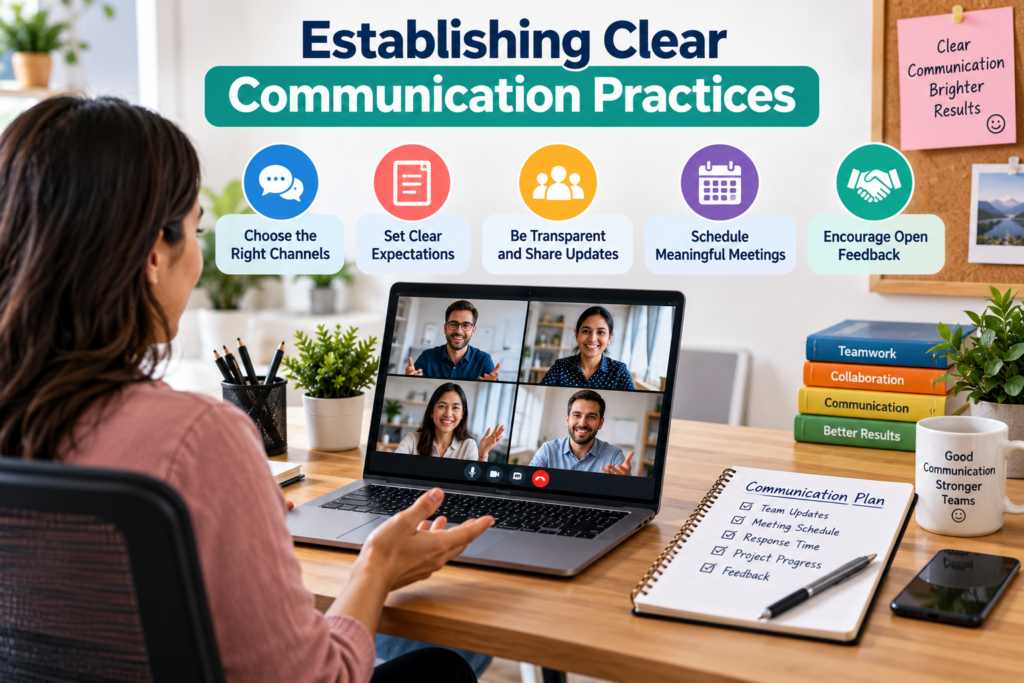
Communication is one of the most important parts of a successful remote work environment because employees cannot always rely on spontaneous conversations to understand what is happening. A short question that could be answered in seconds at an office may take hours if the recipient is working in another time zone or concentrating on a demanding task. To reduce these delays, teams should establish clear expectations about response times, preferred communication channels, meeting participation, and the information that must be documented. Employees should know when to send a message, when to schedule a meeting, and when a task requires a formal written update.
Asynchronous communication is particularly valuable for distributed teams. It allows employees to contribute when they are available rather than requiring everyone to be online simultaneously. A useful project update, for example, can explain what has been completed, what comes next, and whether any obstacles require assistance. Written messages should provide enough context for the recipient to respond without asking several follow-up questions. Instead of writing, “The project is delayed,” an employee could explain which milestone is affected, what caused the delay, and what support is needed. This approach improves accountability while reducing unnecessary back-and-forth communication.
Meetings still have a place, especially when teams need to resolve complicated issues, make decisions, or discuss sensitive subjects. However, every meeting should have a clear purpose, an agenda, and an appropriate list of participants. Organizers should share essential information beforehand and record decisions, responsibilities, and deadlines afterward. Managers should also consider employees in different time zones and avoid scheduling meetings at consistently inconvenient hours for the same people. A communication policy should protect focus time as well as encourage collaboration. When employees understand how and when to communicate, remote work becomes more predictable, inclusive, and efficient.
Building a Strong Remote Work Culture
Company culture is not limited to office decorations, shared lunches, or casual conversations near the coffee machine. It is reflected in how people treat one another, how decisions are made, how managers respond to mistakes, and whether employees feel comfortable asking for help. In a remote work environment, these everyday signals must be created intentionally because colleagues may rarely meet in person. A strong culture encourages trust, transparency, inclusion, and shared responsibility. Employees should understand the organization’s purpose and values, know how their contributions matter, and feel that their work receives fair consideration regardless of where they live.
Managers can strengthen remote culture by communicating organizational priorities regularly, recognizing meaningful contributions, and making important information available to everyone who needs it. They should avoid creating an environment where employees feel pressured to prove their dedication by responding to messages late at night or attending unnecessary meetings. Trust grows when leaders set clear expectations and allow employees reasonable autonomy in how they achieve their goals. It also depends on consistency: policies concerning performance, promotions, training, and recognition should be applied fairly to remote and office-based staff. A healthy culture does not eliminate disagreements or difficult conversations; it gives people respectful ways to address them.
Employee Engagement and Team Connection
Remote employees can feel disconnected when most interactions revolve around deadlines, technical questions, and project updates. To build stronger relationships, teams can schedule occasional informal conversations, celebrate milestones, organize virtual social activities, and create opportunities for employees to share their interests or expertise. These activities should remain optional and inclusive rather than becoming another mandatory task on an already crowded calendar. Some employees enjoy virtual games or social calls, while others prefer a relaxed team discussion or a shared learning session. Offering different ways to connect allows people with different personalities and circumstances to participate comfortably.
Employee engagement also depends on meaningful work and opportunities for development. Managers should hold regular one-to-one conversations to understand employee goals, discuss challenges, and identify training needs. New employees may benefit from an assigned mentor who can explain informal practices, introduce colleagues, and answer questions that are not covered in formal documentation. Teams should also create opportunities for professional growth through courses, internal projects, knowledge-sharing sessions, and constructive feedback. Remote workers should not have to make extra efforts simply to become visible to leadership. When employees feel connected, supported, and able to grow, they are more likely to contribute ideas, ask for assistance early, and remain invested in the organization’s success.
Setting Goals and Measuring Performance
One of the most common mistakes in remote management is measuring commitment through online presence rather than actual results. An employee can remain active in a messaging application all day without making meaningful progress, while another may complete several demanding tasks with fewer interruptions and less visible activity. A better approach is to define clear outcomes, realistic deadlines, quality standards, and individual responsibilities. Employees should know what success looks like before beginning a project, how their performance will be evaluated, and which priorities take precedence when deadlines compete.
Managers can use objectives and key results, project milestones, service-level targets, or other appropriate performance measures. The specific method matters less than whether it reflects the real purpose of the role. For example, a customer support team might track resolution quality, customer satisfaction, and response times, while a software development team might focus on reliable delivery, maintainable code, defect reduction, and successful releases. Counting completed tasks alone can encourage rushed work, so quantitative measures should be balanced with quality, collaboration, and customer outcomes. Performance indicators should support better decisions rather than create pressure to maximize numbers that do not represent meaningful value.
Regular feedback helps employees adjust before small problems become serious ones. Weekly check-ins can be useful for discussing priorities, while monthly or quarterly reviews may help evaluate broader progress and development goals. Managers should ask about obstacles and workload instead of assuming that missed targets automatically reflect poor effort. Employees, in turn, should communicate delays early, seek clarification when requirements are unclear, and keep project information up to date. The goal is to establish shared accountability: leaders provide resources and remove barriers, while employees take ownership of their responsibilities. When performance expectations are transparent and fair, remote teams can operate effectively without excessive supervision.
Protecting Data and Cybersecurity
Cybersecurity is an essential part of every remote work environment because employees may access company information from home networks, personal devices, shared workspaces, and cloud applications. These arrangements create potential risks if organizations rely on weak passwords, outdated software, uncontrolled file sharing, or poorly managed access permissions. Security should therefore be built into daily workflows rather than treated as a problem that belongs exclusively to the IT department. Employees need to understand how to handle sensitive information, recognize suspicious messages, report unusual activity, and use approved systems for professional work.
Recent cybersecurity reporting reinforces the importance of these precautions. A September 2026 report from Statpit highlights phishing, identity-related attacks, unmanaged devices, and inconsistent access controls as continuing concerns for organizations supporting remote workers. Its findings draw together statistics from several sources, so individual figures should be checked against the original studies before being used as definitive industry-wide benchmarks.
The practical lesson remains clear: allowing people to work from different locations requires businesses to protect accounts, devices, applications, and information wherever work takes place.
A strong security program starts with basic safeguards. Organizations should require multi-factor authentication where appropriate, keep operating systems and applications updated, encrypt devices that store business information, and limit access according to job responsibilities. Employees should use approved methods for remote access, avoid sharing passwords, and lock their screens when stepping away. Sensitive documents should be shared with specific authorized recipients rather than through unrestricted public links. Businesses should also maintain secure backups, define how incidents are reported, and regularly review access permissions so former employees and contractors cannot retain unnecessary access.
Artificial intelligence tools introduce another important consideration. Employees may use AI assistants to summarize documents, generate code, draft emails, or organize information, but entering confidential company data into an unapproved service can create privacy and compliance risks. A Reuters Legal Industry article published in October 2026 describes the need for organizations to govern employees’ existing use of generative AI rather than relying only on blanket bans.
Employers should explain which tools are approved, what information can be shared, when human verification is required, and how AI-generated content should be reviewed. Clear policies and practical training help employees use new technology responsibly without unnecessarily restricting useful innovation.
Maintaining Work-Life Balance
Flexibility is one of the most attractive features of remote work, but it can become a disadvantage when employees feel they must always be available. Without a physical office to leave at the end of the day, work can gradually spread into evenings, weekends, and personal time. A message received during dinner may seem harmless, yet repeated interruptions can make it difficult to rest properly. A sustainable remote routine therefore requires clear boundaries, realistic workloads, and a shared understanding that availability is not the same as productivity.
Employees can begin by establishing consistent working hours that suit their role and any necessary collaboration across time zones. Starting the day with a short planning session can help identify the most important tasks, while finishing with a review of progress provides a natural stopping point. Turning off nonessential notifications after working hours, taking regular breaks, and keeping work equipment separate from relaxation areas can make it easier to disconnect. When possible, employees should also schedule time for exercise, social activities, meals, and adequate sleep. These habits are not distractions from professional performance; they support the energy and attention needed to sustain it.
Employers share responsibility for maintaining healthy boundaries. Managers should avoid sending nonurgent messages with an expectation of immediate responses outside agreed working hours. They should review workloads, monitor signs of burnout, and encourage employees to take leave when needed. Flexible schedules should not quietly turn into longer working days simply because people can access their tasks at any time. Where employees are spread across regions, teams can establish core collaboration hours while allowing individual schedules to vary outside those periods. A good remote work environment makes room for professional achievement and personal life instead of treating one as the enemy of the other.
Overcoming Common Remote Work Challenges
Even well-designed remote teams experience obstacles. Internet outages, software problems, unclear responsibilities, household interruptions, and delayed decisions can disrupt daily progress. Social isolation may affect some employees, while others struggle with the lack of structure that an office naturally provides. These problems rarely disappear through motivation alone; they require practical systems and a willingness to adjust. Organizations should encourage employees to report recurring difficulties early and make it safe to discuss challenges without automatically treating them as failures.
Common challenge | Practical solution | Expected benefit |
Frequent distractions | Set focus periods and create a dedicated workspace | Better concentration |
Slow communication | Establish response expectations and document decisions | Fewer misunderstandings |
Social isolation | Offer optional social activities and mentoring | Stronger team connection |
Missed deadlines | Break projects into milestones and identify blockers early | Better planning |
Technical outages | Provide IT support and appropriate backup options | Less downtime |
Security concerns | Use approved devices, access controls, and security training | Reduced exposure |
Employee burnout | Set realistic workloads and respect time off | More sustainable performance |
Another challenge is ensuring that remote employees receive fair opportunities. Workers who regularly attend an office may have more informal contact with managers, which can influence who receives assignments, feedback, and promotion opportunities. Leaders should evaluate performance through documented outcomes and consistent criteria rather than visibility or personal proximity. Important meetings should include the people who need to contribute, and decisions made informally should be recorded where the wider team can access them. Regular reviews of promotion patterns, training participation, and employee feedback can help reveal gaps that might otherwise remain unnoticed.
Technology problems deserve a clear response process as well. Employees should know where to report an outage, how to contact IT support, and what alternative procedures to follow if essential systems become unavailable. Businesses should maintain recovery plans for critical services and identify which tasks can continue offline during temporary disruptions. Similarly, teams should agree on how to handle urgent customer requests or operational incidents when the usual communication platform is unavailable. Planning for predictable problems reduces confusion when something goes wrong.
The final step is continuous improvement. A remote work policy should not remain unchanged simply because it worked when first introduced. Organizations can gather feedback through short surveys, team discussions, project retrospectives, and one-to-one conversations. They should examine whether meetings are useful, whether employees can access the information they need, and whether workloads remain manageable. When a particular process repeatedly causes delays, the team should investigate the underlying cause rather than adding another layer of reporting. Small improvements made consistently can produce a more effective remote environment than a major policy overhaul that ignores employees’ daily experiences.
Conclusion
Building a successful remote work environment is an ongoing process that combines technology, thoughtful management, clear communication, employee well-being, and a culture of trust. A productive workplace does not depend on everyone sitting in the same building or following identical schedules. It depends on people understanding their responsibilities, having the tools to complete their work, receiving timely support, and being evaluated fairly on the value they deliver. From creating a comfortable home office to selecting appropriate collaboration platforms, every decision should make it easier for employees to work effectively while maintaining healthy professional relationships.
Businesses should start with the fundamentals: define expectations, provide reliable equipment, establish secure systems, document important decisions, and set realistic performance goals. They can then strengthen their approach through regular feedback, professional development, inclusive team practices, and policies that respect personal time. Employees also have an important role in this process by organizing their schedules, communicating progress, protecting company information, and asking for help when obstacles arise. Neither side needs to build the perfect system overnight. Consistent improvements based on real experiences will usually produce better results than complicated rules that employees cannot easily follow.
Ultimately, the best remote work environment is one in which flexibility and accountability support each other. Employees have the freedom to manage their work responsibly, managers focus on meaningful outcomes, and technology enables collaboration without overwhelming the people who use it. As working practices and digital tools continue to evolve, organizations that remain adaptable, secure, and people-focused will be better positioned to succeed. Whether you are creating a remote workplace for a small startup or improving an established distributed team, the goal is the same: build a system where people can do excellent work, feel connected, and maintain a sustainable balance between their careers and their lives.
Read Also:
The Ultimate Guide to Starting Your Diving Journey With PADI
Improving Computer Performance With IObit: Features and Benefits
How Lightinthebox Connects Shoppers With Affordable Global Products
Understanding LATAM Airlines: Routes, Services, and Travel Options
How Jobscan.co Can Help Improve Your Resume for Job Applications
Frequently asked questions
A successful remote work environment is a setup that allows employees to work productively and securely outside a traditional office. It combines reliable technology, a comfortable workspace, clear communication, realistic performance expectations, and a supportive company culture. It also provides employees with the flexibility and resources they need to maintain a healthy work-life balance.
Most remote workers need a reliable computer, a stable internet connection, a comfortable desk and chair, and suitable communication equipment such as a headset. Depending on their role, they may also need an external monitor, webcam, specialized software, secure network access, or backup connectivity. Employers should prioritize equipment that supports the employee's actual responsibilities and working conditions.
Managers can improve productivity by setting clear goals, assigning responsibilities, establishing realistic deadlines, and providing regular feedback. They should use appropriate collaboration tools, document important decisions, and remove obstacles that prevent employees from completing their work. Measuring results and work quality instead of constant online activity helps create a more accountable and trusting environment.
Companies can keep employees engaged through regular communication, recognition, mentoring, professional development, and inclusive decision-making. Optional social activities and team-building sessions can strengthen relationships, while regular one-to-one meetings help managers understand individual needs. Employees should also receive fair access to challenging assignments, training, and career advancement opportunities regardless of their location.
Common challenges include isolation, distractions, communication delays, cybersecurity risks, technical problems, and difficulty separating work from personal life. Companies can address these issues through clear policies, secure technology, documented workflows, appropriate IT support, and regular employee feedback. Individuals can improve their experience by creating a dedicated workspace, planning their schedules, taking breaks, and maintaining clear boundaries around working hours.