

Discover how IObit helps improve computer performance with powerful tools for junk file cleaning, startup optimization, driver updates, and unwanted program removal. Explore its key features and benefits to keep your PC cleaner, faster, and more efficient.
Table of Contents
ToggleIntroduction to IObit and PC Optimization
A slow computer can make everyday tasks frustrating, whether you are working, studying, browsing the internet, or playing games. IObit offers a range of Windows utilities designed to help users clean unnecessary files, manage startup applications, and maintain system performance. Its popular tools include Advanced SystemCare, Driver Booster, and IObit Uninstaller, each serving a different computer maintenance purpose.
Understanding Why Computers Become Slow
Computers can slow down because of accumulated temporary files, too many startup applications, limited RAM, insufficient storage, or outdated software. Background processes may also consume valuable system resources, making applications respond slowly. Identifying the underlying cause is essential before choosing an optimization method.
Common Performance Problems
Common signs of poor computer performance include slow startup, delayed application loading, frequent freezing, and reduced responsiveness during multitasking. Browser extensions, demanding applications, and limited hardware resources can contribute to these problems. Reviewing Task Manager and available disk space can help identify potential causes.

What Is IObit Advanced SystemCare?
IObit Advanced SystemCare is a Windows maintenance utility that combines selected cleaning, optimization, and privacy features in one interface. It helps users identify unnecessary files and manage certain system settings. The software offers free and paid editions, with features varying by version.
Key Features of IObit
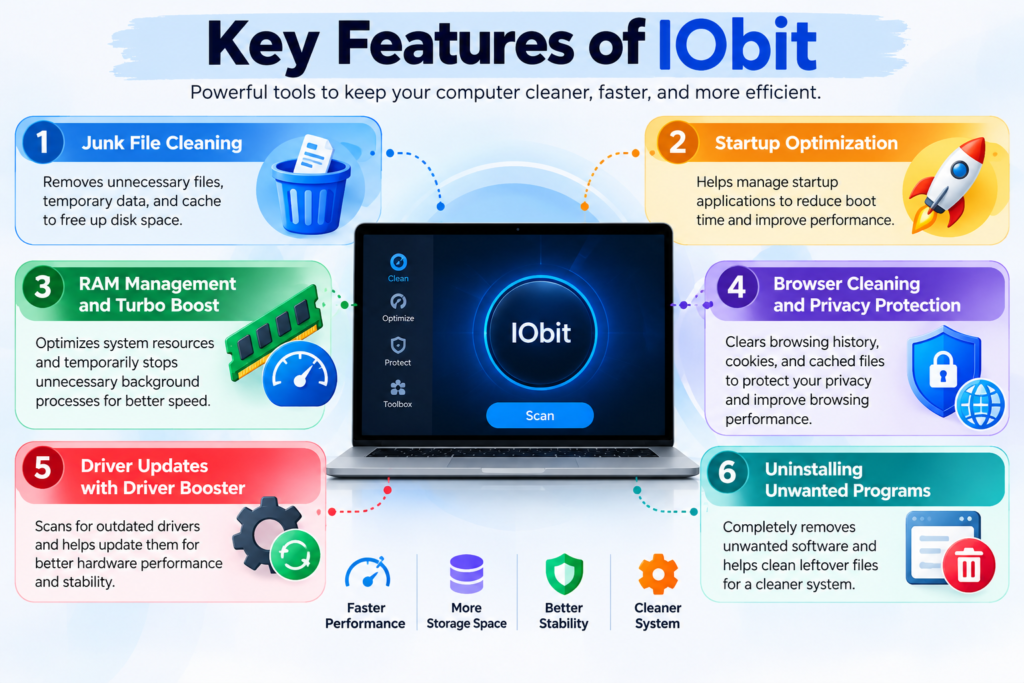
IObit provides several tools designed to support computer maintenance. Advanced SystemCare focuses on general optimization, Driver Booster helps manage supported device driver updates, and IObit Uninstaller assists with removing unwanted applications. Choosing the appropriate tool depends on your computer’s specific requirements.
Junk File Cleaning and Disk Space Management
Temporary files and application caches can gradually occupy valuable disk space. IObit’s cleaning tools help identify selected unnecessary files that users may choose to remove. Recovering storage space can be useful when a system drive is nearly full, although deleting files does not automatically guarantee faster performance.
Startup Optimization and Faster Boot Times
Applications that launch automatically can increase Windows startup time and consume resources in the background. IObit provides tools for reviewing and managing selected startup applications. Disabling programs that you do not need immediately can help your computer become ready for work sooner, but essential system and security services should remain enabled.
RAM Management and Turbo Boost
RAM stores information that active applications need to access quickly. When memory resources become limited, switching between programs may feel slower. IObit’s Turbo Boost feature is designed to reduce selected background activity temporarily, potentially freeing resources for demanding tasks. However, it cannot replace additional physical RAM when your computer consistently runs out of memory.
Browser Cleaning and Privacy Protection
Browsers accumulate cookies, cached files, browsing history, and other data during everyday use. IObit’s browser-related tools help users manage selected browsing information and privacy settings. Cleaning this data can free some storage, but it may also sign you out of websites or remove saved preferences, depending on the options selected.
Driver Updates With IObit Driver Booster
Device drivers allow Windows to communicate with hardware components such as graphics cards, audio devices, and network adapters. IObit Driver Booster scans for supported driver updates and helps users manage installations. Updating drivers can resolve certain compatibility issues or hardware problems, but updates should be selected carefully to avoid introducing instability.
Uninstalling Unwanted Programs
Unused applications can consume storage and sometimes leave behind unnecessary files or background components. IObit Uninstaller helps users remove unwanted programs and identify certain leftover files. Before uninstalling software, confirm that you no longer need it and preserve important documents, settings, or application data.
Major Benefits of Using IObit
IObit’s main advantage is convenience. Its utilities provide accessible options for cleaning files, managing startup applications, and handling selected maintenance tasks. These features can help users keep their computers organized and address some common software-related performance problems. Actual improvements depend on the computer’s hardware, configuration, and existing condition.
Free vs. Paid IObit Features
IObit offers free and paid editions of certain products. Free editions provide access to selected maintenance functions, while premium versions may include additional automation, optimization, and privacy features. Users should compare the current features, licensing terms, and costs before purchasing an upgrade.
How to Improve Computer Performance With IObit
Start by downloading the required utility from IObit’s official website. Review your computer’s storage space and resource usage before running a scan. Examine the scan results, remove only unnecessary files, and disable startup applications that you do not need. Restart your computer afterward and check whether performance has improved. Regular maintenance, safe browsing habits, and software updates can help support long-term reliability.
IObit for Gaming and Productivity
Gamers and professionals often need their computers to manage demanding applications efficiently. Reducing unnecessary background activity may help free system resources for gaming, programming, document editing, and other tasks. However, performance also depends on the processor, graphics card, RAM, and storage device. Optimization software cannot compensate fully for hardware limitations.
Safety, Privacy, and Important Precautions
Always download IObit software from its official website and review installation options carefully. Back up important files before making significant system changes, and be cautious when using registry-cleaning features or deleting browser data. Keep Windows security protections enabled and avoid removing unfamiliar system components. If your computer experiences repeated crashes or overheating, investigate the underlying problem rather than relying exclusively on optimization software.
IObit Compared With Manual PC Maintenance
Windows already includes tools for managing startup applications, cleaning storage, updating the operating system, and monitoring system resources. IObit provides an alternative interface that brings several maintenance functions together. Users who prefer direct control can use Windows’ built-in tools, while those who value convenience may appreciate IObit’s centralized approach.
Who Should Use IObit Software?
IObit may be useful for students, home users, office workers, and other people who want convenient PC maintenance options. It can be particularly helpful when unnecessary startup applications or accumulated files contribute to performance issues. Advanced users may prefer built-in Windows utilities, and computers with serious hardware limitations may benefit more from a suitable hardware upgrade.
Conclusion
Improving computer performance with IObit can be a practical way to manage unnecessary files, review startup applications, and maintain selected aspects of a Windows system. Its different utilities address general optimization, driver management, and software removal. However, results vary depending on the computer and the problems being addressed. For the best experience, use optimization tools carefully, keep your system updated, back up important data, and investigate persistent performance issues. Combining sensible maintenance habits with appropriate hardware can help keep your computer reliable and responsive.
Read Also:
How Lightinthebox Connects Shoppers With Affordable Global Products
Understanding LATAM Airlines: Routes, Services, and Travel Options
How Jobscan.co Can Help Improve Your Resume for Job Applications
Jabra Australia Explained: A Guide to Headsets, Earbuds, and More
A Complete Guide to Improving Your Language Skills With italki
Frequently asked questions
IObit develops Windows utilities for cleaning unnecessary files, optimizing selected system settings, managing supported device drivers, and uninstalling unwanted programs.
It may improve performance when unnecessary startup applications, low disk space, or excessive background activity contribute to slowdowns. Results are not guaranteed.
Yes, a free edition is available. A paid Pro edition offers additional features, depending on the current version.
Download it from the official website, review proposed changes, and back up important files before performing significant maintenance. Keep your regular security protections enabled.
Occasional cleaning and periodic startup reviews are sufficient for many users. The ideal frequency depends on storage usage, computer performance, and personal needs.